Come abilitare la tastiera su schermo in modalità tablet come predefinita
Summary: Informazioni su come impostare la tastiera su schermo in modalità tablet come tastiera predefinita quando non è collegata alcuna tastiera fisica, anche con la modalità tablet disattivata. ...
Acest articol se aplică pentru
Acest articol nu se aplică pentru
Acest articol nu este legat de un produs specific.
Acest articol nu acoperă toate versiunile de produs existente.
Instructions
Prodotti interessati:
- Latitude
- Workstation portatili Precision
- Notebook Dell Plus
- Notebook Dell Pro
- Notebook Dell Pro Max
- Notebook Dell Pro Plus
- Notebook Dell Pro Premium
- Notebook Dell Pro Rugged
Modalità tablet Windows 11
Durata: 00:02:49 (hh:mm:ss)
Se disponibili, è possibile scegliere le impostazioni della lingua dei sottotitoli (sottotitoli) utilizzando l'icona CC su questo lettore video.
Per impostazione predefinita, la tastiera su schermo è disabilitata in Windows e deve essere abilitata tramite le impostazioni di accessibilità.

È disponibile anche una tastiera in modalità tablet abilitata per impostazione predefinita solo quando si passa alla modalità tablet. Gli utenti possono abilitare la tastiera in modalità tablet come tastiera predefinita su schermo quando non è presente alcuna tastiera collegata al computer.
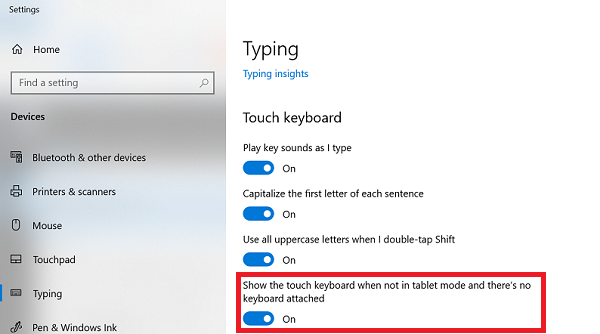
Per abilitare la tastiera in modalità tablet come tastiera predefinita su schermo, attenersi alla seguente procedura:
- Cercare Typing nella ricerca di Windows.

- Una volta aperto Typing settings, scorrere verso il basso fino a Touch keyboard.
- Abilitare Show the touch keyboard when not in tablet mode and there is no keyboard that is attached.
Additional Information
Altre risorse

Produse afectate
Dell Plus, Dell Pro, Dell Pro Max, Dell Pro Plus, Dell Pro Premium, Latitude, Dell Pro Rugged, Mobile WorkstationsProprietăți articol
Article Number: 000128227
Article Type: How To
Ultima modificare: 08 sept. 2025
Version: 16
Găsiți răspunsuri la întrebările dvs. de la alți utilizatori Dell
Servicii de asistență
Verificați dacă dispozitivul dvs. este acoperit de serviciile de asistență.