如何將平板電腦模式螢幕小鍵盤啟用為預設值
Summary: 瞭解如何在未連接實體鍵盤時,即使已關閉平板電腦模式,也能將平板電腦模式的螢幕小鍵盤設定為您的預設鍵盤。
Acest articol se aplică pentru
Acest articol nu se aplică pentru
Acest articol nu este legat de un produs specific.
Acest articol nu acoperă toate versiunile de produs existente.
Instructions
受影響的產品:
- Latitudes
- Precision Mobile Workstation
- Dell Plus 筆記型電腦
- Dell Pro 筆記型電腦
- Dell Pro Max 筆記型電腦
- Dell Pro Plus 筆記型電腦
- Dell Pro Premium 筆記型電腦
- Dell Pro Rugged 筆記型電腦
Windows 11 平板電腦模式
持續時間:00:02:49 (小時:分鐘:秒)
當可用時,您可以使用此影像播放器上的 CC 圖示來選擇隱藏式輔助字幕 (字幕) 語言設定。
根據預設,Windows 中會停用螢幕小鍵盤,必須透過「協助工具」的設定啟用。
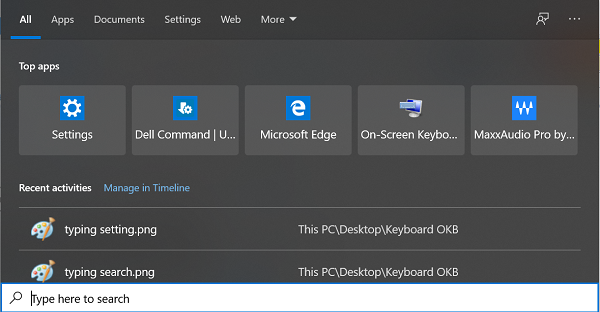
有一個平板電腦模式鍵盤,預設為僅會在切換至平板電腦模式時啟用。使用者可在電腦未連接鍵盤的情況下,將平板電腦模式鍵盤啟用為預設的螢幕小鍵盤。
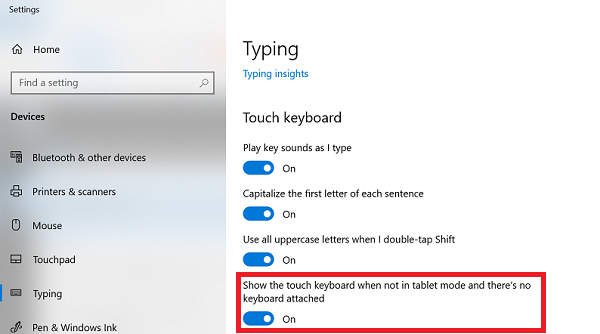
若要將平板電腦模式的鍵盤啟用為預設的螢幕小鍵盤,請按照以下步驟操作:
- 在 Windows 搜尋中搜尋 輸入 。

- 開啟輸入設定後,向下捲動至觸控鍵盤。
- 啟用當不在平板電腦模式中且沒有連接任何鍵盤時顯示觸控鍵盤。
Additional Information
其他資源

Produse afectate
Dell Plus, Dell Pro, Dell Pro Max, Dell Pro Plus, Dell Pro Premium, Latitude, Dell Pro Rugged, Mobile WorkstationsProprietăți articol
Article Number: 000128227
Article Type: How To
Ultima modificare: 08 sept. 2025
Version: 16
Găsiți răspunsuri la întrebările dvs. de la alți utilizatori Dell
Servicii de asistență
Verificați dacă dispozitivul dvs. este acoperit de serviciile de asistență.