如何识别 Dell Data Security 服务器/Dell Data Protection 服务器前端版本
Summary: 了解有关识别 Dell Data Security(以前称为 Dell Data Protection)服务器前端版本的分步说明。
Acest articol se aplică pentru
Acest articol nu se aplică pentru
Acest articol nu este legat de un produs specific.
Acest articol nu acoperă toate versiunile de produs existente.
Instructions
务必要了解 Dell Data Security(以前称为 Dell Data Protection)服务器前端的版本,以便执行以下操作:
- 识别已知问题
- 了解工作流程更改
- 验证系统要求
受影响的产品:
- Dell Security Management Server
- Dell Data Protection | Enterprise Edition Server
受影响的操作系统:
- Windows
本文介绍如何识别 Dell Security Management Server 或 Dell Security Management Server Virtual 的前端服务器版本。要识别后端的版本,请参阅如何识别 Dell Data Security/Dell Data Protection 服务器版本(英文版)。
可通过以下方面来确定版本:
- 安装程序
- Windows 用户界面
单击相应的过程以了解更多信息。
安装程序
- 解压 Security Management Server .zip。
- 转至
[LOCATION]\Security Management Server\x64。注:[LOCATION]= 解压的.zip文件的位置 - 右键单击
setup.exe然后选择 属性。

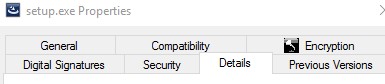
- 单击详细信息选项卡。
- 记下产品版本。在此示例中,产品版本为 9.9.2。
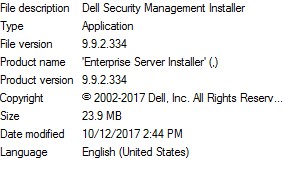 该文件的版本可能与以上屏幕截图中的版本不同。
Windows
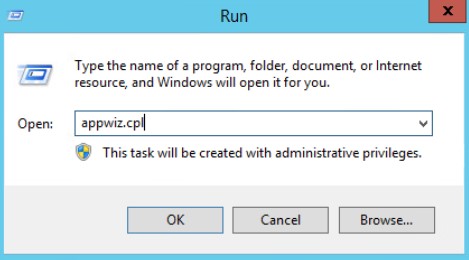
- 以管理员身份登录,右键单击 Windows 开始菜单,然后单击运行。

- 在“运行”UI中,键入
appwiz.cpl然后按 OK。
- 在“程序和功能”中,找到 Dell Security Management Server x64。
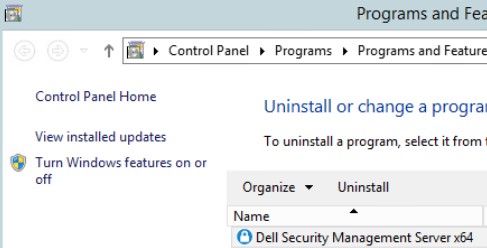 某些服务器版本可能会显示“Dell Enterprise Server”(而非 Dell Security Management Server)。
 - 记录版本。在此示例中,产品版本为 10.2.3。
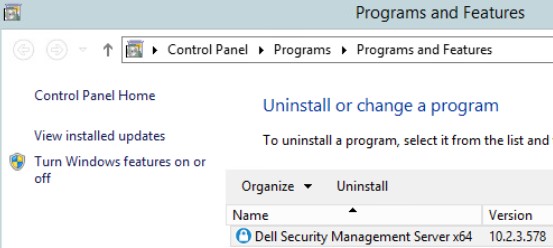 该版本可能与以上屏幕截图中的版本不同。
Additional Information
Videos
Produse afectate
Dell EncryptionProprietăți articol
Article Number: 000130588
Article Type: How To
Ultima modificare: 10 aug. 2026
Version: 12
Găsiți răspunsuri la întrebările dvs. de la alți utilizatori Dell
Servicii de asistență
Verificați dacă dispozitivul dvs. este acoperit de serviciile de asistență.