Det går inte att aktivera BitLocker efter ett hårddiskbyte
Summary: BitLocker kanske inte aktiveras efter att hårddisken har bytts ut.
Acest articol se aplică pentru
Acest articol nu se aplică pentru
Acest articol nu este legat de un produs specific.
Acest articol nu acoperă toate versiunile de produs existente.
Symptoms
Om du stöter på ett hårddiskfel på en BitLocker-aktiverad enhet efter att enheten har bytts ut kan du aktivera BitLocker i ett nytt operativsystem utan problem.
Cause
Om du av någon anledning får ett felmeddelande om att datorn inte kan kommunicera med TPM (Trusted Platform Module) måste du rensa TPM-kretsen och sedan konfigurera BitLocker.
Resolution
- Om du vill rensa TPM startar du BIOS och letar reda på området med TPM-kontrollen. (Finns på samma plats för TPM men kan ha olika alternativ under TPM)
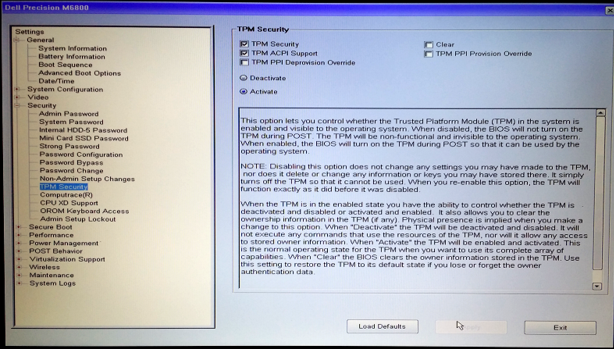
- Välj att rensa TPM och klicka sedan på Ja för att ta bort alla nycklar från TPM. (TPM måste vara aktivt)
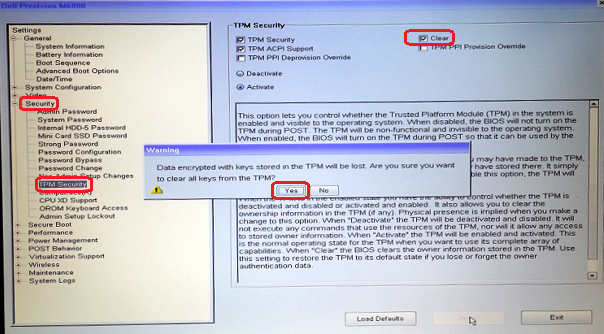
- Avsluta och starta sedan om BIOS igen och kontrollera att TPM fortfarande ses som aktiv.
- Avsluta och starta om till operativsystemet och konfigurera sedan BitLocker enligt den vanliga proceduren.
Produse afectate
Desktops & All-in-Ones, Alienware, Dell All-in-One, Dell Pro All-in-One, Dell Pro Max Micro, Dell Pro Max Slim, Dell Pro Max Tower, Dell Pro Micro, Dell Pro Slim, Dell Pro Tower, Dell Slim, Dell Tower, Inspiron, Legacy Desktop Models, OptiPlex
, Vostro, XPS, G Series, G Series, Alienware, Dell Plus, Dell Pro, Dell Pro Max, Dell Pro Plus, Dell Pro Premium, Inspiron, Latitude, Dell Pro Rugged, Vostro, XPS, Legacy Laptop Models, Fixed Workstations, Mobile Workstations, Dell Pro Max Micro XE FCM2250, Dell Pro Max Slim XE FCS1250, Dell Pro Max Tower T2 XE FCT2250, Dell Pro Max 16 XE MC16250, Dell Pro Micro Plus XE QBM1250, Dell Pro Slim Plus XE5 QBS1250, Dell Pro Tower Plus XE5 QBT1250
...
Proprietăți articol
Article Number: 000137422
Article Type: Solution
Ultima modificare: 13 mai 2025
Version: 5
Găsiți răspunsuri la întrebările dvs. de la alți utilizatori Dell
Servicii de asistență
Verificați dacă dispozitivul dvs. este acoperit de serviciile de asistență.