How to Download the CrowdStrike Falcon Sensor
Summary: Learn how to download the CrowdStrike Falcon Sensor from the Falcon Console for Windows, macOS, or Linux.
Acest articol se aplică pentru
Acest articol nu se aplică pentru
Acest articol nu este legat de un produs specific.
Acest articol nu acoperă toate versiunile de produs existente.
Instructions
Note: The process to access the CrowdStrike Falcon Sensor download is the same regardless of if it is purchased from Dell or CrowdStrike.
- In a web browser, go to https://falcon.crowdstrike.com/login/
.
- Log In to the Falcon Console.

- In the left menu pane, click Host setup and management and then select Sensor Downloads.
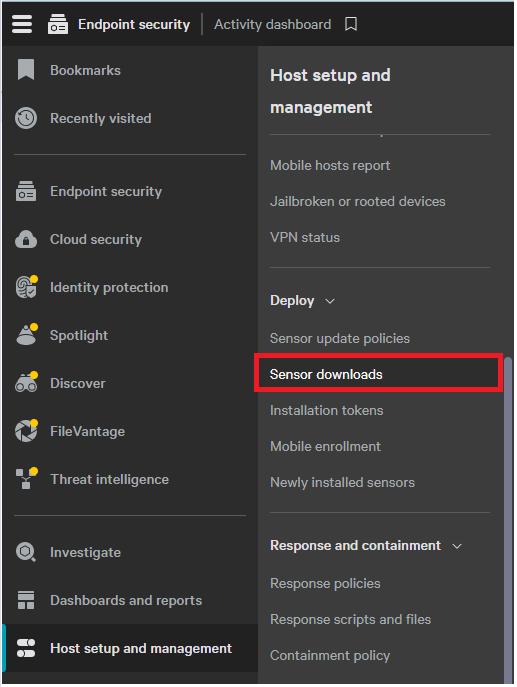 Note: The layout in the example may differ slightly from your environment.
 - Click the Download icon on the appropriate operating system.
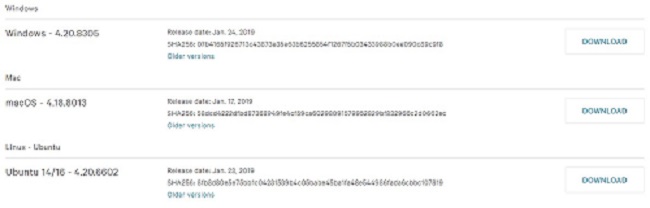
Note: The operating system versions may differ from the example.
Produse afectate
CrowdStrikeProprietăți articol
Article Number: 000156053
Article Type: How To
Ultima modificare: 10 aug. 2026
Version: 20
Găsiți răspunsuri la întrebările dvs. de la alți utilizatori Dell
Servicii de asistență
Verificați dacă dispozitivul dvs. este acoperit de serviciile de asistență.