AppSync:如何确定正在使用的版本
Summary: 如何确定正在使用的 AppSync 版本
Acest articol se aplică pentru
Acest articol nu se aplică pentru
Acest articol nu este legat de un produs specific.
Acest articol nu acoperă toate versiunile de produs existente.
Instructions
要确定正在使用的 AppSync 软件的当前版本,请遵循下面列出的方法之一:
Appsync UI
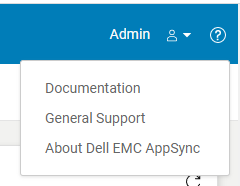
图 2
AppSync 日志
提醒:“Control Panel\Programs\Programs and Features”中显示的 AppSync 版本无法提供足够信息,因为它不确认是否已安装 AppSync 修补程序。
Appsync UI
- 打开 Appsync UI 并登录。
- 单击窗口右上角的“?”。(图 1)
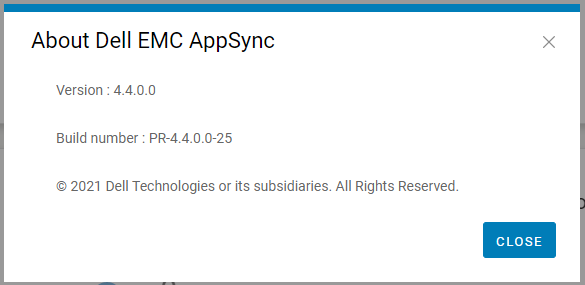
- 单击“About Dell EMC Appsync”。(图 2)
- 请向 Dell AppSync 技术支持提供此版本和内部版本号。
图 2
AppSync 日志
- 在 Appsync 服务器上,导航到安装位置中的日志目录(通常是 C:\EMC\AppSync\jboss\logs)。
- 使用文本编辑器打开 server.log。
- 前两行指示正在使用的 AppSync 版本以及是否安装了任何修补程序。
例如,示例 server.log 片段(版本为 4.3.0.0 并且安装了修补程序 3315_R1)
The current version of AppSync Server is 4.3.0.0_3315_R1
4.请向 Dell AppSync 技术支持提供显示的版本和修补程序状态。
The current version of AppSync Server is 4.3.0.0_3315_R1
提醒:“Control Panel\Programs\Programs and Features”中显示的 AppSync 版本无法提供足够信息,因为它不确认是否已安装 AppSync 修补程序。
Produse afectate
AppSync, AppSyncProprietăți articol
Article Number: 000199464
Article Type: How To
Ultima modificare: 14 mai 2026
Version: 7
Găsiți răspunsuri la întrebările dvs. de la alți utilizatori Dell
Servicii de asistență
Verificați dacă dispozitivul dvs. este acoperit de serviciile de asistență.