Ventana emergente posterior al BIOS de “Dell Security Manager” e interacción de solicitud antes del siguiente proceso
Summary: En este artículo, se proporciona información sobre el mensaje de Dell Security Manager cuando el sistema arranca por primera vez.
Acest articol se aplică pentru
Acest articol nu se aplică pentru
Acest articol nu este legat de un produs specific.
Acest articol nu acoperă toate versiunile de produs existente.
Symptoms
Cuando arranque la computadora Dell por primera vez y vea el mensaje en la pantalla (consulte la Figura 1)
“A BIOS setup change was made to the Secure Boot configuration. Please accept the changes!
If the change are not accepted within the time remaining, the secure boot settings will be reverted to factory defaults, and the computer will reboot.
To accept the changes, please enter the number sequence as below.
Code - 0000
Time remaining (X) seconds”
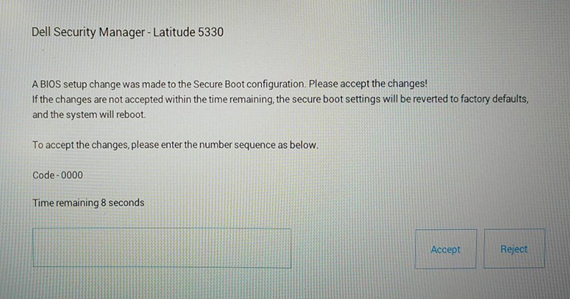
If the change are not accepted within the time remaining, the secure boot settings will be reverted to factory defaults, and the computer will reboot.
To accept the changes, please enter the number sequence as below.
Code - 0000
Time remaining (X) seconds”
Figura 1 Dell Security Manager
Cause
Se debe al ajuste del BIOS. La opción del BIOS “Enable Microsoft UEFI CA” está establecida como OFF en la computadora con configuración habilitada por Vpro.
Resolution
Nota: Funciona según lo previsto para la configuración previa de “Enable Microsoft UEFI CA” en los sistemas con la opción en OFF.
- Después del mensaje para ingresar el código PIN y mantener desactivada la opción “Enable Microsoft UEFI CA”, la computadora arrancará en el sistema operativo.
-
Si no ingresó el código PIN en un plazo de 15 segundos o si seleccionó Reject, la computadora se reiniciará e indicará el siguiente mensaje después del arranque. (Consulte la Figura 2) Se le solicitará que presione F2 para ingresar a la configuración del BIOS y “Enable Microsoft UEFI CA” cambiará a ON automáticamente.
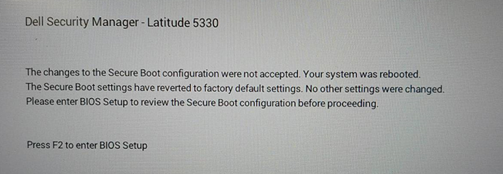
Figura 2 Solicitud
de reinicio de Dell Security Manager O bien, puede establecer manualmente "Enable Microsoft UEFI CA" en OFF en la página "Secure Boot". (Consulte la Figura 3)
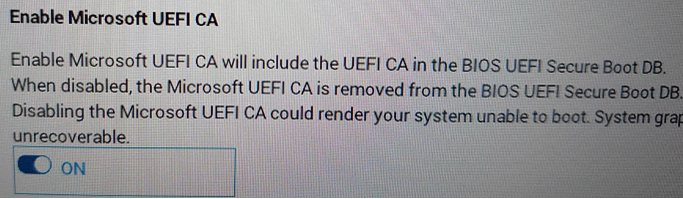
Figura 3 Habilitar CA de Microsoft UEFI
Additional Information
Artículos recomendados
Estos son algunos artículos recomendados relacionados con este tema que podrían ser de su interés.
Produse afectate
Latitude 5330, Latitude 7330, Latitude 9430Proprietăți articol
Article Number: 000199681
Article Type: Solution
Ultima modificare: 14 mai 2026
Version: 8
Găsiți răspunsuri la întrebările dvs. de la alți utilizatori Dell
Servicii de asistență
Verificați dacă dispozitivul dvs. este acoperit de serviciile de asistență.