VxRail: Upgrade Error Failed to Set Customized Depots
Summary: VxRail upgrade error "Failed to upload bundle: Trigger set customized depot meets exception" with vlcm enabled, online depot URL is not valid or cannot be reached now.
Acest articol se aplică pentru
Acest articol nu se aplică pentru
Acest articol nu este legat de un produs specific.
Acest articol nu acoperă toate versiunile de produs existente.
Symptoms
VxRail has vLCM enabled, prior to upgrade to VxRail 7.0.x.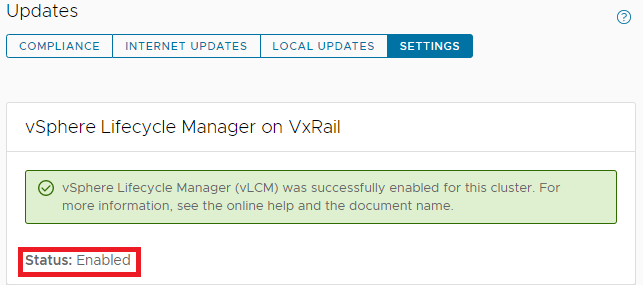
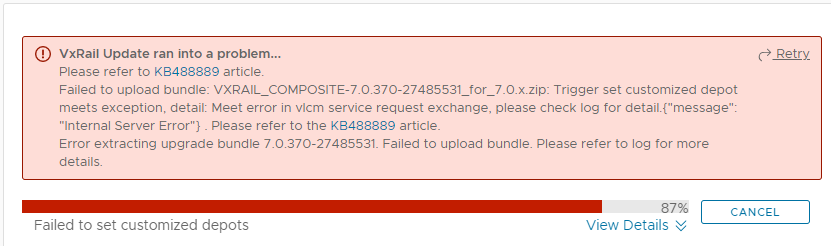
Then while performing the upgrade to VxRail 7.0.x, it fails with the error below:
Failed to upload bundle: VxRail_COMPOSITE-XXXX.zip Trigger set customized depot
meets exception, detail: Meet error in vlcm service request exchange.....
lcm-web.log:
2022-05-17 02:49:13,848 ERROR [SURROGATE] [org.springframework.amqp.rabbit.RabbitListenerEndpointContainer#1-1] c.v.l.a.LCMServiceImpl [LCMServiceImpl.java:913] Trigger set customized depot meets exception, detail:
com.dellemc.vxrail.lcm.data.provider.out.VlcmServiceWriteException: Meet error in vlcm service request exchange, please check log for detail.{"message": "Internal Server Error"}

        at com.dellemc.vxrail.lcm.data.provider.utils.HttpUtilsForVlcm.postVlcmHttpResponse(HttpUtilsForVlcm.java:94)
        at com.dellemc.vxrail.lcm.data.provider.repositories.service.VlcmAPIService.setOnlineDepots(VlcmAPIService.java:164)
        at com.dellemc.vxrail.lcm.data.provider.out.VlcmServiceMicroWriter.setCustomizedOnlineDepots(VlcmServiceMicroWriter.java:95)
        at com.vce.lcm.api.LCMServiceImpl.vlcmCustomizedDepotProcess(LCMServiceImpl.java:890)
        at com.vce.lcm.api.LCMServiceImpl.uploadLocalCompositeBundle(LCMServiceImpl.java:828)
        at com.vce.lcm.api.LCMServiceImpl.resumeUploadCompositeBundle(LCMServiceImpl.java:1146)
        at com.vce.lcm.api.LCMServiceImpl.uploadAcgCompositeBundle(LCMServiceImpl.java:1134)
        at com.vce.lcm.api.LCMServiceImpl.uploadACGUpgradeBundle(LCMServiceImpl.java:362)
        at com.emc.mystic.manager.upgrade.service.VirtualApplianceServiceImpl.startUploadOfUpgradeBundle(VirtualApplianceServiceImpl.java:775)
        at com.emc.mystic.manager.upgrade.service.VirtualApplianceServiceImpl.triggerUploadOfUpgradeBundleFromDeployMessage(VirtualApplianceServiceImpl.java:557)
        at com.emc.mystic.manager.upgrade.service.VirtualApplianceServiceImpl.processUploadOfUpgradeBundle(VirtualApplianceServiceImpl.java:495)
short.term.log:
2022-05-16-07:12:08 microservice.do-cluster "2022-05-16 07:12:08,275 [ERROR] <Dummy-1149:140446016676424> request.py log_response() (131): [REQUEST END] The request could not be understood by the server due to malformed syntax. Response status: 400 BAD REQUEST, Response body: ['{""error_type"": ""INVALID_ARGUMENT"", ""messages"": [{""args"": [""https://<vxm_ip_or_fqdn>/vlcm/depot/vlcm/components/ESXi-7.0.3_19482537-8f99f6c1/index.xml""], ""default_message"": ""Online Depot URL \'https://<vxm_ip_or_fqdn>/vlcm/depot/vlcm/components/ESXi-7.0.3_19482537-8f99f6c1/index.xml\' is not valid or cannot be reached now."", ""localized"": ""Online Depot URL \'https://<vxm_ip_or_fqdn>/vlcm/depot/vlcm/components/ESXi-7.0.3_19482537-8f99f6c1/index.xml\' is not valid or cannot be reached now."", ""id"": ""com.vmware.vcIntegrity.lifecycle.depots.online.Invalid""}]}']"
2022-05-16-07:12:08 microservice.vlcm "2022-05-16 07:12:08,276 - DEBUG - connectionpool(461) - http://api-gateway:8080 ""POST /rest/vxm/internal/do/v1/vc/api/esx/settings/depots/online HTTP/1.1"" 400 556"
2022-05-16-07:12:08 microservice.vlcm "2022-05-16 07:12:08,278 - INFO - do(112) - Call do response status code: 400. "
2022-05-16-07:12:08 microservice.vlcm "2022-05-16 07:12:08,278 - INFO - online_depot_service(42) - INVALID_ARGUMENT"
2022-05-16-07:12:08 microservice.vlcm "2022-05-16 07:12:08,278 - ERROR - app(1892) - Exception on /vlcm/v1/depot/online [POST]"
2022-05-16-07:12:08 microservice.vlcm "Traceback (most recent call last):"
2022-05-16-07:12:08 microservice.vlcm "  File ""/usr/local/venv/lib64/python3.6/site-packages/flask/app.py"", line 1950, in full_dispatch_request"
2022-05-16-07:12:08 microservice.vlcm "    rv = self.dispatch_request()"
2022-05-16-07:12:08 microservice.vlcm "  File ""/usr/local/venv/lib64/python3.6/site-packages/flask/app.py"", line 1936, in dispatch_request"
2022-05-16-07:12:08 microservice.vlcm "    return self.view_functions[rule.endpoint](**req.view_args)"
2022-05-16-07:12:08 microservice.vlcm "  File ""/usr/local/venv/lib64/python3.6/site-packages/flask_restplus/api.py"", line 325, in wrapper"
2022-05-16-07:12:08 microservice.vlcm "    resp = resource(*args, **kwargs)"
2022-05-16-07:12:08 microservice.vlcm "  File ""/usr/local/venv/lib64/python3.6/site-packages/flask/views.py"", line 89, in view"
2022-05-16-07:12:08 microservice.vlcm "    return self.dispatch_request(*args, **kwargs)"
2022-05-16-07:12:08 microservice.vlcm "  File ""/usr/local/venv/lib64/python3.6/site-packages/flask_restplus/resource.py"", line 44, in dispatch_request"
2022-05-16-07:12:08 microservice.vlcm "    resp = meth(*args, **kwargs)"
2022-05-16-07:12:08 microservice.vlcm "  File ""/home/app/api/vlcm_api.py"", line 64, in post"
2022-05-16-07:12:08 microservice.vlcm "    depot_service.add_depot(depot_url)"
2022-05-16-07:12:08 microservice.vlcm "  File ""/home/app/services/online_depot_service.py"", line 46, in add_depot"
2022-05-16-07:12:08 microservice.vlcm "    raise Exception(response.content)"
2022-05-16-07:12:08 microservice.vlcm "Exception: b'{""error_type"":""INVALID_ARGUMENT"",""messages"":[{""args"":[""https://<vxm_ip_or_fqdn>/vlcm/depot/vlcm/components/ESXi-7.0.3_19482537-8f99f6c1/index.xml""],""default_message"":""Online Depot URL \'https://<vxm_ip_or_fqdn>/vlcm/depot/vlcm/components/ESXi-7.0.3_19482537-8f99f6c1/index.xml\' is not valid or cannot be reached now."",""localized"":""Online Depot URL \'https://<vxm_ip_or_fqdn>/vlcm/depot/vlcm/components/ESXi-7.0.3_19482537-8f99f6c1/index.xml\' is not valid or cannot be reached now."",""id"":""com.vmware.vcIntegrity.lifecycle.depots.online.Invalid""}]}'"
Cause
The VxRail Manager SSL certificate was regenerated after enable the vLCM was enabled. vCenter server cannot trust VxRail Manager's certificate.
Usually, VxRail Manager's SSL certificate is replaced with a self-signed certificate.
Usually, VxRail Manager's SSL certificate is replaced with a self-signed certificate.
Resolution
Follow the below steps to replace the VxRail Manager SSL cert signed by VMCA.
- Regenerate VxRail Manager SSL cert by running the below script on VxRail Manager:
Internal vCenter:
python /etc/vmware-marvin/scripts/lcm/scripts/import_vc_generated_vxm_cert_enhance.py -c <vc_fqdn> -u <vc_mgmt_account> -p <vc_mgmt_passwd> -s root -t <vc_root_passwd> -x <vxm_ip> -n <vxm_fqdn>
Note: Add a ' at the beginning and end of the passwords IF you have special characters in the password.
External vCenter:
python /etc/vmware-marvin/scripts/lcm/scripts/import_vc_generated_vxm_cert_enhance.py -c <vc_fqdn> -u <vc_mgmt_account> -p <vc_mgmt_passwd> -s root -t <vc_root_passwd> -x <vxm_ip> -n <vxm_fqdn> -v
Note: Add a ' at the beginning and end of the passwords IF you have special characters in the password.
python /etc/vmware-marvin/scripts/lcm/scripts/import_vc_generated_vxm_cert_enhance.py -h

Usage: import_vc_generated_vxm_cert_enhance.py [options]

Options:
  -h, --help            show this help message and exit
  -c ADDRESS, --address=ADDRESS
                        Address of VC to connect to
  -u MGT_USERNAME, --management-username=MGT_USERNAME
                        user name to use when connecting to VC
  -p MGT_PASSWORD, --management-password=MGT_PASSWORD
                        Password to use when connecting to VC
  -s GUEST_USERNAME, --guest-username=GUEST_USERNAME
                        user name to use when running guest OS operation on VC
  -t GUEST_PASSWORD, --guest-password=GUEST_PASSWORD
                        Password to use when running guest OS operation to VC
  -x VXM_IP, --vxm-ip=VXM_IP
                        The VXM IP, must provide it when this script is not
                        running on VXM server
  -n VXM_FQDN, --vxm-fqdn=VXM_FQDN
                        The VXM fqdn, must provide it when this script is not
                        running on VXM server
  -v, --external-vc     The external vc flag, must set true if VC is external.
  -e, --encrypted-auth  The flag to claim provided auth are encrypted, need to
                        decrypt when script running.
  -m, --m2m-enabled     The flag to claim if hosts enable m2m
The below is a Sample output in a Lab with an internal vCenter:
vxm:/home/mystic # python /etc/vmware-marvin/scripts/lcm/scripts/import_vc_generated_vxm_cert_enhance.py -c vcluster101-vcsa.vv009.local -u administrator@vsphere.local -p 'Testvxrail123!' -s root -t Testvxrail123! -x 172.16.10.200 -n vcluster101-vxm.vv009.local
Note: Add a ' at the beginning and end of the passwords IF you have special characters in the password.
Below is the script output:
Start to connect VC: vcluster101-vcsa.vv009.local

Succeed to connect VC

VXM ip: 172.16.10.200, VXM fqdn: vcluster101-vxm.vv009.local, VC fqdn: vcluster101-vcsa.vv009.local


Getting VM via ip: vcluster101-vcsa.vv009.local

VC VM: vcluster101-vcsa.vv009.local 172.16.10.201

Create temporary SSL cert folder on VC: /tmp/ssl_cert-172.16.10.200-5203

Generate private key for vxm cert

Generate certtool config file

Generate vxm cert

Backup root cert

Generate import ssl cert API script

 #!/bin/sh
# Import cert
get_cert_data() {
  while read -r line; do
  # first line and not empty line
    if [[ -z $x ]] && [[ -n $line ]]; then
      x=$x"$line"
  # other line and not empty line
    elif [[ ! -z $line ]]; then
      x=$x"\n""$line"
    fi
  done <$1
  echo $x
}

generate_post_data() {
cat <<EOF
{"cert":"${vxm_cert}","primary_key":"${vxm_private_key}","root_cert_chain":"${root_cert}","password":"testpassword"}
EOF
}

vxm_key_file=$1
vxm_crt_file=$2
root_crt_file=$3
vxm_key_filter_file=$4


cat $vxm_key_file | sed -n -e "/BEGIN RSA PRIVATE KEY/, $"p >$vxm_key_filter_file

vxm_cert=$(get_cert_data $vxm_crt_file)
echo "vxm cert: $vxm_cert"
echo ""

root_cert=$(get_cert_data $root_crt_file)
echo "root cert: $root_cert"
echo ""

vxm_private_key=$(get_cert_data $vxm_key_filter_file)
echo "vxm private key: $vxm_private_key"
echo ""

echo $(generate_post_data)

i=1
while [[ $i -le 5 ]]; do
  result=`curl -k -X POST -H "Content-Type:application/json" -H "Authorization: Basic $5" https://$6/rest/vxm/$7/certificates/import-vxm --data "$(generate_post_data)"`

  echo "result: $result"
  echo ""

  message=$(echo $result | grep "message")

  if [[ $message =~ "successfully" ]]; then
    echo "Successfully"
    exit 0
  else
    echo "Import cert retry: $i"
    echo ""
    let i++
    sleep 60
  fi
done

if [[ $i -eq 5 ]]; then
  echo "Fail"
  exit 1
fi

Run import SSL cert API script

Finish to import VC generated cert to VXM.
- Retry upgrade
Produse afectate
VxRail, VxRail Appliance Series, VxRail SoftwareProprietăți articol
Article Number: 000199795
Article Type: Solution
Ultima modificare: 25 feb. 2026
Version: 5
Găsiți răspunsuri la întrebările dvs. de la alți utilizatori Dell
Servicii de asistență
Verificați dacă dispozitivul dvs. este acoperit de serviciile de asistență.