PowerVault ME4-ME5: ePSA error code 2000-0151 reported by PowerEdge diagnostics with SAS attached array
Summary: Dell Enhanced Pre-Boot System Assessment (ePSA) or Dell Pre-Boot System Assessment (PSA) Diagnostics that are run against a SAS attached PowerVault ME series array reports a false positive error. Use PowerVault Manager or CLI to assess the PowerVault ME series SAN health. ...
Instructions
ePSA diagnostics may return error code: 2000-0151 when run against a PowerVault ME series array that is attached to a Dell PowerEdge server using a SAS cable to a Dell 12 Gb SAS HBA or Dell HBA355e.
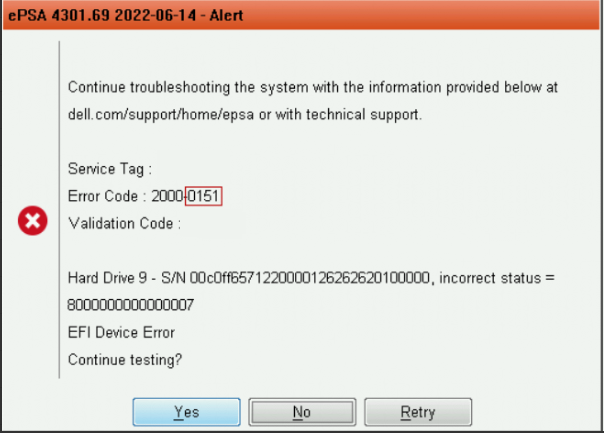
This alert can be ignored for external SAS attached SAN, disk drive status within the PowerVault ME series can be determined using PowerVault Manager and PowerVault ME event logs. See the PowerVault ME Storage System Administrator’s Guide, the documentation for your model is available on dell.com/support.
This is resolved in ePSA application release build 4301.77 and later. The updated package can found on dell.com/support under the Drivers & Downloads section for some PowerEdge models. Dell 64-Bit uEFI Diagnostics is found under the Diagnostics category.