TPM PCR 验证错误导致启动时恢复 BitLocker
Summary: 本文提供有关在启动时导致 BitLocker 恢复的可信平台模块 (TPM) 平台配置注册 (PCR) 验证错误的信息。
Acest articol se aplică pentru
Acest articol nu se aplică pentru
Acest articol nu este legat de un produs specific.
Acest articol nu acoperă toate versiunile de produs existente.
Symptoms
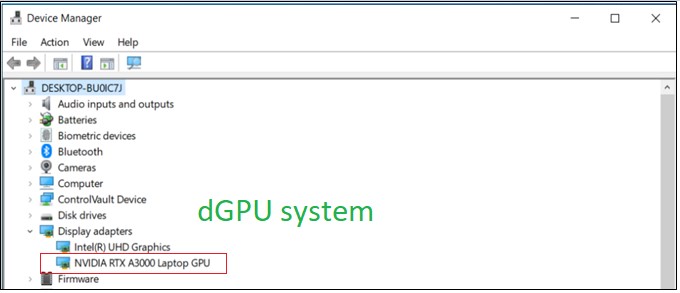
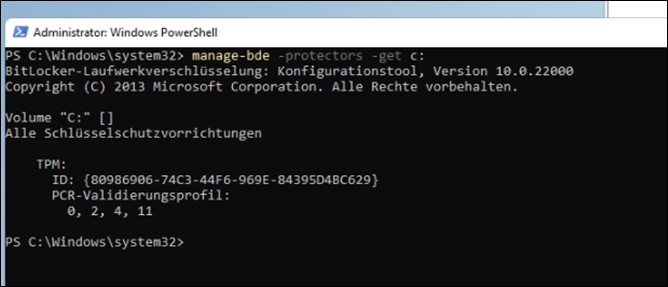
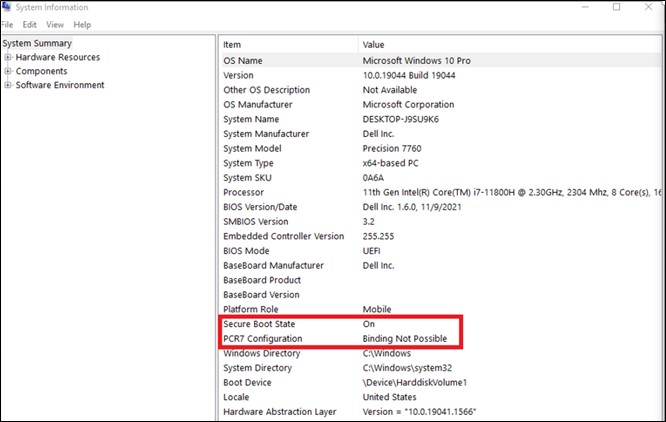
GFX 显卡 计算机不 使用 PCR7 绑定,并显示为 Binding not possible(0、2、4、11)。
测试步骤:
- 启动以 进行设置
- 启用 安全启动
- 启用 TPM
- 引导至 操作系统
- 按 Win + R “Cmd”, 以管理员身份运行。
- 输入命令 “manage-bde-protectors-get c:”
Cause
dGPU(可扩展卡)及其 OROM/UEFI 驱动程序必须通过 TPM PCR7 签名和测量。BIOS 1.6.0,通过实施遵循 TCG 和 MSFT 要求的安全机制来解决安全漏洞。
从 TCG 方面:
https://trustedcomputinggroup.org/wp-content/uploads/TCG_PCClient_PFP_r1p05_v23_pub.pdf

从操作系统方面:
在 Microsoft 自己关于 BitLocker 驱动器加密的文档中
OEM 设备上的 Windows 10 BitLocker 驱动器加密
如果可扩展卡(例如 GFX 卡)的存在导致 UEFI BIOS 在引导过程中加载 OROM UEFI 驱动程序,则 BitLocker 不使用 PCR7 绑定。
Resolution
根据 Microsoft 的信息,这是预期行为,没有恢复计划。
Produse afectate
Precision 3571, Precision 7560, Precision 7670, Precision 7770Proprietăți articol
Article Number: 000204144
Article Type: Solution
Ultima modificare: 07 iul. 2026
Version: 7
Găsiți răspunsuri la întrebările dvs. de la alți utilizatori Dell
Servicii de asistență
Verificați dacă dispozitivul dvs. este acoperit de serviciile de asistență.