Dell Unity:NASサーバーがドメイン コントローラー サーバーに到達できないと報告した(ユーザー修正可能)
Summary: 構成された1つ以上のドメイン コントローラーがRODC(読み取り専用ドメイン コントローラー)である場合に、NASサーバーでドメイン コントローラーに到達できないというアラートを受信する
Acest articol se aplică pentru
Acest articol nu se aplică pentru
Acest articol nu este legat de un produs specific.
Acest articol nu acoperă toate versiunile de produs existente.
Symptoms
NASサーバーが、ドメイン コントローラーに到達できないことを示す断続的な警告を報告しました。
svc_cifssupport -pingdc コマンドは、DC NETLOGONの障害とDOWNGRADE_DETECTEDを示します。
svc_cifssupport -pingdc コマンドは、DC NETLOGONの障害とDOWNGRADE_DETECTEDを示します。
spa:/service/user# svc_cifssupport cifs_test -pingdc -compname cifs_test -dc WIN2016 -verbose
cifs_test : done

PINGDC GENERAL INFORMATION

DC SERVER:
Netbios name  : WIN2016

CIFS SERVER:
Compname      : cifs_test
Domain        : peeps.lab

Error 13160939576: cifs_test :  PingDC failure: The compname 'cifs_test' could not successfully contact the DC 'WIN2016' because of NT errors (SUCCESS) at step Request Domain Sid. Details of the issue: origin=9000, '' DC='DC NETLOGON pipe failure'/'DOWNGRADE_DETECTED' This issue may prevent user authentication to this domain. Error 13160939579: cifs_test :  PingDC failure: The compname 'cifs_test' could not successfully contact the DC 'WIN2016'. Failed to access the pipe NETLOGON at step Open NETLOGON Secure Channel:  Action failed with status=DOWNGRADE_DETECTED
Cause
NASサーバーが接続に失敗するドメイン コントローラーは、RODC(読み取り専用ドメイン コントローラー)です。
RODCは、「パスワード レプリケーション ポリシー」に基づいてユーザーとコンピューターのパスワードのみを保存します。拒否グループではなく、許可グループに含まれるアカウントのパスワードのみをRODCにレプリケートできます。
NASサーバーがドメインに参加した後、そのコンピューター アカウントとパスワードはWirteable Domain Controllerに保存され、デフォルトでは、RODCにはレプリケートされません。
したがって、NASサーバーがRODCへのセキュア チャネルを確立しようとすると、RODCにはNASサーバーのコンピューター パスワードがないため、「STATUS_NO_TRUST_SAM_ACCOUNT」と「DOWNGRADE_DETECTED」が返されます。
RODCは、「パスワード レプリケーション ポリシー」に基づいてユーザーとコンピューターのパスワードのみを保存します。拒否グループではなく、許可グループに含まれるアカウントのパスワードのみをRODCにレプリケートできます。
NASサーバーがドメインに参加した後、そのコンピューター アカウントとパスワードはWirteable Domain Controllerに保存され、デフォルトでは、RODCにはレプリケートされません。
したがって、NASサーバーがRODCへのセキュア チャネルを確立しようとすると、RODCにはNASサーバーのコンピューター パスワードがないため、「STATUS_NO_TRUST_SAM_ACCOUNT」と「DOWNGRADE_DETECTED」が返されます。
Resolution
この問題を回避するには、NASサーバーのアカウント パスワードをRODCにレプリケートできるように、NASサーバーのコンピューター アカウントをRODCのパスワード レプリケーション ポリシーに追加する必要があります。
1.書き込み可能ドメイン コントローラにログインします。
2.「active directory Usrs and Computers」
を開きます。 3.[ドメイン コントローラー]OU
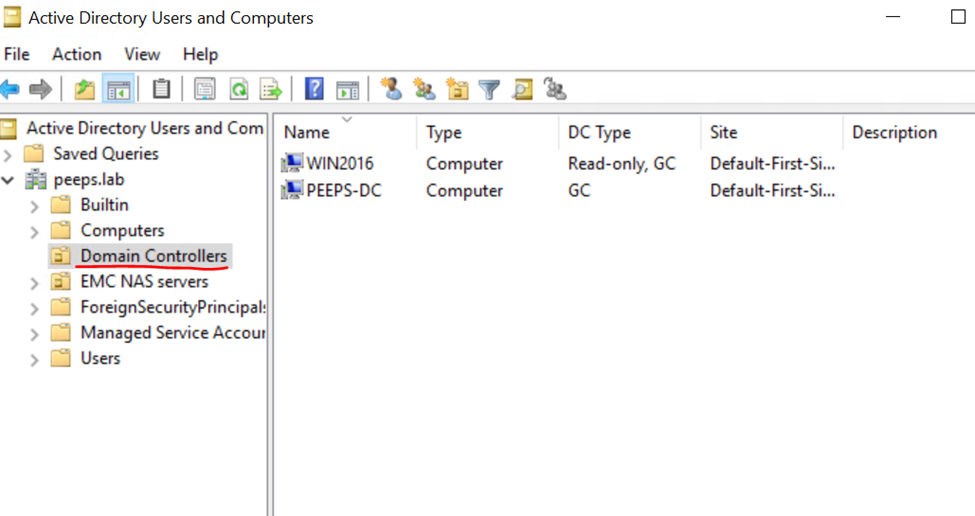
4に移動します。「Passowrdレプリケーション ポリシー」を構成する必要があるRODCを選択し、プロパティをクリックします。
5.[パスワード レプリケーション ポリシー]タブに移動し、NASサーバーのコンピューター アカウントを ALLOW グループに追加します。
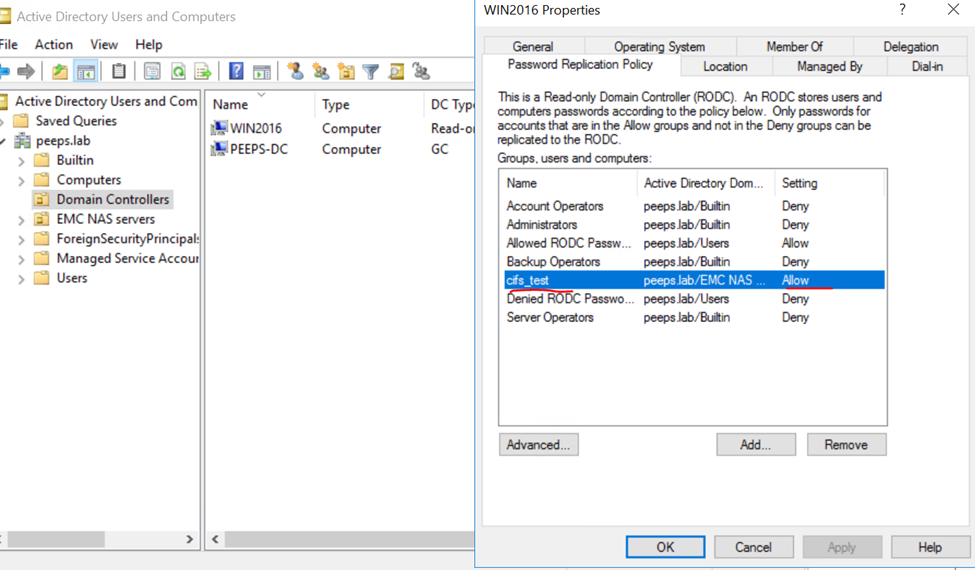
pingdcコマンドをもう一度実行します。今回はpingdcがエラーなしで完了します。
1.書き込み可能ドメイン コントローラにログインします。
2.「active directory Usrs and Computers」
を開きます。 3.[ドメイン コントローラー]OU
4に移動します。「Passowrdレプリケーション ポリシー」を構成する必要があるRODCを選択し、プロパティをクリックします。
5.[パスワード レプリケーション ポリシー]タブに移動し、NASサーバーのコンピューター アカウントを ALLOW グループに追加します。
pingdcコマンドをもう一度実行します。今回はpingdcがエラーなしで完了します。
spa:/service/user# svc_cifssupport cifs_test -pingdc -compname cifs_test -dc WIN2016 -verbose
cifs_test : done

PINGDC GENERAL INFORMATION

DC SERVER:
Netbios name  : WIN2016

CIFS SERVER:
Compname      : cifs_test
Domain        : peeps.lab
Additional Information
参照:
https://www.rebeladmin.com/2014/10/password-replication-in-rodc/
https://www.rebeladmin.com/2014/10/password-replication-in-rodc/
Produse afectate
Dell EMC UnityProprietăți articol
Article Number: 000204287
Article Type: Solution
Ultima modificare: 15 mai 2026
Version: 4
Găsiți răspunsuri la întrebările dvs. de la alți utilizatori Dell
Servicii de asistență
Verificați dacă dispozitivul dvs. este acoperit de serviciile de asistență.