Dell Security Management Server Virtual 11.0以降ではLDAPをバインドできない
Summary: この記事では、リモート管理コンソールでLDAPをバインドするときに、Dell Security Management Server Virtual v11.0以降で「サーバーに接続できません」というエラーが表示される状況について説明します。
Acest articol se aplică pentru
Acest articol nu se aplică pentru
Acest articol nu este legat de un produs specific.
Acest articol nu acoperă toate versiunile de produs existente.
Symptoms
対象製品:
- Dell Security Management Server Virtual
影響を受けるバージョン:
- v11.0以降
対象オペレーティング システム:
- Linux
通常、古いバージョンからDell Security Management Server Virtual v11.0以降にアップグレードし、アップデート前に正常に機能していたのと同じLDAP設定を使用しようとすると、ドメインのステータスが無効と表示され、LDAP設定を保存しようとしたときにエラーが発生します。
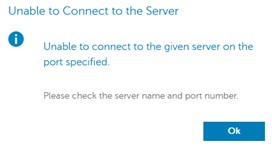
リモート管理コンソールでLDAPをバインドしようとすると、サーバーに接続できないというエラーが表示されます。ログにSSLハンドシェイク エラーが表示されます。
org.springframework.ldap.CommunicationException: simple bind failed: ADSERVER.DOMAIN.COM:636; nested exception is javax.naming.CommunicationException: simple bind failed: ADSERVER.DOMAIN.COM:636 [Root exception is javax.net.ssl.SSLHandshakeException: No subject alternative DNS name matching ADSERVER.DOMAIN.COM found.]
Cause
v11.0での自己作成証明書とJavaアップデート。LDAPS(Secure LDAP over TLS)接続の堅牢性を向上させるために、エンドポイント識別アルゴリズムがデフォルトで有効になっています。変更ログから: https://www.oracle.com/technetwork/java/javase/8u181-relnotes-4479407.html

Resolution
以下の手順に従って、「wrapper.conf」を修正して、エンドポイントの識別を無効にします。
注:この操作は、必要に応じてSSHセッションを介して実行できます。SSHを有効にする方法: Dell Security Management Server VirtualでSSHを有効にする方法
- サービスを停止する 方法については、「Dell Security Management Server Virtualのサービスを停止および開始する方法」を参照してください。
- メイン メニューから、[ Launch Shell]を選択します。
![[Launch Shell]の選択](https://supportkb.dell.com/img/ka0Do000000dfT8IAI/ka0Do000000dfT8IAI_ja_1.jpeg)
- 「
su dellsupportEnterキーを押します。

- のパスワードを入力します
dellsupportアカウントを選択し、 Enterを押します。

- 「
sudo nano /opt/dell/server/security-server/conf/wrapper.confの詳細を確認してください。

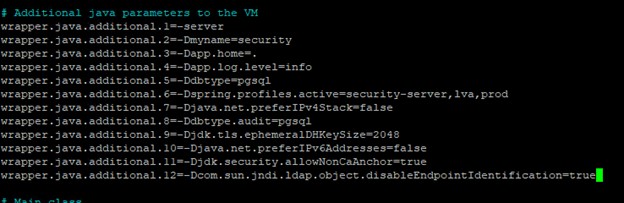
- [# Additional java parameters to the VM]で、次の行を追加します。
wrapper.java.additional.XX=-Dcom.sun.jndi.ldap.object.disableEndpointIdentification=trueここで、 XX はリストの増分です(この例では12です)。
- CTRL + Oを押して変更を保存します。
- CTRL + Xを押して終了します。
- 「
exitEnterを押してログアウトしますdellsupportの詳細を確認してください。

- 「
exit次に Enter を押してシェルからログアウトし、メインメニューに戻ります。

- サービスの開始 については、「Dell Security Management Server Virtualでサービスを停止および開始する方法」を参照してください。
これで、LDAPポートを使用してドメインをバインドできます。
Produse afectate
Dell EncryptionProprietăți articol
Article Number: 000205453
Article Type: Solution
Ultima modificare: 05 iun. 2026
Version: 3
Găsiți răspunsuri la întrebările dvs. de la alți utilizatori Dell
Servicii de asistență
Verificați dacă dispozitivul dvs. este acoperit de serviciile de asistență.