Dell Security Management Server Virtual 11.0 이상에서 LDAP를 바인딩할 수 없음
Summary: 이 문서에서는 Remote Management Console에서 LDAP를 바인딩할 때 Dell Security Management Server Virtual v11.0 이상에서 "서버에 연결할 수 없음" 오류가 발생하는 상황에 대해 설명합니다.
Acest articol se aplică pentru
Acest articol nu se aplică pentru
Acest articol nu este legat de un produs specific.
Acest articol nu acoperă toate versiunile de produs existente.
Symptoms
영향을 받는 제품:
- Dell Security Management Server Virtual
영향을 받는 버전:
- v11.0 이상
영향을 받는 운영 체제:
- Linux
일반적으로 이전 버전에서 Dell Security Management Server Virtual v11.0 이상으로 업그레이드한 후 업데이트 전에 정상적으로 작동했던 동일한 LDAP 설정을 사용하려고 하면 도메인에 대해 잘못된 상태가 표시되고 LDAP 설정을 저장하려고 할 때 오류가 발생합니다.
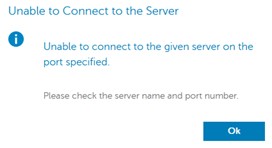
원격 관리 콘솔에서 LDAP를 바인딩하려고 할 때 서버에 연결할 수 없다는 오류가 나타납니다. 로그에 SSL 핸드셰이크 오류가 표시됩니다.
org.springframework.ldap.CommunicationException: simple bind failed: ADSERVER.DOMAIN.COM:636; nested exception is javax.naming.CommunicationException: simple bind failed: ADSERVER.DOMAIN.COM:636 [Root exception is javax.net.ssl.SSLHandshakeException: No subject alternative DNS name matching ADSERVER.DOMAIN.COM found.]
Cause
자체 인증 인증서 및 v11.0의 Java 업데이트. 엔드포인트 식별 알고리듬은 LDAPS(Secure LDAP over TLS) 연결의 안정성을 향상시키기 위해 기본적으로 활성화되어 있습니다. 변경 로그에서: https://www.oracle.com/technetwork/java/javase/8u181-relnotes-4479407.html

Resolution
아래 지침에 따라 wrapper.conf를 수정하여 엔드포인트 식별을 비활성화합니다.
참고: 이 작업은 필요한 경우 SSH 세션을 통해 수행할 수 있습니다. SSH 활성화 방법: Dell Security Management Server Virtual에서 SSH를 활성화하는 방법
- 서비스 중지 참조 Dell Security Management Server Virtual에서 서비스를 중지하고 시작하는 방법.
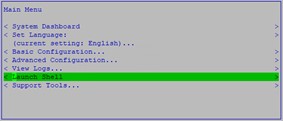
- 기본 메뉴에서 Launch Shell을 선택합니다.
- 실행 대화 상자에
su dellsupportEnter 키를 누릅니다.

- 의 암호를 입력합니다.
dellsupportaccount를 입력하고 Enter 키를 누릅니다.

- 실행 대화 상자에
sudo nano /opt/dell/server/security-server/conf/wrapper.conf.

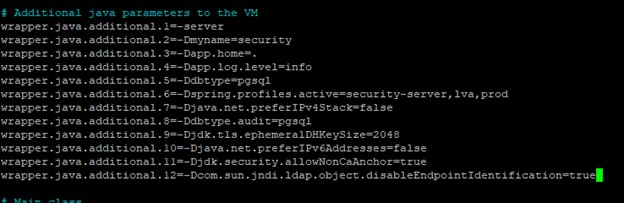
- # Additional java parameters to the VM에서 다음 줄을 추가합니다.
wrapper.java.additional.XX=-Dcom.sun.jndi.ldap.object.disableEndpointIdentification=true여기서 XX는 목록에 증분 적입니다 (이 예에서는 12입니다).
- CTRL + O를 눌러 변경 사항을 저장합니다.
- Ctrl+X를 눌러 종료합니다.
- 실행 대화 상자에
exit그런 다음 Enter 키를 눌러 로그아웃합니다.dellsupport.

- 실행 대화 상자에
exit그런 다음 Enter 키를 눌러 셸에서 Main Menu로 로그아웃합니다.

- 서비스 시작 Dell Security Management Server Virtual에서 서비스를 중지하고 시작하는 방법을 참조하십시오.
이제 LDAP 포트를 사용하여 도메인을 바인딩할 수 있습니다.
Produse afectate
Dell EncryptionProprietăți articol
Article Number: 000205453
Article Type: Solution
Ultima modificare: 05 iun. 2026
Version: 3
Găsiți răspunsuri la întrebările dvs. de la alți utilizatori Dell
Servicii de asistență
Verificați dacă dispozitivul dvs. este acoperit de serviciile de asistență.