NVP vProxy - Virtual Machine Image Recover failing with Error registering VM: ServerFaultCode: Permission to perform this operation was denied.
Summary: Virtual Machine "Image Recover" consistently failing using recently upgraded vCenter. NetWorker vProxy Image Recover has stopped working after recent vCenter upgrade.
Acest articol se aplică pentru
Acest articol nu se aplică pentru
Acest articol nu este legat de un produs specific.
Acest articol nu acoperă toate versiunile de produs existente.
Symptoms
The NetWorker vProxy recover session log shows:
159373:nsrvproxy_recover: vProxy Log: ####-##-#####:##:### ERROR:  [75] Error registering VM: ServerFaultCode: Permission to perform this operation was denied.
159373:nsrvproxy_recover: vProxy Log: ####-##-#####:##:### ERROR:  [75] Error in registering VM "[####l-####-SAN-Datastore] ###_1/###_1.vmx". "ServerFaultCode: Permission to perform this operation was denied."
159373:nsrvproxy_recover: vProxy Log: ####-##-#####:##:### WARN:   [75] RecoverVMSessions "####-###-###-###-113093c9524a" cleaning up running recover session due to error.
159373:nsrvproxy_recover: vProxy Log: ####-##-#####:##:### INFO:   [75] Successfully removed folder/file "[####l-####-SAN-Datastore] ###_1".
159373:nsrvproxy_recover: vProxy Log: ####-##-#####:##:### INFO:   [75] Disconnected from session on vCenter '####.###.###'.
159373:nsrvproxy_recover: vProxy Log: ####-##-#####:##:### ERROR:  [75] Failed to recover to a new VM. ServerFaultCode: Permission to perform this operation was denied.
152793:nsrvproxy_recover: vProxy Log Ends =================================================
153335:nsrvproxy_recover: Virtual machine recovery failed: vProxy recovery failed with error message: Session "####-###-###-###-113093c9524a" failed. Error: ServerFaultCode: Permission to perform this operation was denied..vProxy Recover Log locations
/opt/emc/vproxy/runtime/logs/vrecoverd
/opt/emc/vproxy/runtime/logs/recycle/vrecoverd
Cause
The VMware vCenter has the "Deployed in Cloud" checkbox Enabled in NetWorker; however, the vCenter server is not deployed in Cloud.
Resolution
- Goto NetWorker Management Console (NMC) user interface
- Launch NetWorker Administration Window.
- Right Click vCenter
- Click "Modify vCenter."
- Clear the "Deployed in Cloud" checkbox.
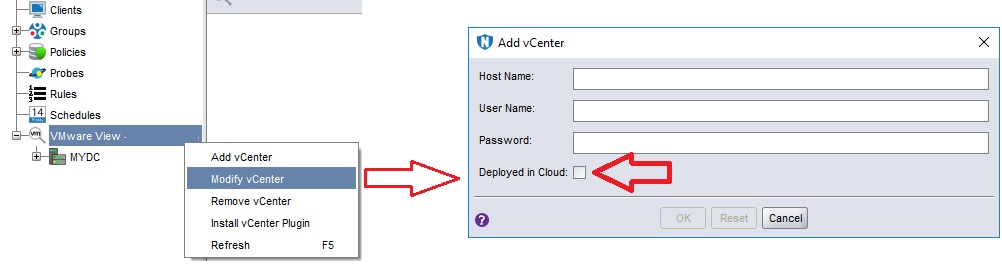
- Perform the VM restore again, and it completes successfully.
- Perform VM backups as well to ensure no impact to data protection.
Alternatively, this change can be performed from a nsradmin prompt on the NetWorker server:
[root@nsr ~]# nsradmin
NetWorker administration program.
Use the "help" command for help, "visual" for full-screen mode.
nsradmin> show name; cloud
nsradmin> print type: nsr hypervisor
                        name: vcsa.amer.lan;
                       cloud: Yes;
nsradmin> update cloud: No
                       cloud: No;
Update? y
updated resource id 177.0.110.157.0.0.0.0.243.35.70.103.192.168.9.150(19710)
nsradmin> print
                        name: vcsa.amer.lan;
                       cloud: No;
nsradmin> quit
Additional Information
This issue can also be related to a user permissions issue at the vCenter level: NVP vProxy: Image Restore Fails "ServerFaultCode: Permission to perform this operation was denied."
Produse afectate
NetWorker FamilyProprietăți articol
Article Number: 000205793
Article Type: Solution
Ultima modificare: 12 mar. 2025
Version: 4
Găsiți răspunsuri la întrebările dvs. de la alți utilizatori Dell
Servicii de asistență
Verificați dacă dispozitivul dvs. este acoperit de serviciile de asistență.