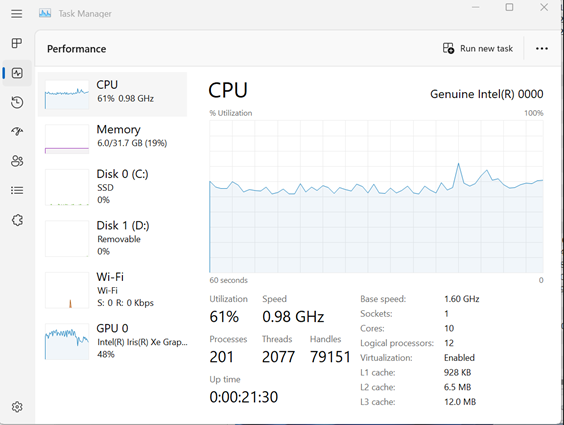
Windows 작업 관리자의 CPU 사용률이 100%에 도달할 수 없음
Summary: Windows 작업 관리자 성능 탭 CPU 사용률 정보가 100%에 도달할 수 없는 경우 수행할 작업에 대해 알아봅니다.
Acest articol se aplică pentru
Acest articol nu se aplică pentru
Acest articol nu este legat de un produs specific.
Acest articol nu acoperă toate versiunile de produs existente.
Symptoms
사용자가 Windows 작업 관리자의 성능 탭에서 CPU 사용률이 100%에 도달할 수 없다고 보고할 수 있습니다. 이 문제는 과부하 상태에서 또는 인텔 PTAT(Power and Thermal Analysis Tool)를 실행하는 동안 발생합니다.
해당되는 플랫폼:
- Latitude 5340
- Latitude 5540
- Latitude 7340
- Latitude 7440
- Latitude 7640
- Precision 3580
- Precision 3581
Cause
인텔 13세대 프로세서 Raptor Lake(RPL-U15)에는 15W TDP(Thermal Design Power)가 있습니다. 인텔은 CPU 전원이 TDP 전원보다 높은 경우에만 사용률이 100%에 도달하는 것을 확인했습니다. TDP가 인텔에서 권장하는 수준보다 높지 않으면 활용도가 100% 미만입니다. CPU 전원이 TDP 전원보다 높은 경우를 확인할 수 있는 유일한 방법은 타사 유틸리티를 사용하는 것입니다.
Resolution
이는 예상된 동작입니다. 이는 인텔에서 확인한 대로 설계된 대로 작동하고 있습니다.
Produse afectate
Latitude 5340, Latitude 7340, Latitude 7440, Latitude 5540, Latitude 7640, Precision 3580, Precision 3581Proprietăți articol
Article Number: 000209738
Article Type: Solution
Ultima modificare: 16 mai 2026
Version: 5
Găsiți răspunsuri la întrebările dvs. de la alți utilizatori Dell
Servicii de asistență
Verificați dacă dispozitivul dvs. este acoperit de serviciile de asistență.