External Display Blacks Out for 30 Seconds After Changing Refresh Rate
Summary: Learn about external monitors displaying a black screen after changing the refresh rate on a Latitude or Precision laptop, and the monitor is connected to a dock using the USB Type-C Multi-Function DisplayPort (MFDP). ...
Acest articol se aplică pentru
Acest articol nu se aplică pentru
Acest articol nu este legat de un produs specific.
Acest articol nu acoperă toate versiunile de produs existente.
Symptoms
Affected Products:
- WD19
- WD19TB
- WD19DC
- WD22TB4
Affected Platforms:
- Latitude 5340
- Latitude 5540
- Latitude 7340
- Precision 3580
- Precision 3581
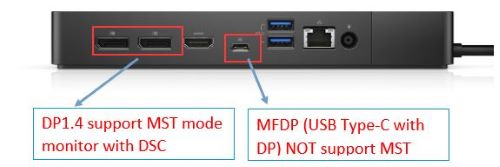
Connect Multi-Stream Transport (MST) and Display Stream Compression (DSC) monitor to WD19, WD19TB, WD19DC, or WD22TB4 USB Type-C Multi-Function DisplayPort (MFDP). The monitor may only show the display after 30 seconds, when changing the refresh rate.
Cause
Parade PS8469 has a limitation on 8 and 10 bits of interalignment feature, which sends the wrong FEC protocol to the monitor which causes the issue to occur.
Resolution
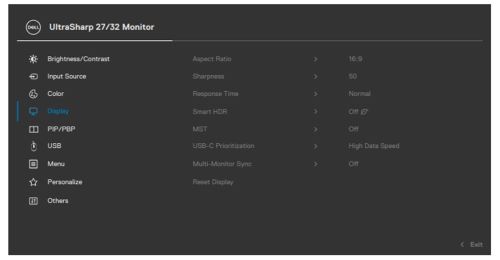
Use either full-size DP1.4 port connection for monitors that are using MST. Also, when connecting DSC monitors with MST capability to the USB Type-C MFDP disables MST in the monitor on-screen display (OSD) menu options.
Produse afectate
Dell Dock WD19, Dell Performance Dock - WD19DC, Dell Thunderbolt Dock - WD19TB, Latitude 5340, Latitude 7340, Latitude 5540, Precision 3580, Precision 3581, Dell Thunderbolt Dock – WD22TB4Proprietăți articol
Article Number: 000210214
Article Type: Solution
Ultima modificare: 16 mai 2026
Version: 6
Găsiți răspunsuri la întrebările dvs. de la alți utilizatori Dell
Servicii de asistență
Verificați dacă dispozitivul dvs. este acoperit de serviciile de asistență.