Dell Networking SONiC MC-LAG bliver påvirket, når status for bevaringssession falder
Summary: Denne artikel beskriver, hvordan MC-LAG påvirkes, når status for keepalive session går ned i SONiC.
Acest articol se aplică pentru
Acest articol nu se aplică pentru
Acest articol nu este legat de un produs specific.
Acest articol nu acoperă toate versiunile de produs existente.
Symptoms
MC-LAG påvirkes, når status for keepalive session går ned i SONiC.
Følgende MC-LAG-status vises på tidspunktet for den bevarende session:
Følgende MC-LAG-status vises på tidspunktet for den bevarende session:
SONIC-1# show mclag brief

Domain ID            : 1
Role                 : active
Session Status       : down
Peer Link Status     : up
Source Address       : 192.168.2.1
Peer Address         : 192.168.2.2
Peer Link            : PortChannel100
Keepalive Interval   : 1 secs
Session Timeout      : 30 secs
Delay Restore        : 300 secs
System Mac           : XX:XX:XX:XX:XX:XX
Mclag System Mac     : 00:00:00:00:00:01


Number of MLAG Interfaces:1
-----------------------------------------------------------
MLAG Interface       Local/Remote Status
-----------------------------------------------------------
PortChannel1             up/unknown
Cause
MC-LAG bliver påvirket, når status for keepalive session går ned i SONiC. Den keepalive i SONiC er konfigureret med IPv4 L3-kommunikation svarende til sikkerhedskopieringslinket i OS9 og OS10, som normalt ikke påvirker VLT-Portchannel-status. Peer-link-status i OS9 og OS10 vil påvirke VLT-Portchannel-status i stedet. I SONiC skal status for den bevarende session dog være opdateret, for at MC-LAG kan være aktiv. For keepalive link har den periodiske impuls mellem MC-LAG-peer-enheder og bruges også til at synkronisere tilstanden mellem MC-LAG-peer-enheder. I modsætning til SONiC skal OS9 og OS10 bruge peer-linket til at synkronisere tilstanden mellem VLT-peer-enheder.
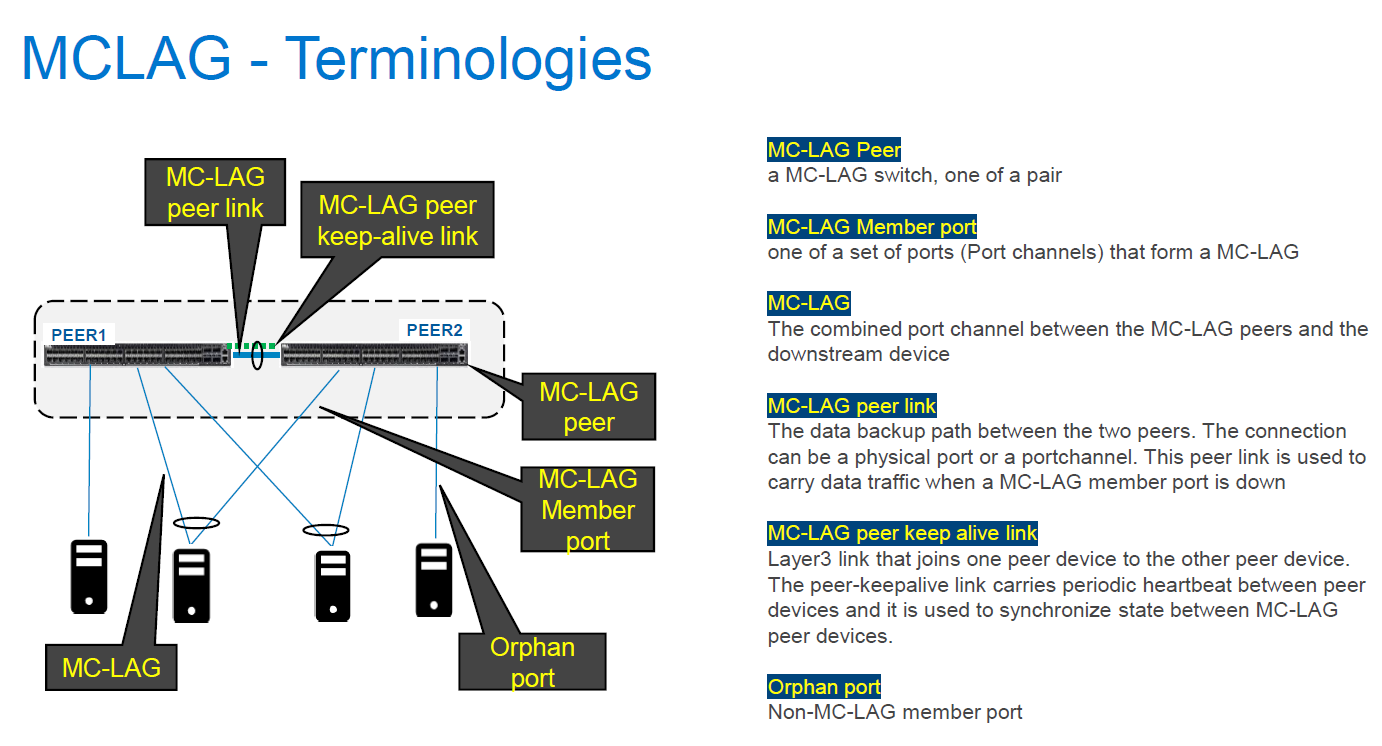
Når linket til den bevarende session er nede, bliver MC-LAG-status på begge MC-LAG-peer-enheder oppe/ukendte pga. synkroniseringsfejlen mellem begge peer-enheder.
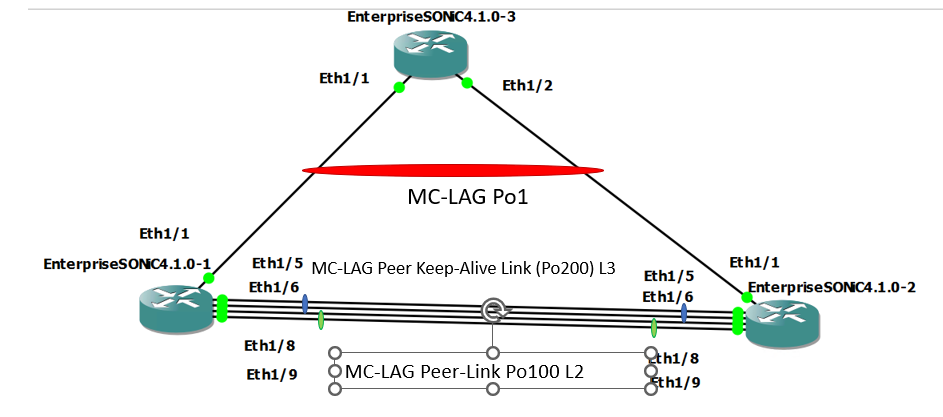
I normal tilstand
I problemtilstand (Keepalive-link-status nede ved at lukke Po200-medlemsporte)
Når linket til den bevarende session er nede, bliver MC-LAG-status på begge MC-LAG-peer-enheder oppe/ukendte pga. synkroniseringsfejlen mellem begge peer-enheder.
I normal tilstand
SONIC-1#show version

Software Version  : 4.1.0-Enterprise_Base
Product           : Enterprise SONiC Distribution by Dell Technologies
Distribution      : Debian 10.13
Kernel            : 5.10.0-8-2-amd64
Config DB Version : version_4_1_1
Build Commit      : 93589a15db
Build Date        : Tue Apr 18 17:56:48 UTC 2023
Built By          : sonicbld@sonic-lvn-csg-001
Platform          : x86_64-kvm_x86_64-r0
HwSKU             : DellEMC-S5248f-P-25G-DPB

SONIC-1# show ip interfaces
Flags: U-Unnumbered interface, A-Anycast IP
-----------------------------------------------------------------------------------------------------------------
Interface            IP address/mask                              VRF                 Admin/Oper     Flags
-----------------------------------------------------------------------------------------------------------------
PortChannel200       192.168.2.1/24                                                   up/up
Vlan636              172.16.0.1/24                                                    up/up
SONIC-1#
SONIC-1#
SONIC-1# show PortChannel summary
Flags(oper-status):  D - Down U - Up (portchannel) P - Up in portchannel (members)
----------------------------------------------------------------------------------------------------------------------------
Group               PortChannel                   Type                Protocol          Member Ports
----------------------------------------------------------------------------------------------------------------------------
1                   PortChannel1   (U)            Eth                 LACP                 Eth1/1(P)
100                 PortChannel100 (U)            Eth                 NONE                 Eth1/8(P)
                                                                                           Eth1/9(P)
200                 PortChannel200 (U)            Eth                 LACP                 Eth1/5(P)
                                                                                           Eth1/6(P)
SONIC-1#
SONIC-1#
SONIC-1# show mclag brief

Domain ID            : 1
Role                 : active
Session Status       : up
Peer Link Status     : up
Source Address       : 192.168.2.1
Peer Address         : 192.168.2.2
Peer Link            : PortChannel100
Keepalive Interval   : 1 secs
Session Timeout      : 30 secs
Delay Restore        : 300 secs
System Mac           : XX:XX:XX:XX:XX:XX
Mclag System Mac     : 00:00:00:00:00:01


Number of MLAG Interfaces:1
-----------------------------------------------------------
MLAG Interface       Local/Remote Status
-----------------------------------------------------------
PortChannel1             up/up
SONIC-1#
SONIC-1#
SONIC-1# show running-configuration interface PortChannel 1
!
interface PortChannel1 mode active
 switchport trunk allowed Vlan 636
 no shutdown
 mclag 1
SONIC-1# show running-configuration interface PortChannel 100
!
interface PortChannel100 mode on
 switchport trunk allowed Vlan 1-4094
 no shutdown
SONIC-1# show running-configuration interface PortChannel 200
!
interface PortChannel200 mode active
 no shutdown
 ip address 192.168.2.1/24
SONIC-1#
SONIC-1#
SONIC-1# ping 172.16.0.3  //IP address assigned to VLAN636 on uplink SW.
PING 172.16.0.3 (172.16.0.3) 56(84) bytes of data.
64 bytes from 172.16.0.3: icmp_seq=1 ttl=64 time=3.26 ms
64 bytes from 172.16.0.3: icmp_seq=2 ttl=64 time=3.47 ms
64 bytes from 172.16.0.3: icmp_seq=3 ttl=64 time=3.21 ms
64 bytes from 172.16.0.3: icmp_seq=4 ttl=64 time=2.84 ms
64 bytes from 172.16.0.3: icmp_seq=5 ttl=64 time=11.1 ms
^C
SONIC-1#
SONIC-2#show version

Software Version  : 4.1.0-Enterprise_Base
Product           : Enterprise SONiC Distribution by Dell Technologies
Distribution      : Debian 10.13
Kernel            : 5.10.0-8-2-amd64
Config DB Version : version_4_1_1
Build Commit      : 93589a15db
Build Date        : Tue Apr 18 17:56:48 UTC 2023
Built By          : sonicbld@sonic-lvn-csg-001
Platform          : x86_64-kvm_x86_64-r0
HwSKU             : DellEMC-S5248f-P-25G-DPB

SONIC-2# show ip interfaces
Flags: U-Unnumbered interface, A-Anycast IP
-----------------------------------------------------------------------------------------------------------------
Interface            IP address/mask                              VRF                 Admin/Oper     Flags
-----------------------------------------------------------------------------------------------------------------
PortChannel200       192.168.2.2/24                                                   up/up
Vlan636              172.16.0.2/24                                                    up/up
SONIC-2#
SONIC-2#
SONIC-2# show PortChannel summary
Flags(oper-status):  D - Down U - Up (portchannel) P - Up in portchannel (members)
----------------------------------------------------------------------------------------------------------------------------
Group               PortChannel                   Type                Protocol          Member Ports
----------------------------------------------------------------------------------------------------------------------------
1                   PortChannel1   (U)            Eth                 LACP                 Eth1/1(P)
100                 PortChannel100 (U)            Eth                 NONE                 Eth1/8(P)
                                                                                           Eth1/9(P)
200                 PortChannel200 (U)            Eth                 LACP                 Eth1/5(P)
                                                                                           Eth1/6(P)
SONIC-2#
SONIC-2#
SONIC-2# show mclag brief

Domain ID            : 1
Role                 : standby
Session Status       : up
Peer Link Status     : up
Source Address       : 192.168.2.2
Peer Address         : 192.168.2.1
Peer Link            : PortChannel100
Keepalive Interval   : 1 secs
Session Timeout      : 30 secs
Delay Restore        : 300 secs
System Mac           : XX:XX:XX:XX:XX:XX
Mclag System Mac     : 00:00:00:00:00:01


Number of MLAG Interfaces:1
-----------------------------------------------------------
MLAG Interface       Local/Remote Status
-----------------------------------------------------------
PortChannel1             up/up
SONIC-2#
SONIC-2#
SONIC-2#
SONIC-2#
SONIC-2# show running-configuration interface PortChannel 1
!
interface PortChannel1 mode active
 switchport trunk allowed Vlan 636
 no shutdown
 mclag 1
SONIC-2# show running-configuration interface PortChannel 100
!
interface PortChannel100 mode on
 switchport trunk allowed Vlan 1-4094
 no shutdown
SONIC-2# show running-configuration interface PortChannel 200
!
interface PortChannel200 mode active
 no shutdown
 ip address 192.168.2.2/24
SONIC-2#
SONIC-2#
SONIC-2# ping 172.16.0.3
PING 172.16.0.3 (172.16.0.3) 56(84) bytes of data.
64 bytes from 172.16.0.3: icmp_seq=1 ttl=64 time=3.48 ms
64 bytes from 172.16.0.3: icmp_seq=2 ttl=64 time=2.94 ms
^CSONIC-2#
I problemtilstand (Keepalive-link-status nede ved at lukke Po200-medlemsporte)
SONIC-1# show mclag brief

Domain ID            : 1
Role                 : active
Session Status       : down
Peer Link Status     : up
Source Address       : 192.168.2.1
Peer Address         : 192.168.2.2
Peer Link            : PortChannel100
Keepalive Interval   : 1 secs
Session Timeout      : 30 secs
Delay Restore        : 300 secs
System Mac           : XX:XX:XX:XX:XX:XX
Mclag System Mac     : 00:00:00:00:00:01


Number of MLAG Interfaces:1
-----------------------------------------------------------
MLAG Interface       Local/Remote Status
-----------------------------------------------------------
PortChannel1             up/unknown
SONIC-1#
SONIC-1#
SONIC-1# ping 172.16.0.3
PING 172.16.0.3 (172.16.0.3) 56(84) bytes of data.
64 bytes from 172.16.0.3: icmp_seq=1 ttl=64 time=8.00 ms
64 bytes from 172.16.0.3: icmp_seq=2 ttl=64 time=3.08 ms
64 bytes from 172.16.0.3: icmp_seq=3 ttl=64 time=2.99 ms
64 bytes from 172.16.0.3: icmp_seq=4 ttl=64 time=2.92 ms
64 bytes from 172.16.0.3: icmp_seq=5 ttl=64 time=3.07 ms
^C
SONIC-1#
SONIC-2# show PortChannel summary
Flags(oper-status):  D - Down U - Up (portchannel) P - Up in portchannel (members)
----------------------------------------------------------------------------------------------------------------------------
Group               PortChannel                   Type                Protocol          Member Ports
----------------------------------------------------------------------------------------------------------------------------
1                   PortChannel1   (U)            Eth                 LACP                 Eth1/1(P)
100                 PortChannel100 (U)            Eth                 NONE                 Eth1/8(P)
                                                                                           Eth1/9(P)
200                 PortChannel200 (D)            Eth                 LACP                 Eth1/5(D)
                                                                                          Eth1/6(D)
SONIC-2# show mclag brief

Domain ID            : 1
Role                 : standby
Session Status       : down
Peer Link Status     : up
Source Address       : 192.168.2.2
Peer Address         : 192.168.2.1
Peer Link            : PortChannel100
Keepalive Interval   : 1 secs
Session Timeout      : 30 secs
Delay Restore        : 300 secs
System Mac           : XX:XX:XX:XX:XX:XX
Mclag System Mac     : 00:00:00:00:00:01


Number of MLAG Interfaces:1
-----------------------------------------------------------
MLAG Interface       Local/Remote Status
-----------------------------------------------------------
PortChannel1             up/unknown
SONIC-2#
SONIC-2# ping 172.16.0.3
PING 172.16.0.3 (172.16.0.3) 56(84) bytes of data.
From 172.16.0.2 icmp_seq=1 Destination Host Unreachable
From 172.16.0.2 icmp_seq=1 Destination Host Unreachable
From 172.16.0.2 icmp_seq=1 Destination Host Unreachable
From 172.16.0.2 icmp_seq=1 Destination Host Unreachable
^C
Resolution
For at MC-LAG kan holde op med at fungere uden problemer, skal keepalive link-status også holde sig i gang. Administrationsporten bruges normalt til keepalive link, men portkanalen med den IP-adresse, der er tildelt den, kan bruges til keepalive link til redundansformål. Den adfærd (at MC-LAG påvirkes, når keepalive link-status går ned) beskrevet i denne KB-artikel forventes i alle versioner, mindst indtil SONiC version 4.2.0.
Produse afectate
Enterprise SONiC Distribution, PowerSwitch N3200-ON, PowerSwitch S5212F-ON, PowerSwitch S5224F-ON, PowerSwitch S5232F-ON, PowerSwitch S5248F-ON, PowerSwitch S5296F-ON, PowerSwitch Z9100-ON, PowerSwitch Z9264F-ON, PowerSwitch Z9332F-ONProprietăți articol
Article Number: 000213968
Article Type: Solution
Ultima modificare: 23 ian. 2024
Version: 3
Găsiți răspunsuri la întrebările dvs. de la alți utilizatori Dell
Servicii de asistență
Verificați dacă dispozitivul dvs. este acoperit de serviciile de asistență.