Connectrix: B-Serie: Beim Ausführen des Befehls configdownload ist ein ungültiger Header in der Konfigurationsdatei aufgetreten.
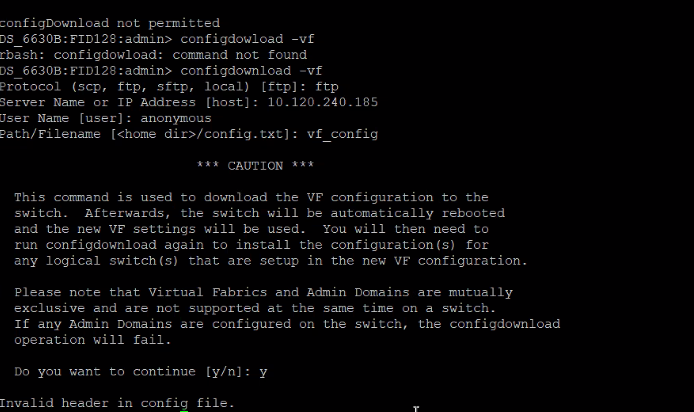
Summary: Dieses Problem tritt auf, wenn die gesicherte Switchkonfiguration mithilfe des Befehls configdownload auf den Switch geladen wurde.
Symptoms
Error: Invalid header in config file
Cause
Dieses Szenario tritt während des Switchaustauschprozesses auf, bei dem die alte Switchkonfigurationsdatei ein anderes Switch-Banner enthält. Die neue Switchkonfigurationsdatei weist ein anderes Muster auf, was zu einer Nichtübereinstimmung führt.
Resolution
Schritt 1: Vergleichen Sie die alte Switchkonfigurationsdatei und die neue Switchkonfigurationsdatei und notieren Sie den Unterschied auf dem Banner.
Schritt 2: Beispiel:
Old switch Banner
============================================================= ATTENTION: It is recommended that you change the default passwords for all the switch accounts. Refer to the product release notes and the administrator's guide if you need further information. =============================================================
Banner für neuen Switch:
-------------------------------------------------------------------------------------------- ATTENTION It is recommended that you change the default passwords for all the switch accounts. Refer to the product release notes and the administrator's guide if you need further information. --------------------------------------------------------------------------------------------
Schritt 3: Bearbeiten Sie das neue Switch-Banner manuell entsprechend dem alten Switch-Banner.
Schritt 4: Speichern Sie die Konfigurationsdatei und versuchen Sie, den Befehl configdownload.