PowerProtect Data Manager: How to Identify the Software Serial ID to Open a Support Case
Summary: This article describes where to find the software serial number for PowerProtect Data Manager when opening a support case.
Instructions
For the PowerProtect Data Manager MA check procedure, ask for either Software ID (SWID) and PowerProtect Data Manager hostname OR license file.
Below are the steps to collect the SWID and hostname from the PowerProtect Data Manager UI.
The hostname or IP address can be found on the website page.
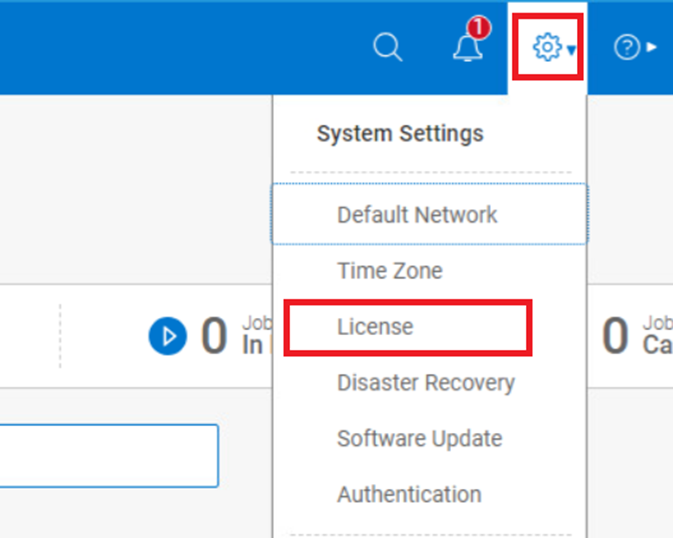
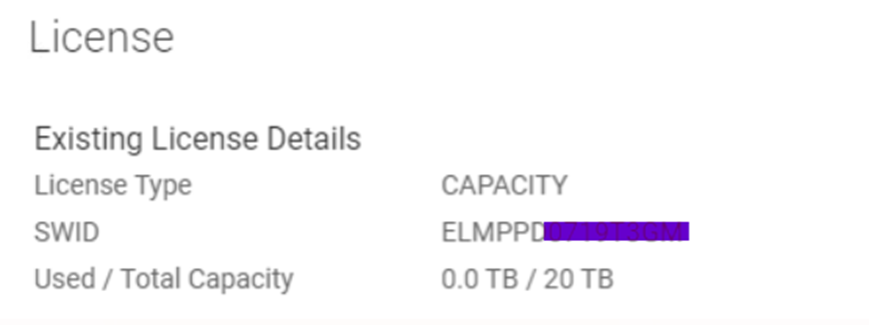
The following steps are for versions earlier than 19.22.0-24.
SWID: PowerProtect Data Manager UI-> Setting -> License -> SWID
Figure 1. System Settings License Details
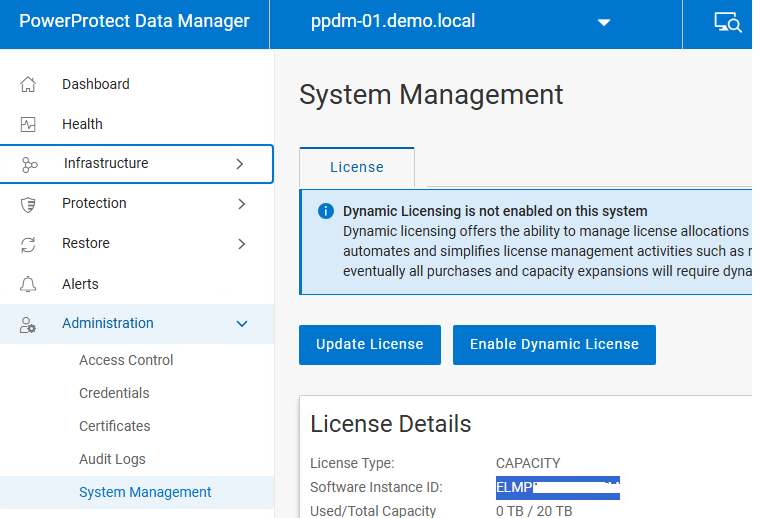
The following steps are for versions 19.22.0-24 or later.
SWID: PowerProtect Data Manager UI -> Administration-> System Management-> Software Instance ID
Figure 2 System Settings License Details
Additional Information
The examples for each product are based on certain versions.
If there is any difference or update on the steps, see the latest product administration guide.
Alternatively, contact the Support team.