NetWorker: CLI에서 NetWorker Client 소프트웨어 인벤토리를 수행하는 방법
Summary: 이 작업은 각 클라이언트 머신에 개별적으로 로그인하거나 타사 소프트웨어를 사용하지 않고 NetWorker Server에서 직접 수행할 수 있습니다.
Acest articol se aplică pentru
Acest articol nu se aplică pentru
Acest articol nu este legat de un produs specific.
Acest articol nu acoperă toate versiunile de produs existente.
Instructions
아래 명령은 다음 순서로 실행해야 합니다.
1단계:
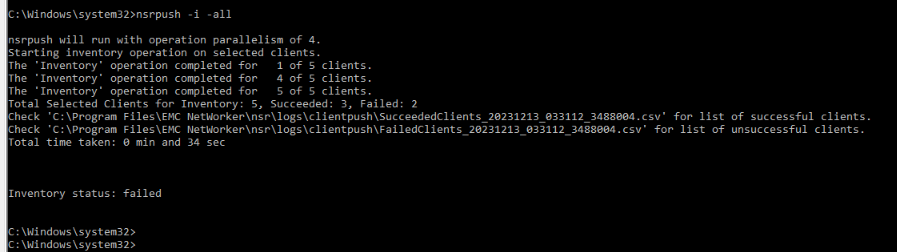
nsrpush -i -all
이렇게 하면 모든 클라이언트에서 인벤토리가 수행됩니다. 이 작업은 " 옵션 대신 클라이언트 이름을 사용하여 특정 호스트로 제한할 수 있습니다.-all"
성공/실패한 인벤토리 작업에 대한 로그는 오류 메시지와 함께 NetWorker Server의 아래 위치에서 찾을 수 있습니다.
NetWorker-Installation-Path\nsr\logs\clientpush\
2단계:
nsrpush -s -t -all > output.txt
그러면 각 클라이언트에 설치된 모든 NetWorker 패키지가 표 형식으로 나열되고 출력이 "output.txt" 파일로 전달됩니다. 이 작업은 " 옵션 대신 클라이언트 이름을 사용하여 특정 호스트로 제한할 수 있습니다.-all"

Additional Information
추가 옵션에 대한 자세한 내용은 nsrpush NetWorker Command Reference Guide에서 확인할 수 있습니다. NetWorker 설명서는 다음을 통해 제공됩니다. NetWorker 지원 | 설명서 및 문서 (Dell 지원 계정으로 로그인해야 함)
Produse afectate
NetWorkerProprietăți articol
Article Number: 000220483
Article Type: How To
Ultima modificare: 06 apr. 2026
Version: 3
Găsiți răspunsuri la întrebările dvs. de la alți utilizatori Dell
Servicii de asistență
Verificați dacă dispozitivul dvs. este acoperit de serviciile de asistență.