Dell Client Device Managerをインストールする方法
Summary: この記事では、Dell Client Device Manager (DCDM)のインストールについて説明します。
Acest articol se aplică pentru
Acest articol nu se aplică pentru
Acest articol nu este legat de un produs specific.
Acest articol nu acoperă toate versiunile de produs existente.
Instructions
対象製品:
- Dell クライアントデバイスマネージャ
- ダウンロード と 解凍:
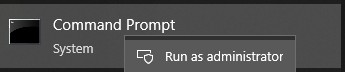
- 管理者としてコマンド プロンプトを実行します。
- DCDMを解凍した場所にディレクトリーを変更(cd)します。

- 必要に応じて、以下のパラメーターまたは例を使用して 、PowerShellスクリプトを実行します
powershell.exe -executionpolicy Bypass -windowstyle hidden -noninteractive -nologo -file "dcdm_deployment.ps1" -action -modules

| パラメータ | 説明 |
|---|---|
| -help | オプション:パラメーターの説明を表示します |
| -アクション | 必須:実行するアクション(インストールまたはアンインストール)を指定します |
| -モジュール | オプション 含めるモジュールを指定します。デフォルト(DCDMCS、DCDMU、DCDMS) |
| -logpath | オプション:デフォルトはC:ProgramData\Dell\ClientDeviceManagerです。ログ ファイルのパスを指定します |
| -詳細ログ | オプション:コンソールでのログ表示を有効にします(TrueまたはFalse) |
| -debuglevel | オプション:デフォルトはallです。デバッグ情報のレベルを指定します |
| -テレメトリー同意 | 省略可能: 既定値は true です。テレメトリーの同意を示します |
| モジュール | 説明 | モジュールは次に依存します |
|---|---|---|
| DCDMCsの | Dell Client Device Managerコア サービス(旧Dell Core Service(DCS)) | 該当なしコア コンポーネントが必要 |
| DCDMSの | Dell Client Device Manager Security(旧Dell Trusted Device(DTD)) | DCDMCsの |
| DCDMUの | Dell Client Device Manager Update(旧Dell Command Update(DCU)) | DCDMCS、DCDMS |
例:
すべてのモジュールをインストールまたはアップデートし、DCDMUのテレメトリーを送信する
powershell.exe -executionpolicy Bypass -windowstyle hidden -noninteractive -nologo -file "dcdm_deployment.ps1" -action "install"
テレメトリーなしですべてのモジュールをインストールまたはアップデートする
powershell.exe -executionpolicy Bypass -windowstyle hidden -noninteractive -nologo -file "dcdm_deployment.ps1" -action "install" -telemetryconsent "false"
Dell Client Device Managerのインストールまたはアップデート |セキュリティ(DCDMS)
powershell.exe -executionpolicy Bypass -windowstyle hidden -noninteractive -nologo -file "dcdm_deployment.ps1" -action "install" -modules "DCDMS"
Dell Client Device Managerのアンインストール |セキュリティ(DCDMS)
powershell.exe -executionpolicy Bypass -windowstyle hidden -noninteractive -nologo -file "dcdm_deployment.ps1" -action "uninstall" -modules "DCDMS"
すべてのモジュールをアンインストールする
powershell.exe -executionpolicy Bypass -windowstyle hidden -noninteractive -nologo -file "dcdm_deployment.ps1" -action "uninstall"
Produse afectate
Dell Client Device ManagerProprietăți articol
Article Number: 000299185
Article Type: How To
Ultima modificare: 22 mai 2026
Version: 3
Găsiți răspunsuri la întrebările dvs. de la alți utilizatori Dell
Servicii de asistență
Verificați dacă dispozitivul dvs. este acoperit de serviciile de asistență.