How to Install Dell Client Device Manager
Summary: This article provides information about installing Dell Client Device Manager (DCDM).
Acest articol se aplică pentru
Acest articol nu se aplică pentru
Acest articol nu este legat de un produs specific.
Acest articol nu acoperă toate versiunile de produs existente.
Instructions
Affected Products:
- Dell Client Device Manager
- Download and extract:
- Reference, How to Download Dell Client Device Manager
- Reference, How to Extract Dell Client Device Manager.
- Run the command prompt as administrator.
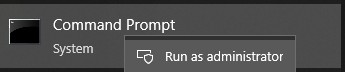
- Change the directory (cd) to the location where DCDM was extracted.

- Run the PowerShell script using the parameters or examples found below based on your needs
powershell.exe -executionpolicy Bypass -windowstyle hidden -noninteractive -nologo -file "dcdm_deployment.ps1" -action -modules

| Parameter | Description |
|---|---|
| -help | Optional Displays a description of parameters |
| -action | Mandatory Specifies the action to be performed (install or uninstall) |
| -modules | Optional Specifies the modules to be included.Default (DCDMCS,DCDMU,DCDMS) |
| -logpath | Optional The default is C:ProgramData\Dell\ClientDeviceManager. Specifies the path for log files |
| -verboselog | Optional Enables log display in the console (True or False) |
| -debuglevel | Optional Default is all. Specifies the level of debugging information |
| -telemetryconsent | Optional Default is true. Indicates telemetry consent |
| Module | Description | Module depends on |
|---|---|---|
| DCDMCS | Dell Client Device Manager Core Services (formerly known as Dell Core Service (DCS)) | N/A core component required |
| DCDMS | Dell Client Device Manager Security (formerly known as Dell Trusted Device (DTD)) | DCDMCS |
| DCDMU | Dell Client Device Manager Update (formerly known as Dell Command Update (DCU)) | DCDMCS, DCDMS |
Examples:
Install or update all modules and send telemetry for DCDMU
powershell.exe -executionpolicy Bypass -windowstyle hidden -noninteractive -nologo -file "dcdm_deployment.ps1" -action "install"
Install or update all modules without telemetry
powershell.exe -executionpolicy Bypass -windowstyle hidden -noninteractive -nologo -file "dcdm_deployment.ps1" -action "install" -telemetryconsent "false"
Install or update Dell Client Device Manager | Security (DCDMS)
powershell.exe -executionpolicy Bypass -windowstyle hidden -noninteractive -nologo -file "dcdm_deployment.ps1" -action "install" -modules "DCDMS"
Uninstall Dell Client Device Manager | Security (DCDMS)
powershell.exe -executionpolicy Bypass -windowstyle hidden -noninteractive -nologo -file "dcdm_deployment.ps1" -action "uninstall" -modules "DCDMS"
Uninstall all modules
powershell.exe -executionpolicy Bypass -windowstyle hidden -noninteractive -nologo -file "dcdm_deployment.ps1" -action "uninstall"
Produse afectate
Dell Client Device ManagerProprietăți articol
Article Number: 000299185
Article Type: How To
Ultima modificare: 22 mai 2026
Version: 3
Găsiți răspunsuri la întrebările dvs. de la alți utilizatori Dell
Servicii de asistență
Verificați dacă dispozitivul dvs. este acoperit de serviciile de asistență.