PowerScale: AD sudo-kommandoer slutter å fungere etter oppgradering
Summary: Når du oppgraderer PowerScale OneFS, ber sudo-kommandoer om passord tre ganger, og utfører deretter ikke kommandoen med "sudo: 3 feil passordforsøk"
Symptoms
Active Directory-brukeren (i dette tilfellet AD-brukernavnet er "PowerScale") i en "System Admin"-rolle tillater fortsatt SSH-oppføring, kommandoen mislykkes som følger:
cluster-1# ssh DOMAIN\\PowerScale@cluster-1
(DOMAIN\PowerScale@cluster-1) Password:
PowerScale OneFS 9.12.0.1
Could not chdir to home directory /ifs/home/DOMAIN/PowerScale: No such file or directory
cluster-1% sudo -s

We trust you have received the usual lecture from the local System
Administrator. It usually boils down to these three things:

    #1) Respect the privacy of others.
    #2) Think before you type.
    #3) With great power comes great responsibility.

For security reasons, the password you type will not be visible.

Password:
Sorry, try again.
Password:
Sorry, try again.
Password:
sudo: 3 incorrect password attempts
cluster0-1%
Feil i /var/log/auth.log ligner på:
2026-01-09T14:08:46.964341-05:00 <4.6> isi-9510-1(id1) sshd[9292]: Accepted keyboard-interactive/pam for DOMAIN\PowerScale from 10.20.48.1 port 31599 ssh2
2026-01-09T14:09:02.165862-05:00 <4.1> isi-9510-1(id1) sudo[9315]: DOMAIN\PowerScale : 3 incorrect password attempts ; TTY=pts/1 ; PWD=/ ; USER=root ; COMMAND=/bin/zs
Cause
En oppdatering av sudo førte til at store Active Directory-brukernavn mislyktes. Merk at dette bare er for miljøer som trenger Active Directory-brukere for å bli bedt om et passord. Passordløse sudo-kommandoer skal ikke påvirkes. Passordbeskyttede ledetekster har oppføringer i 'isi_visudo' som dette:
DOMAIN\\powerscale ALL=(ALL) PASSWD: ALLResolution
PowerScale Engineering har identifisert dette problemet og jobber med en permanent løsning. Brukere kan redigere brukernavnet i Active Directory slik at det er med bare små bokstaver:
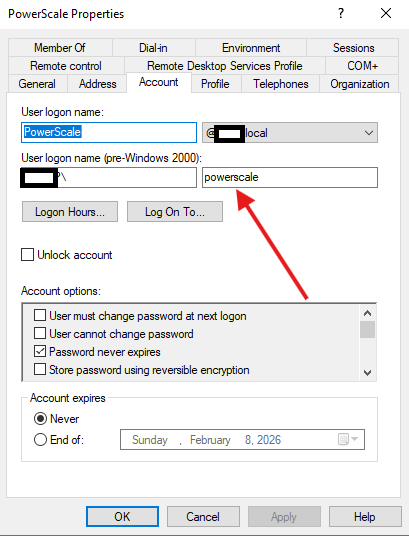
Som med alle Active Directory-redigeringer kan det ta tid å forplante seg. Hvis brukeren fremdeles ikke arbeider, starter du en logginnsamling og kontakter PowerScale-støtte.