Dell Unity: Alert 14:b20080 TLSv1.0 and TLSv1.1 are not secure. It is recommended that you use TLSv1.2
Сводка: After an upgrade (NDU) to Unity OS 5.4.0.0.5.094, an alert is generated for "TLSv1.0 and TLSv1.1 are not secure. It is recommended that TLSv1.2 is used. See KB 000022527 for information about how to disable TLSv1.0 and TLSv1.1" ...
Данная статья применяется к
Данная статья не применяется к
Эта статья не привязана к какому-либо конкретному продукту.
В этой статье указаны не все версии продуктов.
Симптомы
After an upgrade (NDU) to Unity OS 5.4.0.0.5.094, an alert 14:b20080 is generated for TLSv1.0 and TLSv1.1 are not secure. It is recommended that you use TLSv1.2. See KB 000022527 for information about how to disable TLSv1.0 and TLSv1.1"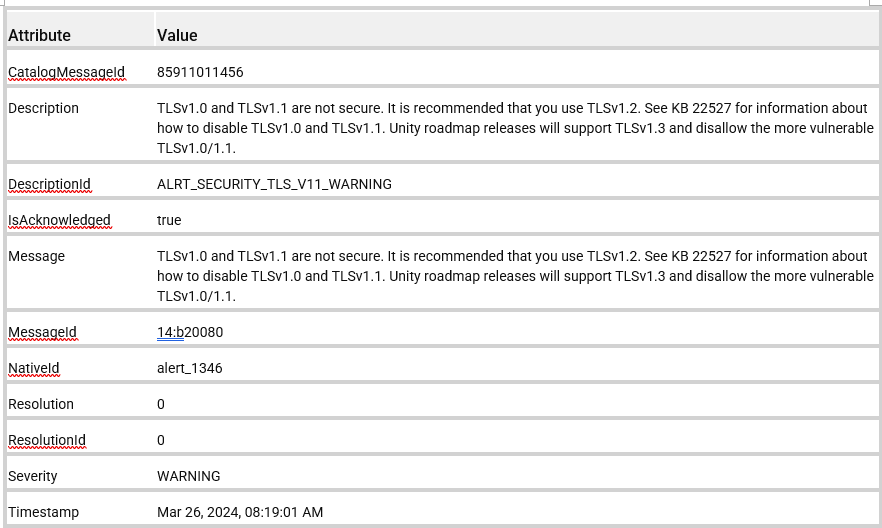
Причина
This is a new alert that was added to the Unity OS 5.4.0.0.5.094 release to warn customers that TLSv1.0 and TLSv1.1 are not secure and can pose a security risk when used. A future Unity OS release disallows the use of TLSv1.0/1.1.
Разрешение
It is recommended that customers disable TLSv1.0/1.1 and use TLSv1.2. See KBA 000022527 Dell Unity: How to Disable TLS 1.0 and 1.1 on Unity Array (User Correctable) for instructions on disabling TLSv1.0/1.1.
NOTE:
UEMCLI clients 5.0.2 and earlier do not support TLSv1.2. If TLSv1.1 is disabled on Unity, the old UEMCLI clients cannot connect with Unity. Upgrade to UEMCLI client version 5.0.3 or above to ensure support for TLSv1.2.
UEMCLI clients 5.0.2 and earlier do not support TLSv1.2. If TLSv1.1 is disabled on Unity, the old UEMCLI clients cannot connect with Unity. Upgrade to UEMCLI client version 5.0.3 or above to ensure support for TLSv1.2.
NOTE:
There is a rare issue where Dell Unity arrays upgraded from Unity OS 4.2 (or earlier) code may still attempt to use TLSv1.0 even when it is disabled due to a Unisphere rolemapping file not being updated properly. See KBA 000035540 Dell Unity: Unisphere UI fails to log in as LDAP User when TLS1.0 is disabled with message "The logged in user is not authorized to access Unisphere" (Dell Correctable)
There is a rare issue where Dell Unity arrays upgraded from Unity OS 4.2 (or earlier) code may still attempt to use TLSv1.0 even when it is disabled due to a Unisphere rolemapping file not being updated properly. See KBA 000035540 Dell Unity: Unisphere UI fails to log in as LDAP User when TLS1.0 is disabled with message "The logged in user is not authorized to access Unisphere" (Dell Correctable)
Затронутые продукты
Dell EMC Unity, Dell EMC Unity FamilyСвойства статьи
Номер статьи: 000223686
Тип статьи: Solution
Последнее изменение: 25 Jul 2025
Версия: 4
Получите ответы на свои вопросы от других пользователей Dell
Услуги технической поддержки
Проверьте, распространяются ли на ваше устройство услуги технической поддержки.