NetWorker: le richieste di API REST hanno esito negativo con messaggio di errore: HTTP status 404 - Not Found "The Requested Resource is Not Available"
Сводка: Le query API (Application Programming Interface) REST di NetWorker hanno esito negativo con messaggio di errore: HTTP status 404 - Not Found "The Requested Resource is Not Available. Il server di origine non ha trovato una rappresentazione corrente per la risorsa di destinazione o non è disposto a rivelarne l'esistenza". ...
Симптомы
Le richieste dell'API REST NetWorker hanno esito negativo con messaggio di errore: HTTP status 404 - Not Found "The Requested Resource is Not Available"
[root@NETWORKER_SERVER]:~# curl -ik GET -u **userid**:'***Password***' -H "Content-Type: application/json" 'https://NETWORKER_SERVER:9090/nwrestapi/v3/global/clients'
curl: (6) Could not resolve host: GET; Name or service not known
HTTP/1.1 404
Content-Type: text/html;charset=utf-8
Content-Language: en
Content-Length: 790
Date: Tue, 04 Jul 2023 12:11:41 GMT
Server: NSR SERVICES for Authentication


<!doctype html><html lang="en"><head><title>HTTP Status 404 – Not Found</title><style type="text/css">body {font-family:Tahoma,Arial,sans-serif;} h1, h2, h3, b {color:white;background-color:#525D76;} h1 {font-size:22px;} h2 {font-size:16px;} h3 {font-size:14px;} p {font-size:12px;} a {color:black;} .line {height:1px;background-color:#525D76;border:none;}</style></head><body><h1>HTTP Status 404 – Not Found</h1><hr class="line" /><p><b>Type</b> Status Report</p><p><b>Message</b> The requested resource [/nwrestapi/v3/global/clients] is not available</p><p><b>Description</b> The origin server did not find a current representation for the target resource or is not willing to disclose that one exists.</p><hr class="line" /><h3>Apache Tomcat/9.0.52</h
Nell'installazione del server NetWorker manca il nwrestapi .
/nsr/authc/webapps/nwrestapi/
Windows:
C:\Program Files\EMC NetWorker\nsr\authc-server\tomcat\webapps\nwrestapi
Le restapi.log non esiste o non si aggiorna:
/nsr/logs/restapi/restapi.log
Windows:
C:\Program Files\EMC NetWorker\nsr\logs\restapi\restapi.log
Причина
I tasti nwrestapi percorso inesistente. Le query API REST non sono in grado di trovare alcun endpoint o di correlare il modo in cui devono presentare i dati dagli altri database NetWorker.
Разрешение
nwrestapi è configurato insieme al server di NetWorker authc che utilizza Java Runtime Environment (JRE). Si consiglia di utilizzare NRE (NetWorker Runtime Environment) per evitare potenziali problemi relativi a Java durante la configurazione authc. I pacchetti NRE più recenti sono disponibili per il download dalla pagina Driver e download del supporto Dell NetWorker .
Linux:
- Accedere al server NetWorker e passare a root:
sudo su -
- Verificare se NRE è installato e quale istanza Java per NetWorker è configurata:
rpm -qa | grep nre
cat /nsr/authc/conf/installrc

[root@networker-mc]:~# rpm -qa | grep nre
nre-8.0.15-1.x86_64
[root@networker-mc]:~#
[root@networker-mc]:~# cat /nsr/authc/conf/installrc
JAVA_HOME=/opt/nre/java/latest
- Eseguire il seguente script per riconfigurare NetWorker
authcServer.
/opt/nsr/authc-server/scripts/authc_configure.sh

[root@networker-mc]:~# /opt/nsr/authc-server/scripts/authc_configure.sh

Specify the directory where the Java Standard Edition Runtime Environment (JRE) software is installed [/opt/nre/java/latest]:

The installation process will install an Apache Tomcat instance. For optimum security, EMC NetWorker Authentication Service will use a non-root user (nsrtomcat) to start the Apache Tomcat instance.
If your system has special user security requirements, ensure that proper operational permissions are granted to this non-root user (nsrtomcat).
Please refer to NetWorker Installation Guide.

WARNING: Port 9090 is already in use.

Do you wish to specify a different port number [y]? n

The Apache Tomcat will use "networker-mc.emclab.local" as the host name.
The Apache Tomcat will use "9090" as the port number.

The NetWorker Authentication Service requires a keystore file to configure encryption and to provide SSL support.

EMC recommends that you specify a keystore password that has a minimum of six characters.

Do you want to use the existing keystore /nsr/authc/conf/authc.keystore [y]?

Specify password for the existing keystore:
The install will use the existing certificate "emcauthctomcat" for Apache Tomcat.
The install will use the existing certificate "emcauthcsaml" for Authentication Service.

Creating the installation log in /opt/nsr/authc-server/logs/install.log.

Performing initialization. Please wait...

The installation completed successfully.
authc. Questa operazione può essere eseguita con quanto segue systemctl Comandi:
systemctl stop networker
and
systemctl start networker
- Verificare che sia stata creata la seguente cartella:
/nsr/authc/webapps/nwrestapi

[root@networker-mc]:~# ls -l /nsr/authc/webapps/nwrestapi/
total 0
drwx------. 2 nsrtomcat nsrtomcat  44 Jul  6 12:22 META-INF
drwx------. 3 nsrtomcat nsrtomcat  21 Jul  6 12:22 v1
drwx------. 3 nsrtomcat nsrtomcat  21 Jul  6 12:22 v2
drwx------. 3 nsrtomcat nsrtomcat  21 Jul  6 12:22 v3
drwx------. 6 nsrtomcat nsrtomcat 107 Jul  6 12:22 WEB-INF
- Se il
nwrestapiè stata creata la directory, eseguire query API REST.
Windows:
- Verificare se NRE è installato e quale istanza Java per NetWorker è configurata:
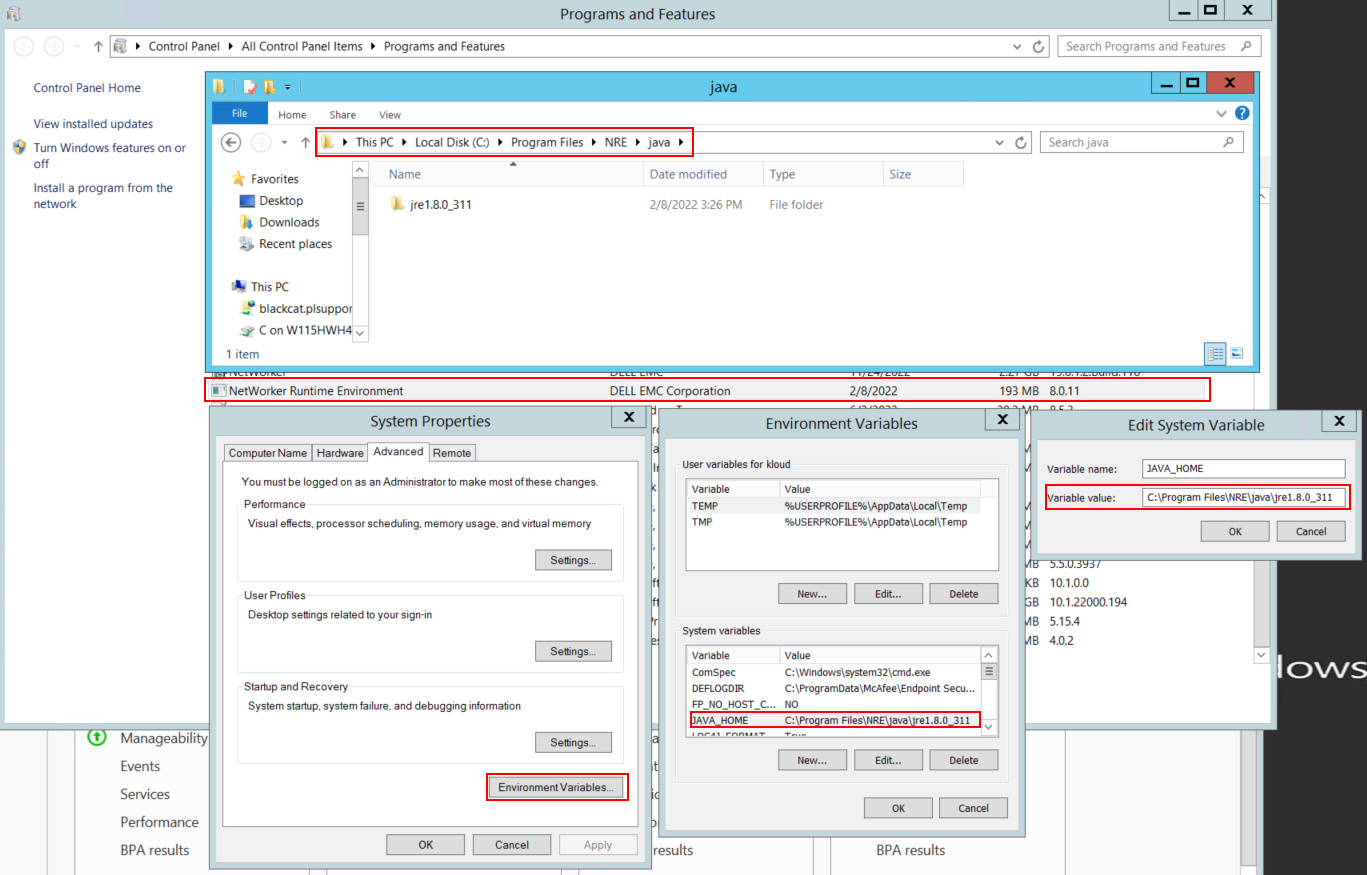
Figura 1: Verificare l'istanza Java utilizzata da NetWorker. La variabile può essere visualizzata come JAVA_HOME o NSR_JAVA_HOME.
- Disinstallare il pacchetto NetWorker. In questo modo non vengono rimossi i database o le risorse di configurazione di NetWorker.
- Reinstallare NetWorker sul percorso di installazione esistente. La reinstallazione di NetWorker riconfigura il servizio di autenticazione di NetWorker.
- Verificare che esista il seguente percorso:
C:\Program Files\EMC NetWorker\nsr\authc-server\tomcat\webapps\nwrestapi
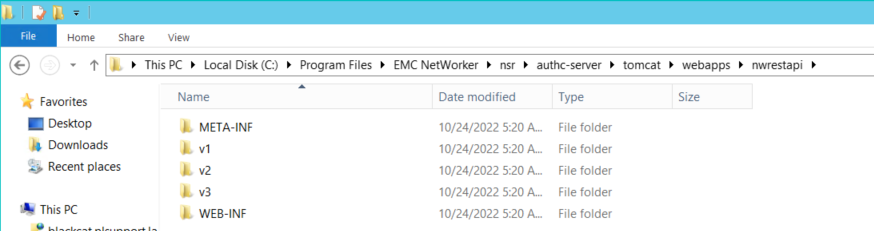
Figura 2: verificare che il nwrestapi Il percorso esiste.
- Se il
nwrestapiè stata creata la directory, eseguire query API REST.