NetWorker: How to Update the Index Path for Multiple Clients
Сводка: After changing the location of the index folder on the NetWorker server, use this article to update the index paths for all clients in one move. Examples shown in this article are on a Linux operating system; however, these steps can be used for Windows operating system as well. ...
Данная статья применяется к
Данная статья не применяется к
Эта статья не привязана к какому-либо конкретному продукту.
В этой статье указаны не все версии продуктов.
Инструкции
NOTE: The purpose of this article is to explain how to update multiple client's Index Path configurations at once. Use the below step only if all clients have indexes in the same folder (for example, /index).
- In the NetWorker Management Console, go to Protection > Clients > Add Column > More > Index path.

Figure 1: NMC client column options
- Click the Index path column for any individual client > press CTRL + A (to select all).

Figure 2: Click Index Path for any individual Client with CTRL+A to select all.
- Right-click the Index path column > select Edit Index path.

Figure 3: Click Edit Index path for Index path column.
- Enter the path's new folder as "/nsr/new_index_folder" (see below snip) > Click OK.

Figure 4: Enter the path's new folder as "/nsr/new_index_folder
- The following error may occur:

Figure 5: Error may occur: Encountered an error updating Client 2 out of 3. Remember to move or remove original Client indexes.
NOTE: This is a confirmation pop out. Press OK and then press OK again in the "Edit index path" window. Repeat this step until the "Edit index path" window closes.
- The index path is updated successfully:
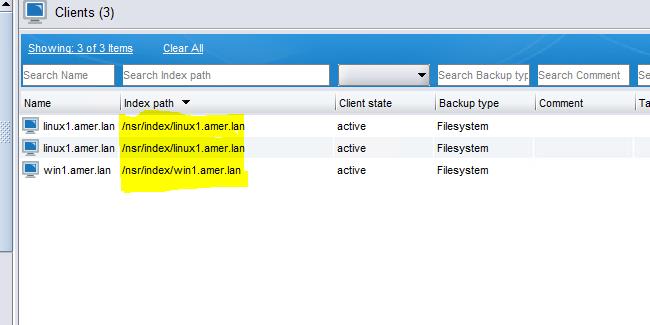
Figure 6: Screenshot of updated Index path
Дополнительная информация
Dell KB article 80544: NetWorker: How to Move a Client File Index to a New Location
Затронутые продукты
NetWorkerСвойства статьи
Номер статьи: 000217030
Тип статьи: How To
Последнее изменение: 29 Nov 2023
Версия: 4
Получите ответы на свои вопросы от других пользователей Dell
Услуги технической поддержки
Проверьте, распространяются ли на ваше устройство услуги технической поддержки.