NVP vProxy: VM Backups Fail With "VDDK Error: 13: You do not have access rights to this file unable to open virtual disk in hot add mode"
Сводка: NetWorker VMware Protection (NVP) Virtual Machine (VM) backups configured for hot add access only fail. A general Virtual Disk Development Kit (VDDK) error appears, suggesting that NetWorker does not have access rights to the VM files. ...
Симптомы
The NVP vProxy only supports Hot Add and Network Block Device (NBD) transport modes.
NVP vProxy VM backups are failing with the following error:
YYYY/MM/DD HH:MM:SS TRACE:  [@(#) Build number: ###] Opening source VMDK "[DATASTORE] VM_NAME/VM_NAME.vmdk" ...
YYYY/MM/DD HH:MM:SS INFO:   [@(#) Build number: ###] Calling VixDiskLib_Open("[DATASTORE] VM_NAME/VM_NAME.vmdk")...
YYYY/MM/DD HH:MM:SS ERROR:  [@(#) Build number: ###] VDDK Error: 13: You do not have access rights to this file.
YYYY/MM/DD HH:MM:SS ERROR:  [@(#) Build number: ###] Failed to open source VMDK "[DATASTORE] VM_NAME/VM_NAME.vmdk".
YYYY/MM/DD HH:MM:SS ERROR:  [@(#) Build number: ###] "Hard disk 1": BackupVmdk: "Hard disk 1": Unable to open Virtual Disk "[DATASTORE] VM_NAME/VM_NAME.vmdk" in "hotadd" mode.
YYYY/MM/DD HH:MM:SS ERROR:  [@(#) Build number: ###] "Hard disk 1": BackupVmdk: Failed backup.
YYYY/MM/DD HH:MM:SS ERROR:  [@(#) Build number: ###] Unable to backup virtual disk "Hard disk 1".
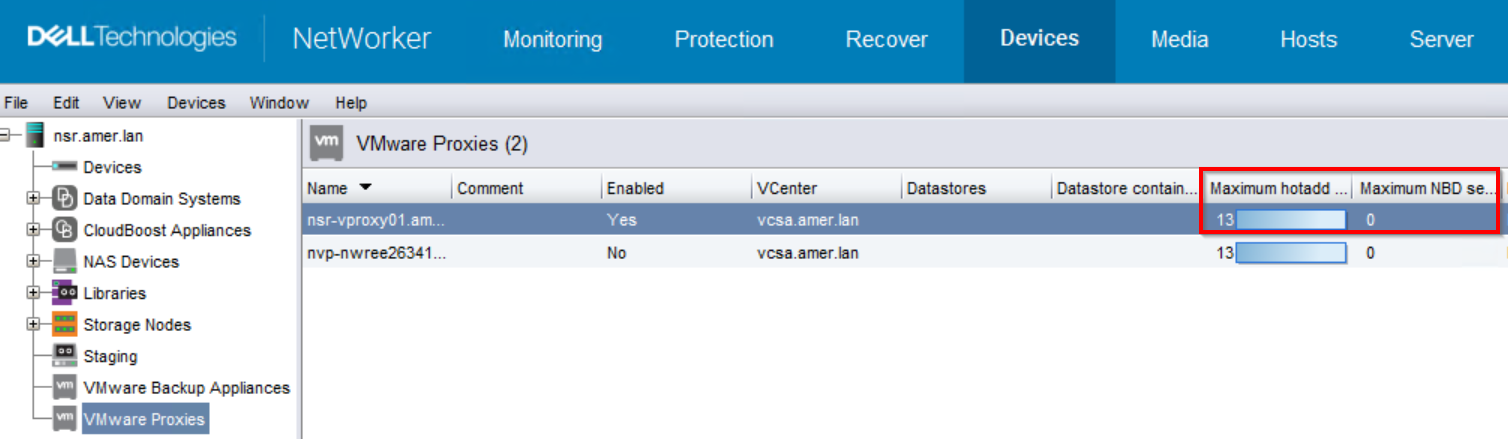
The vProxy is configured to support only hot add backups.
Причина
The VMs failing with this error reside on a VMware datastore that the vProxy's ESXi host does not have access to.
The default and preferred transport mode is hot add. In order to facilitate hot add backups, the vProxy VM must reside on an ESXi host that has direct VMware datastore access. If NBD sessions are enabled, the vProxy automatically falls back to NBD when hot add fails to access virtual machine files. NBD does not require direct datastore access. Instead, the vProxy uses the ESXi management network to access the VM files for backup. NBD is only recommended in scenarios where the VM or VMware environment does not support hot add.
Разрешение
Option One:
In vSphere, ensure that the vProxy's ESXi host has datastore access to the VMs in the backup workflow: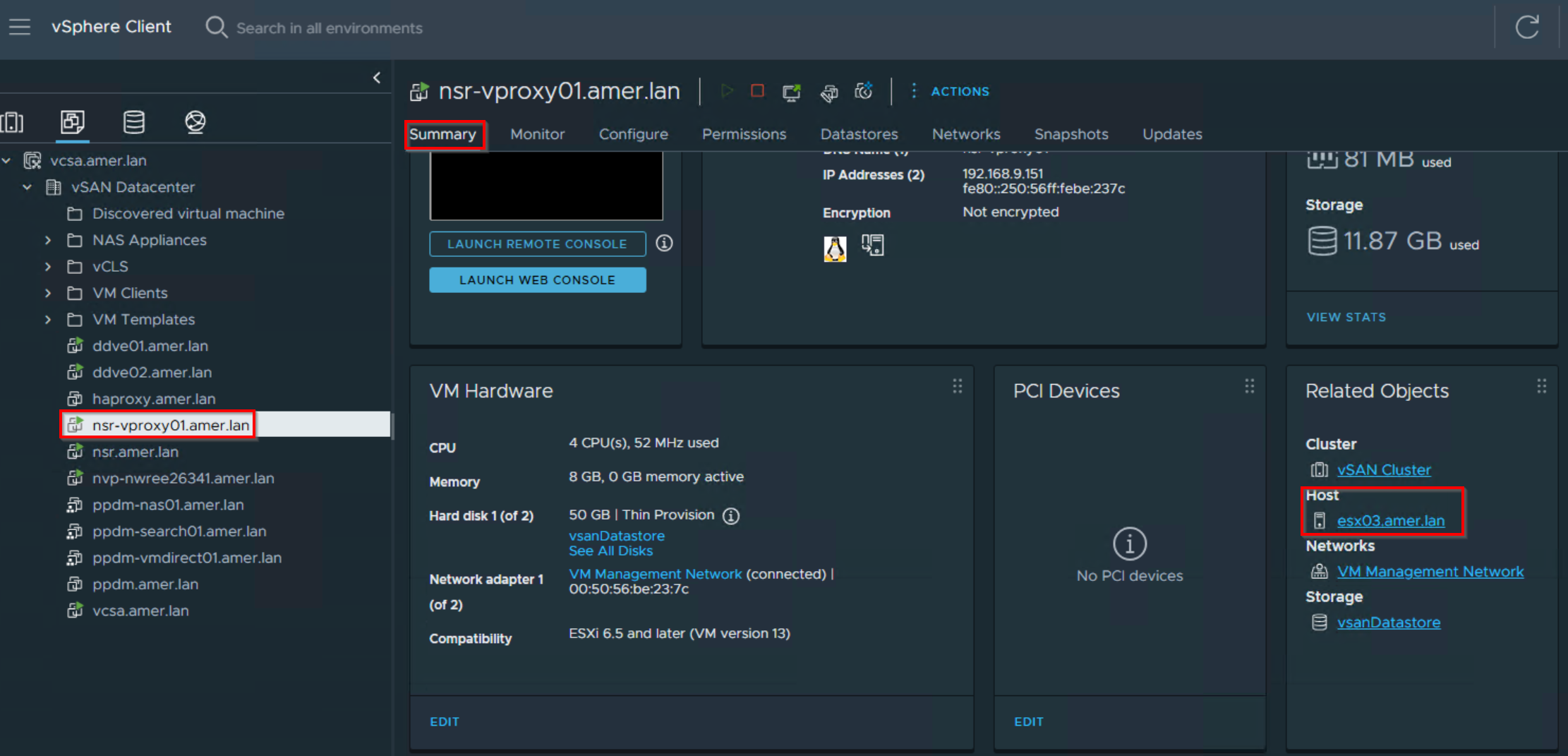

If the datastores where VMs are failing to backup are not listed, one of the following options must be performed.
-
- In VMware, grant the vProxy's ESXi host access to all the required datastores.
- Deploy a vProxy appliance on the ESXi hosts which have access to the required datastores. The new vProxy must be registered in NetWorker. The backup action must use Automatic vProxy selection.
Option Two:
If the ESXi host lacks datastore access, vProxies cannot be added, or hot add is not supported, enable Network Block Device sessions on the vProxies:

Дополнительная информация
VDDK Error 13 is a general access error, other potential causes can result in this error.
To diagnose the specific cause to the error, see: NVP vProxy: VM backups fail with "VDDK Error 13: You do not have access rights to this file" - Troubleshooting Guide