NMC: Installation Fails with Error "Unable to Verify Authentication Server's Hostname or Port"
Сводка: NetWorker Management Console (NMC) installation fails on a Windows host with error: "Unable to verify Authentication Server's hostname or port."
Данная статья применяется к
Данная статья не применяется к
Эта статья не привязана к какому-либо конкретному продукту.
В этой статье указаны не все версии продуктов.
Симптомы
- The NetWorker Management Console (NMC) installation fails on a Windows host with an Authentication failure message.
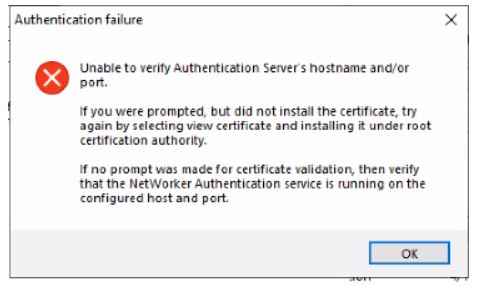
Figure 1: Authentication failure message appears during NMC installation on Windows.
- The NMC server is installed on a Windows host separate from the NetWorker server.
- The NetWorker authentication service is up and running.
- Port 9090 is open.
nsrports -t NetWorker_ServerName -p 9090
Причина
The NMC installation negotiates with the NetWorker authentication service over TLS earlier than version 1.2.
NOTE: See Additional Information section for instructions on validating TLS handshake between NetWorker server and NMC server.
Разрешение
Perform the following on the NetWorker server:
- Make a backup copy of:
C:\Program Files\EMC NetWorker\nsr\authc-server\tomcat\conf\server.xml.
- Edit the
server.xmlfile and look for the string.
NetWorker 19.12 (and Earlier) Example:
sslEnabledProtocols="TLSv1.2"
Networker 19.13 (and later) Example:
SSLHostConfig protocols="TLSv1.2"Change the value oof the protocols string to:
"TLSv1.2, TLSv1.1, TLSv1"
NOTE: These changes are temporary and are only being done to complete the NMC installation. They can be reverted once the NMC installation has been completed.
- Save the changes to the file.
- Restart the NetWorker service.
net stop nsrd
net start nsrd
- Install NetWorker and NMC on the NMC server. This time the prompt to install the certificate should appear.
NOTE: If you still do not see the option to install the certificate, the issue may be due to a mismatch between the Ciphers advertised by the Authc server OS and the ones used by your NetWorker version's Authc Ciphers. See: NetWorker: NMC server install fails on Windows Host "Unable to verify Authentication Server's Hostame and or Port". - Add the certificate to the Root Trusted certificate list.
- Click View Certificate.
- From the Certificate, click Install Certificate.
- Select Local Machine and click Next.
- Select Place all certificates in the following store, then click Browse.
- Select Trusted Root Certification Authorities, then click OK.
- On the Certificate Install Wizard, click Next.
- Click Finish.
- You should receive a pop-up stating "The import was successful," click OK.
- From the Certificate window, click OK.
- From the Security Alert window, click Yes.
- Continue until the installation completes.
After the installation finishes, revert to the original copy of server.xml. A NetWorker service restart is required for the changes to take effect.
Дополнительная информация
Related Article: NMC install fails on Windows Host "Unable to verify Authentication Server's Hostname and/or Port"
TLS validation:
The following can be run in a PowerShell prompt on the NMC server, replace the AUTHC_SERVERNAME with your AUTHC server address.
$server = "AUTHC_SERVERNAME"
$port   = 9090

$tcp = [System.Net.Sockets.TcpClient]::new()
$tcp.Connect($server, $port)
$ssl = [System.Net.Security.SslStream]::new(
    $tcp.GetStream(),
    $false,
    { param($sender,$cert,$chain,$errors) $true }
)

try {
    $ssl.AuthenticateAsClient($server)
    "=== Protocol ==="
    $ssl.SslProtocol
    "=== Cipher ==="
    "$($ssl.CipherAlgorithm) ($($ssl.CipherStrength)-bit)"
    "=== Certificate Chain (PEM) ==="
    # Build the chain from the remote leaf certificate
    $remoteCert = [System.Security.Cryptography.X509Certificates.X509Certificate2]::new($ssl.RemoteCertificate)
    $xchain = [System.Security.Cryptography.X509Certificates.X509Chain]::new()
    $null = $xchain.Build($remoteCert)
    $i = 0
    foreach ($elem in $xchain.ChainElements) {
        $i++
        $c = $elem.Certificate
        "----- Certificate $i -----"
        "Subject  : $($c.Subject)"
        "Issuer   : $($c.Issuer)"
        "NotBefore: $($c.NotBefore)"
        "NotAfter : $($c.NotAfter)"
        ""
    }
}
finally {
    $ssl.Dispose()
    $tcp.Dispose()
}
Example:
PS C:\Users\Administrator.NETWORKER> $server = "win-srvr02.networker.lan"
PS C:\Users\Administrator.NETWORKER> $port   = 9090
PS C:\Users\Administrator.NETWORKER>
PS C:\Users\Administrator.NETWORKER> $tcp = [System.Net.Sockets.TcpClient]::new()
PS C:\Users\Administrator.NETWORKER> $tcp.Connect($server, $port)
PS C:\Users\Administrator.NETWORKER> $ssl = [System.Net.Security.SslStream]::new(
>>     $tcp.GetStream(),
>>     $false,
>>     { param($sender,$cert,$chain,$errors) $true }
>> )
PS C:\Users\Administrator.NETWORKER>
PS C:\Users\Administrator.NETWORKER> try {
>>     $ssl.AuthenticateAsClient($server)
>>     "=== Protocol ==="
>>     $ssl.SslProtocol
>>     "=== Cipher ==="
>>     "$($ssl.CipherAlgorithm) ($($ssl.CipherStrength)-bit)"
>>     "=== Certificate Chain (PEM) ==="
>>     # Build the chain from the remote leaf certificate
>>     $remoteCert = [System.Security.Cryptography.X509Certificates.X509Certificate2]::new($ssl.RemoteCertificate)
>>     $xchain = [System.Security.Cryptography.X509Certificates.X509Chain]::new()
>>     $null = $xchain.Build($remoteCert)
>>     $i = 0
>>     foreach ($elem in $xchain.ChainElements) {
>>         $i++
>>         $c = $elem.Certificate
>>         "----- Certificate $i -----"
>>         "Subject  : $($c.Subject)"
>>         "Issuer   : $($c.Issuer)"
>>         "NotBefore: $($c.NotBefore)"
>>         "NotAfter : $($c.NotAfter)"
>>         ""
>>     }
>> }
>> finally {
>>     $ssl.Dispose()
>>     $tcp.Dispose()
>> }
=== Protocol ===
Tls12
=== Cipher ===
Aes256 (256-bit)
=== Certificate Chain (PEM) ===
----- Certificate 1 -----
Subject  : CN=WIN-SRVR02.networker.lan, OU=NetWorker, O=DELL, L=Round Rock, S=TX, C=US
Issuer   : CN=WIN-SRVR02.networker.lan, OU=NetWorker, O=DELL, L=Round Rock, S=TX, C=US
NotBefore: 12/12/2025 15:16:03
NotAfter : 12/06/2050 15:16:03
This output shows that the TLS protocol negotiated is TLSv1.2, and that the AUTHC server is using a valid self-signed certificate.
Затронутые продукты
NetWorker, NetWorker Management ConsoleПродукты
NetWorker FamilyСвойства статьи
Номер статьи: 000219009
Тип статьи: Solution
Последнее изменение: 16 Jul 2026
Версия: 6
Получите ответы на свои вопросы от других пользователей Dell
Услуги технической поддержки
Проверьте, распространяются ли на ваше устройство услуги технической поддержки.