Dell Optimizer Audio Panel Option Missing and Audio Jack Detection Issue after Windows 10 Installation
Сводка: This article discusses the audio panel option missing and audio jack detection issue in Dell Optimizer on Latitude 5320 and 5520 after Windows 10 installation with BIOS 1.17.2 to 1.19.1. ...
Данная статья применяется к
Данная статья не применяется к
Эта статья не привязана к какому-либо конкретному продукту.
В этой статье указаны не все версии продуктов.
Симптомы
Affected Products:
- Dell Optimizer
Affected Platforms:
- Latitude 5320
- Latitude 5520
Affected Operating Systems:
- Windows 10 21H2
Affected Versions:
- BIOS v1.17.2 to 1.19.1
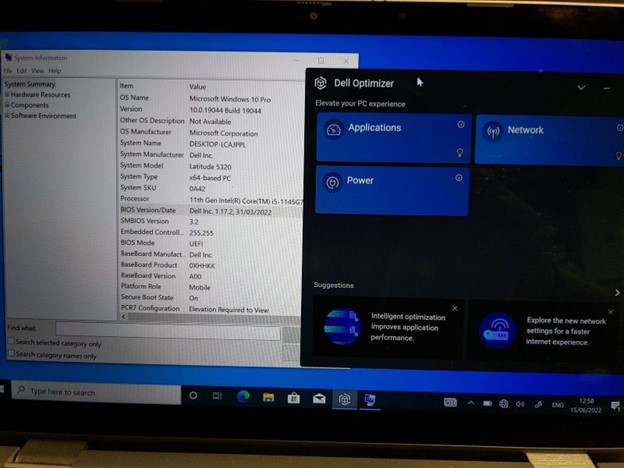
- When BIOS versions 1.17.2 to 1.19.1 are installed there appears to be an issue with detection of connected audio jack devices (headsets, headphones, speakers so on), which do not get detected at all, unless the audio device is connected on boot up (and then only until they are removed, not after replugging).
- When Dell Optimizer is installed, the Audio Panel and Option pane is missing,
- No Dell Optimizer audio settings and adjustments are available, severely limiting the functionality of the Latitude 5320.
- Dell Optimizer is required for full audio functionality, including microphone input using the audio jack.
Причина
Interplay of BIOS, Audio driver, and Windows installation is the cause of the issue.
Разрешение
The engineering department is provided on a fix to be released in BIOS version 1.20.0 and later. The updated BIOS is posted to the computer's support page.
Затронутые продукты
Dell Optimizer, Latitude 5320, Latitude 5520Свойства статьи
Номер статьи: 000200858
Тип статьи: Solution
Последнее изменение: 06 Jul 2026
Версия: 17
Получите ответы на свои вопросы от других пользователей Dell
Услуги технической поддержки
Проверьте, распространяются ли на ваше устройство услуги технической поддержки.