NVP vProxy: NetWorker VIB to Open NFS Ports For vProxy FLR
Сводка: NetWorker does not have a vSphere Installation Bundle (VIB) to open ports needed for FLR on the VMware ESXi hosts. Request For Enhancement (RFE) was opened for this.
Данная статья применяется к
Данная статья не применяется к
Эта статья не привязана к какому-либо конкретному продукту.
В этой статье указаны не все версии продуктов.
Симптомы
- NetWorker VMware Protection (NVP) vProxy File Level Restore (FLR) or Instant Access restore fails with an NFS-related error in the recover session log.
159373:nsrvproxy_flr: vProxy Log: YYYY/MM/DDTHH:MM:SSZ INFO: [@(#) Build number: 123] Unmounting after mount failure: Unable to create datastore 'EMC-FLR-vproxy_name-026473-1645810870' using 'DD_NAME:/data/col1/networker/FLR-vproxy_name-4bd57875-57f8-4dbf-a98a-b949ea2d5d30': ServerFaultCode: An error occurred during host configuration. Operation failed, diagnostics report: Mount failed: Unable to complete Sysinfo operation. Please see the VMkernel log file for more details.: Unable to connect to NFS server.
OR:
159373:nsrvproxy_flr: vProxy Log: YYYY/MM/DD HH:MM:SS INFO: [@(#) Build number: 66] Unmounting after mount failure: Unable to create datastore '[VPROXY_NAME]-1487848168' using '[DATA_DOMAIN]:/data/col1/coral/[VPROXY_NAME]-519f0a6a-348f-4950-bba7-5af3b1e4fca8': ServerFaultCode: An error occurred during host configuration.
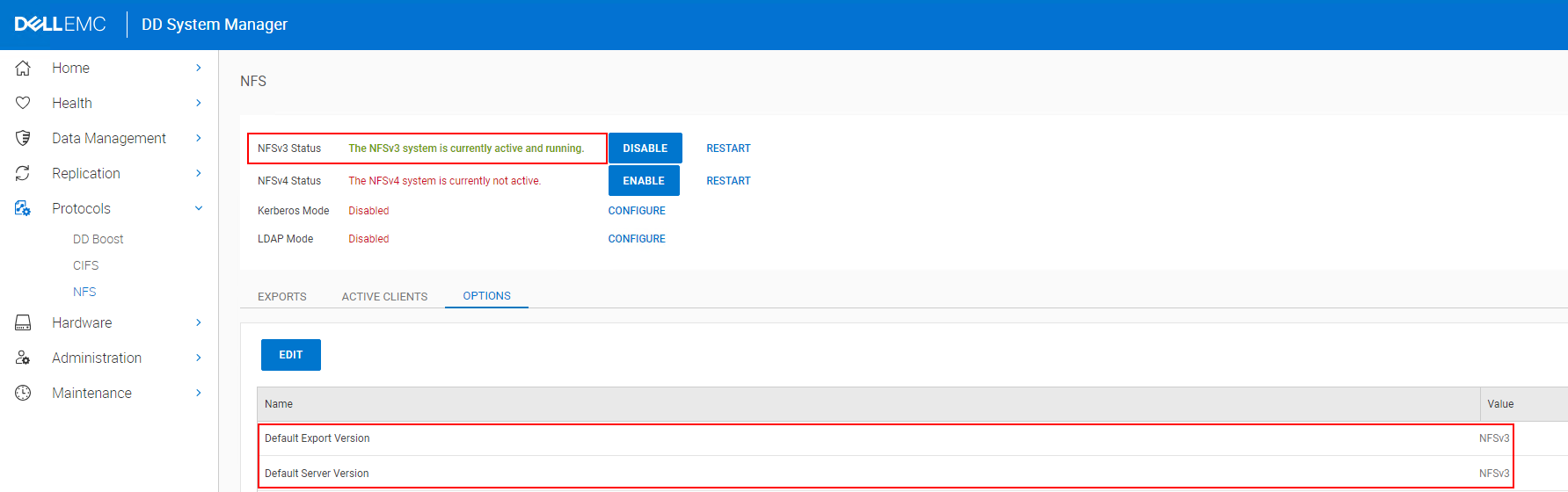
- NFSv3 is enabled on the Data Domain and is the default Network File System (NFS) protocol.
- The ESXi host the vProxy resides on is unable to reach NFS ports 2049, 2052 on the Data Domain host.
NVP vProxy: Troubleshooting Network Connectivity For Backup and Restore Operations
nc -zv DATA_DOMAIN_ADDRESS PORT
Причина
Ports 2049, 2052, and 111 are required between the ESXi hosts and Data Domain in order for vProxy FLR and Instant Access Restore to succeed.
The ESXi host security profile is blocking one or more of these ports, and it is not possible for the VMware administrator to open the ports.
The ESXi host security profile is blocking one or more of these ports, and it is not possible for the VMware administrator to open the ports.
Разрешение
Request For Enhancement (RFE) NW-I-2300 was filed to request a VIB that opens the ports required by vProxy FLR and Instant Access Restore on ESXi hosts. If you would like to track the RFE, contact your Dell Site Account Manager (SAM) or sales representative with RFE NW-I-2300.
Workaround:
To recover files, you must perform a disk restore (VMDK) and copy the files from the recovered disk to the system the disk was restored to. A VMDK restore reboots the target Virtual Machine (VM) during the restore. You can recover the disk to an alternate VM if it is the same OS type (that is: Linux or Windows).
Дополнительная информация
ESXi Firewall Configuration: https://docs.vmware.com/en/VMware-vSphere/7.0/com.vmware.vsphere.security.doc/GUID-8912DD42-C6EA-4299-9B10-5F3AEA52C605.html
Incoming and Outgoing Firewall Ports for ESXi Hosts https://docs.vmware.com/en/VMware-vSphere/7.0/com.vmware.vsphere.security.doc/GUID-171B99EA-15B3-4CC5-8B9A-577D8336FAA0.html
Incoming and Outgoing Firewall Ports for ESXi Hosts https://docs.vmware.com/en/VMware-vSphere/7.0/com.vmware.vsphere.security.doc/GUID-171B99EA-15B3-4CC5-8B9A-577D8336FAA0.html
Затронутые продукты
NetWorkerПродукты
NetWorker Family, NetWorker SeriesСвойства статьи
Номер статьи: 000225591
Тип статьи: Solution
Последнее изменение: 06 May 2025
Версия: 2
Получите ответы на свои вопросы от других пользователей Dell
Услуги технической поддержки
Проверьте, распространяются ли на ваше устройство услуги технической поддержки.