Using Command Line to Set Microphone Mute Unmutes the Dell P3424WEB Display Speaker
Сводка: Learn why using command line (CLI) to set microphone mute for the display unmutes the display speaker.
Данная статья применяется к
Данная статья не применяется к
Эта статья не привязана к какому-либо конкретному продукту.
В этой статье указаны не все версии продуктов.
Симптомы
The display speaker may be unmuted when using Dell Display and Peripheral Manager for macOS (DDPM Mac) command line to set the display microphone to mute. The issue occurs after running the /Microphone mute command line.
Before running the /Microphone mute command line, the On-Screen Display (OSD) for the P3424WEB shows below:
- Speaker: Mute
- Microphone: Unmute
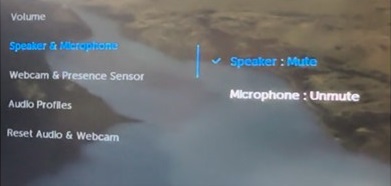
After running the /Microphone mute command line, the OSD for the P3424WEB shows below:
- Speaker: Unmute
- Microphone: Mute
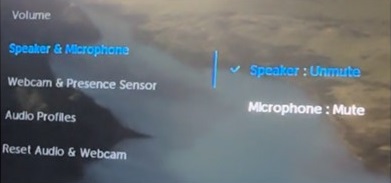
Affected Monitor:
- Dell P3424WEB
Affected Software:
- Dell Display and Peripheral Manager for macOS Version 1.3.2 and later
Причина
This issue is caused by the display firmware. The display firmware does not interact properly with the CLI settings configured through DDPM on macOS.
Разрешение
Always set the Microphone and Speaker mute/unmute status in pair.
- When setting the microphone mute and the speaker unmute:
- Set the microphone mute by DDPM CLI Command:
./DDPM /Microphone mute - Set the speaker unmute by DDPM CLI Command:
./DDPM /Speaker unmute
- Set the microphone mute by DDPM CLI Command:
- When setting the microphone mute and the speaker mute:
- Set the microphone mute by DDPM CLI Command:
./DDPM /Microphone mute - Set the speaker mute by DDPM CLI Command:
./DDPM /Speaker mute
- Set the microphone mute by DDPM CLI Command:
Затронутые продукты
Dell Display and Peripheral Manager, Dell P3424WEBСвойства статьи
Номер статьи: 000263750
Тип статьи: Solution
Последнее изменение: 24 Jul 2026
Версия: 7
Получите ответы на свои вопросы от других пользователей Dell
Услуги технической поддержки
Проверьте, распространяются ли на ваше устройство услуги технической поддержки.