Dell Command Update AMDX Template Upload Fails in Microsoft Intune
Сводка: This article provides information about failure occurring while uploading Dell Command | Update (DCU) .ADMX template to Microsoft Intune.
Данная статья применяется к
Данная статья не применяется к
Эта статья не привязана к какому-либо конкретному продукту.
В этой статье указаны не все версии продуктов.
Симптомы
Affected Products:
- Dell Command | Update
Status shows Upload failed when attempting to import the Dell Command | Update ADMX template to Microsoft Intune.
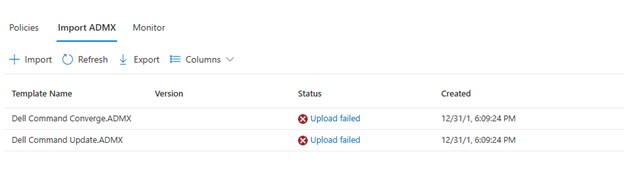
Clicking Upload failed, displays:
ADMX file: Dell Command Update.ADMX
State: failed
Last modified date: xx/xx/xxxx
Error Details: ADMX file referenced not found NamespaceMissing:Dell.Policies. Please upload it first.
Причина
The base Dell.ADMX and Dell.ADML template files must be uploaded first before any application specific AMDX can be uploaded.
Разрешение
The ADMX templates can be extracted from the Dell Command | Update installation package. Upload the Dell.ADMX and Dell.ADML files first. Then uploading the Dell Command Update.ADMX and Dell Command Update.ADML completes successfully.
Note: For more information about how to extract the templates from the installation package, reference How To Access .AMDX and .ADML Files for Use with Dell Command Update.
Затронутые продукты
Dell Command | UpdateСвойства статьи
Номер статьи: 000290019
Тип статьи: Solution
Последнее изменение: 15 Jul 2026
Версия: 5
Получите ответы на свои вопросы от других пользователей Dell
Услуги технической поддержки
Проверьте, распространяются ли на ваше устройство услуги технической поддержки.