Resolution for Common Issues in SupportAssist for Home PCs
Сводка: This article provides information about the resolution of common issues for SupportAssist for Home PCs.
Данная статья применяется к
Данная статья не применяется к
Эта статья не привязана к какому-либо конкретному продукту.
В этой статье указаны не все версии продуктов.
Симптомы
Причина
Not applicable
Разрешение
Fails to install or launch:
- Uninstall SupportAssist from Control Panel
- Go to the Search bar and type Control Panel
- Search and click Program and Features
- Right-click Dell SupportAssist for Home PCs and select Uninstall
- After uninstalling is completed, refresh to validate if uninstallation is successful
Note: If you get any error message or the service failing to start. Contact Dell Tech support team.
- Restart computer
- Go to Search and type Services
- Verify, the below services are not present
- Dell Data Vault Collector
- Dell Data Vault Processor
- Dell Data Vault Service API
- Dell SupportAssist
- Dell TechHub
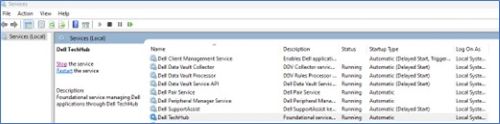
Restart computer and install the latest version of SupportAssist from Home PCs from the Dell website.
If you are still unable to install or encounter any failure. Contact Dell Tech support team.
Fails to update or driver scan fails:
- Verify if the services are disabled:
- Go to the Search bar and type Services
- Search and start the service below
- Dell Client Management Service
- Dell SupportAssist
- Right click above service and click Properties (a new window opens).
- Select Automatic (Delayed Start) from the startup type dropdown
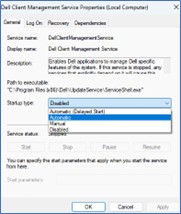
- Click Apply followed by Start button (you observe Service status: Running now)
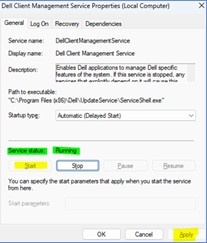 Note: If you get any error message or the service failing to start. Contact Dell Tech support team.
- If the service is not disabled and running, still update scan is not running or failing
- Go to Search and type Services
- Search and restart the services below
- Dell Client Management Service
- Dell SupportAssist
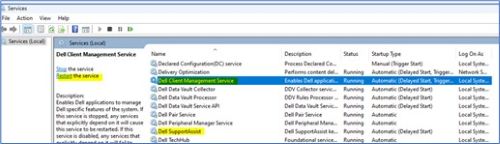
- Even after services restart, still update scan is not running or failing
- Stop both the services below:
- Dell Client Management Service
- Dell SupportAssist
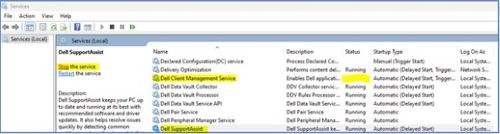
- Go to C:\ProgramData\Dell and remove the UpdateService folder
- Go to C:\Program Files (x86)\Dell and remove the UpdateService folder
- Go to Services and start both the services
- Dell Client Management Service
- Dell SupportAssist
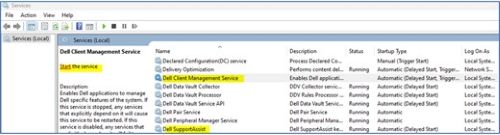 Note: If you get any error message or the service failing to start. Contact Dell Tech support team.
- Stop both the services below:
Hardware scan does not start or fails to complete
- If the service is not disabled and running, still hardware scan is not running or failing
- Go to Search and type Services
- Search and restart the below Service
- Dell TechHub
- Right click above service and click Properties (A new window opens).
- Select Automatic (Delayed Start) from the Startup type dropdown
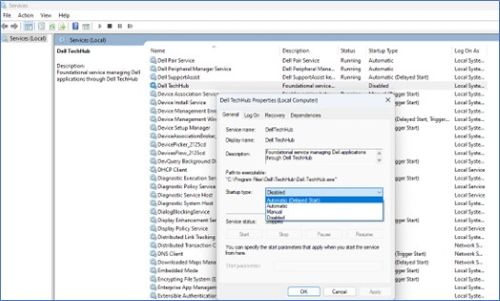 ;
; - Click Apply followed by Start button (you observe Service status: Running now)
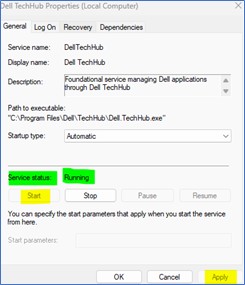 Note: If you get any error message or the service failing to start. Contact Dell Tech support team.
- If the service is not disabled and running, still hardware scan is not running or failing
- Go to Search and type Services
- Search and restart the below Service
- Dell TechHub

- Dell TechHub
- Even after services restart, still hardware scan is not running or failing
- Stop both of the below Services
- Dell TechHub
- Go to C:\Program Files\Dell and remove DTP folder
- Go to Services
- Start:
- Dell TechHub

- Dell TechHub
- Stop both of the below Services
Затронутые продукты
SupportAssist for Home PCsСвойства статьи
Номер статьи: 000317292
Тип статьи: Solution
Последнее изменение: 29 Jun 2026
Версия: 2
Получите ответы на свои вопросы от других пользователей Dell
Услуги технической поддержки
Проверьте, распространяются ли на ваше устройство услуги технической поддержки.