How to Install the Dell Device Management Agent on a Host Computer
Сводка: This article provides information about how to install the Dell Device Management Agent (DDMA) on to a host computer.
Данная статья применяется к
Данная статья не применяется к
Эта статья не привязана к какому-либо конкретному продукту.
В этой статье указаны не все версии продуктов.
Инструкции
Affected Products:
- Dell Device Management Console
Note: After successful installation of the DDMA, when launching the agent icon in the system tray should have all the access to the host computer information.
Example of a successful Dell Device Manager Agent UI installed.
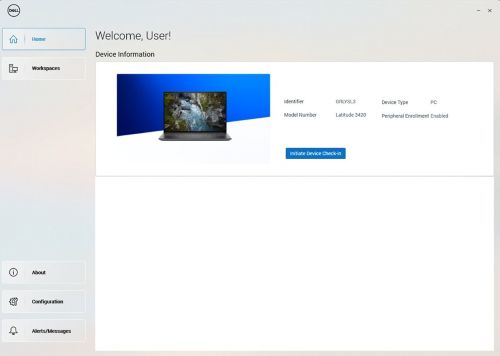
Steps to install DDMA:
- From the host computer, log in to the Dell Device Manager Console (DDMC).
https://device.manage.dell.com/ - From the DDMC go to the Deployment Tab and select Manage Available Software.
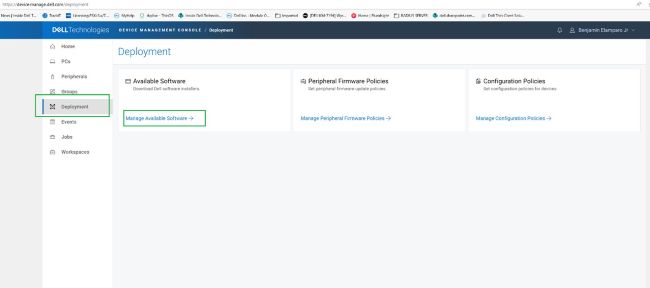
- Download the DDMA.
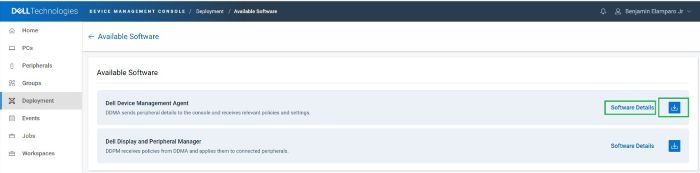
- Click Software Details and then copy the Group Token.
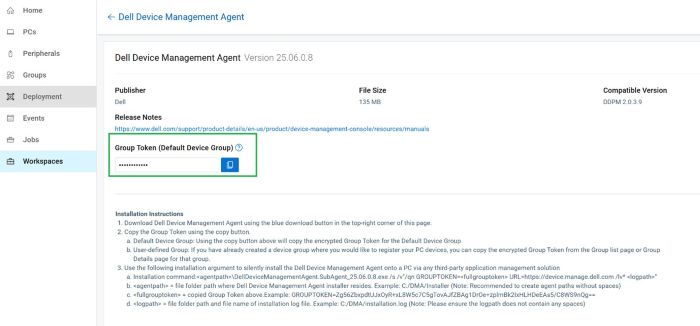
- Deploy the DDMA using the Group Token with the installation arguments for the server URL.
- Installation steps:
- Place the downloaded DDMA agent in the host at
C:\temp. - Open the command prompt with administrative privileges.
- From the command prompt, change the directory to
C:\temp. - Run the following command syntax, including the GROUPTOKEN:
DellDeviceManagementAgent.SubAgent_25.06.0.8.exe /s /v"/qn GROUPTOKEN=xxxxxxxx URL=https://device.manage.dell.com:443 /lv* c:\dma_installer.log"
Note: To ensure that the BIOS TPM is enabled.
- Place the downloaded DDMA agent in the host at
- Installation steps:
- Reboot the host computer and check the DMA agent in the system tray. It should appear as expected.
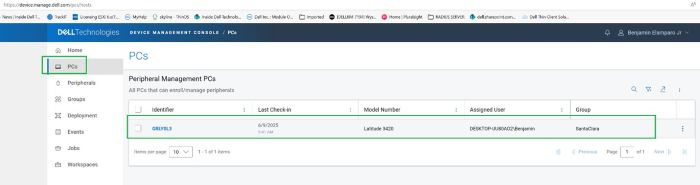
The host computer is now registered in the Dell Device Management Console.
Затронутые продукты
Dell Device Management Console | Peripheral Management, Dell Device Management ConsoleСвойства статьи
Номер статьи: 000348644
Тип статьи: How To
Последнее изменение: 30 Jun 2026
Версия: 4
Получите ответы на свои вопросы от других пользователей Dell
Услуги технической поддержки
Проверьте, распространяются ли на ваше устройство услуги технической поддержки.