SupportAssist for Home PCs Wireless Network Card Test Cannot Cancel With Alienware Computer
Сводка: Learn about why a wireless network card test in SupportAssist shows Completed even after clicking the Cancel button.
Симптомы
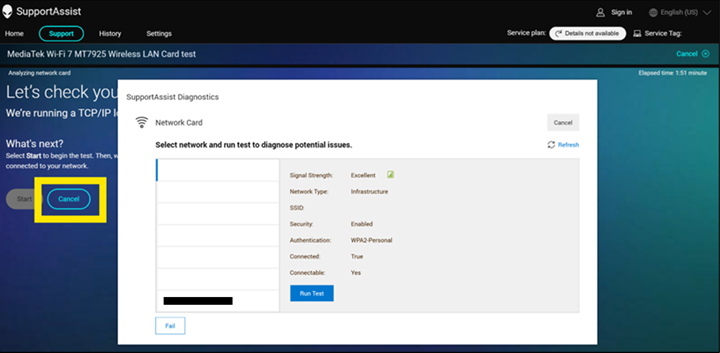
When an Alienware 15 DA15260 or Alienware 15 DA15265 is connected to a Wi-Fi network, tests in SupportAssist for Home PCs may appear to not cancel correctly. From the affected computer, open Dell SupportAssist version 5.0, go to the Support tab, then click the Get Started button under Test my hardware. Click Run Test on the right side of the wireless network card device, under Communication Devices. Click the Start button, then click the Cancel button.
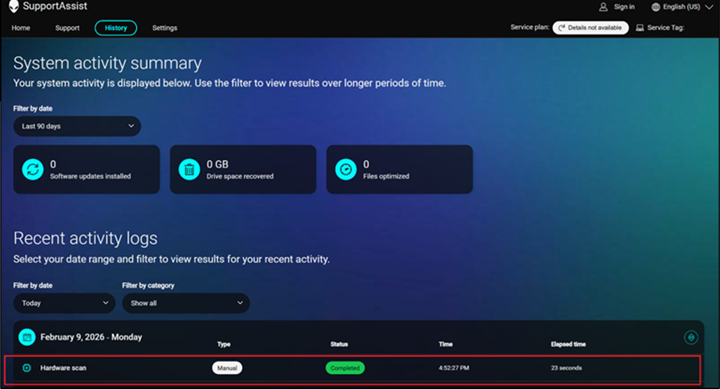
From the History page, the test shows Completed instead of Canceled.
Affected Platforms:
- Alienware 15 DA15260
- Alienware 15 DA15265
Affected Software:
- SupportAssist for Home PCs version 5.0
Причина
This happens because the network test has no user interaction. SupportAssist for Home PCs is only expected to show a network list.
Разрешение
- Back up all personal data. For more information, refer to Back Up and Recovery.
- Connect the AC adapter if updates are being run on a laptop.
- Ensure that power remains connected if updates are being run on a desktop.
Updating SupportAssist for Home PCs to version 5.1.1 or later on the computer resolves the issue. To download and install SupportAssist for Home PCs, refer to SupportAssist for Home PCs.