Falta la carpeta geodrive de ECS
Сводка: Falta la carpeta GeoDrive de ECS en la unidad local.
Данная статья применяется к
Данная статья не применяется к
Эта статья не привязана к какому-либо конкретному продукту.
В этой статье указаны не все версии продуктов.
Симптомы
El usuario verá la carpeta de GeoDrive o una subcarpeta que falta en su unidad local en el host.
La carpeta tendrá los datos, pero será invisible/oculta.
- Por ejemplo, falta una carpeta "folder1" en GeoDrive.

- Intente crear una nueva carpeta con el mismo nombre y, a continuación, recibirá el indicador de que la carpeta realmente existe.
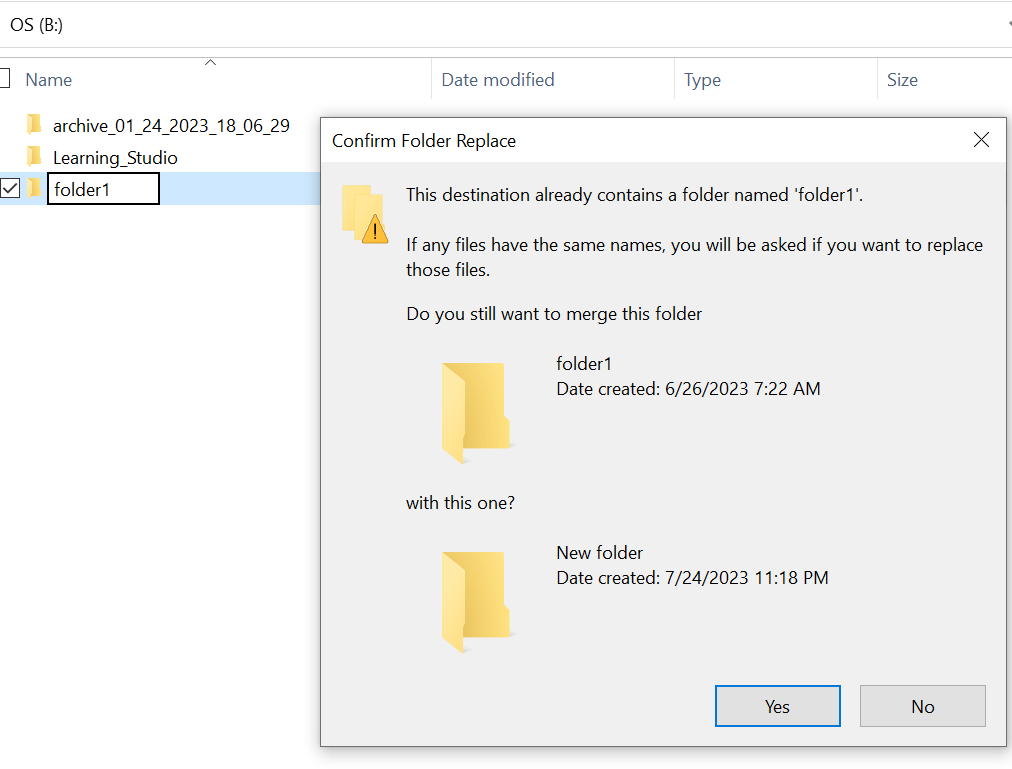
- Busque con la ruta de la carpeta faltante en el explorador. Deberíamos poder ver el contenido.

Причина
Esto se debe a los atributos HIDDEN y SYSTEM que se configuraron en la carpeta.
Разрешение
Siga los pasos que se indican a continuación.
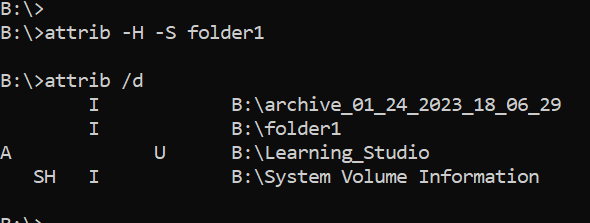
Después de ejecutar este comando, vuelva a comprobar la unidad local. La carpeta faltante volverá a la normalidad.
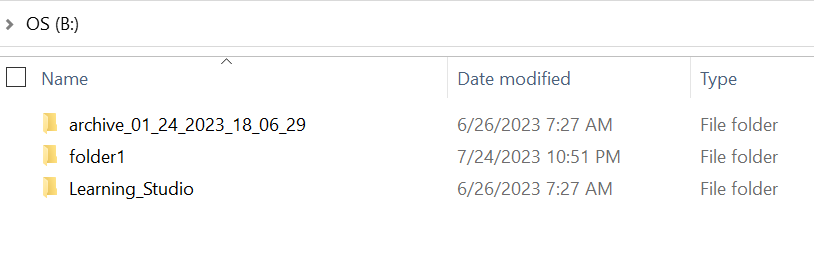
- Vaya al símbolo del sistema de Windows en el sistema host.
- cd al directorio primario donde falta la carpeta y ejecute "attrib /d".
- Debería ver una lista de directorios y la carpeta faltante debe estar en la lista.
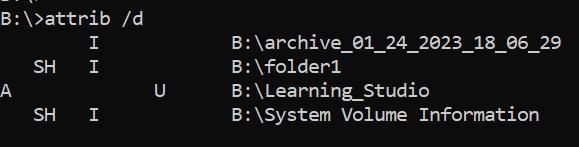
- Las letras antes de ella indican los atributos. Debería ver SH antes del archivo (SYSTEM y HIDDEN).
- A continuación, ejecute este comando para eliminar los dos atributos anteriores: attrib -H -S folder_name
Дополнительная информация
Hay muchas otras opciones disponibles para el comando attrib.
B:\>attrib /?
Displays or changes file attributes.

ATTRIB [+R | -R] [+A | -A] [+S | -S] [+H | -H] [+O | -O] [+I | -I] [+X | -X] [+P | -P] [+U | -U]
       [drive:][path][filename] [/S [/D]] [/L]

  +   Sets an attribute.
  -   Clears an attribute.
  R   Read-only file attribute.
  A   Archive file attribute.
  S   System file attribute.
  H   Hidden file attribute.
  O   Offline attribute.
  I   Not content indexed file attribute.
  X   No scrub file attribute.
  V   Integrity attribute.
  P   Pinned attribute.
  U   Unpinned attribute.
  B   SMR Blob attribute.
  [drive:][path][filename]
      Specifies a file or files for attrib to process.
  /S  Processes matching files in the current folder
      and all subfolders.
  /D  Processes folders as well.
  /L  Work on the attributes of the Symbolic Link versus
      the target of the Symbolic Link
Затронутые продукты
ECS, Elastic Cloud StorageСвойства статьи
Номер статьи: 000215245
Тип статьи: Solution
Последнее изменение: 18 May 2026
Версия: 4
Получите ответы на свои вопросы от других пользователей Dell
Услуги технической поддержки
Проверьте, распространяются ли на ваше устройство услуги технической поддержки.