How to subscribe to Dell Technical Advisories (DTAs) and Dell Security Advisories (DSAs)
Zhrnutie: How to subscribe or unsubscribe from Dell DTA's or DSA's.
Tento článok sa vzťahuje na
Tento článok sa nevzťahuje na
Tento článok nie je viazaný na žiadny konkrétny produkt.
V tomto článku nie sú uvedené všetky verzie produktov.
Pokyny
Dell Technologies issues advisories for Dell products in order to notify you about critical issues and potential impacts on their environment. Set up automated email notifications whenever a Dell security or technical advisory is issued or only when an advisory is issued for a specific product.
For steps to remediate an advisory, see Managing security and technical advisories within MyService360. A login is required for MyService360.
1. Log in to https://www.dell.com/support.
2. On the top-right corner, hover over and click Dell Preferences. The Account Settings & Preferences page is displayed.
3. Click the NOTIFICATIONS & ALERTS tab and click the Product Advisories tab.
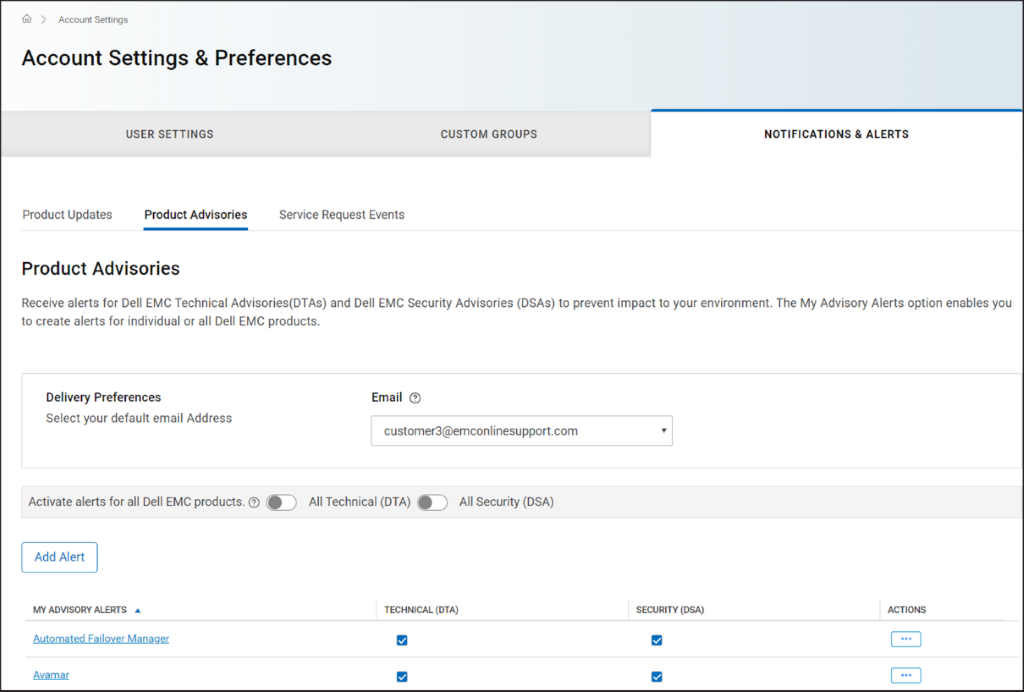
Figure 1 Product Advisories tab
4. In the Delivery Preferences pane, select the email address at which you want to receive the notifications.
5. To receive email notifications whenever an advisory is issued, perform the following:
NOTE: By default, email notifications are sent for both technical and security advisories. Depending on your requirement, you can clear the checkboxes in the TECHNICAL (DTA) or SECURITY (DSA) columns.
For steps to remediate an advisory, see Managing security and technical advisories within MyService360. A login is required for MyService360.
1. Log in to https://www.dell.com/support.
2. On the top-right corner, hover over
and click Dell Preferences. The Account Settings & Preferences page is displayed.
3. Click the NOTIFICATIONS & ALERTS tab and click the Product Advisories tab.
Figure 1 Product Advisories tab
4. In the Delivery Preferences pane, select the email address at which you want to receive the notifications.
5. To receive email notifications whenever an advisory is issued, perform the following:
- For technical advisories, turn on the All Technical (DTA) toggle switch.
- For security advisories, turn on the All Security (DSA) toggle switch.
- Click Add Alert.
- Enter a product name and click Add Product.
- The alert is created and displayed on the Product Advisories page.
Vlastnosti článku
Číslo článku: 000113250
Typ článku: How To
Dátum poslednej úpravy: 18 apr 2026
Verzia: 8
Nájdite odpovede na svoje otázky od ostatných používateľov spoločnosti Dell
Služby podpory
Skontrolujte, či sa na vaše zariadenie vzťahujú služby podpory.