How to Grant Full Disk Access for the CrowdStrike Falcon Sensor
Zhrnutie: Learn step-by-step instructions to grant full disk access for the CrowdStrike Falcon Sensor.
Tento článok sa vzťahuje na
Tento článok sa nevzťahuje na
Tento článok nie je viazaný na žiadny konkrétny produkt.
V tomto článku nie sú uvedené všetky verzie produktov.
Pokyny
Full Disk Access is required to protect all data on macOS Mojave (10.14.5) and later. This article describes how to enable full disk access for the CrowdStrike Falcon Sensor.
Affected Products:
- CrowdStrike Falcon Sensor
Affected Operating Systems:
- macOS Mojave (10.14.5) and Later
On September 24, 2018, Apple released macOS Mojave (10.14). This operating system update includes a new security feature that is called Full Disk Access. Full Disk Access blocks third-party applications from accessing certain file paths and may prevent the CrowdStrike Falcon Sensor from fully protecting a device.
Note: Dell Technologies recommends using CrowdStrike Falcon Sensor v5.22.10306 or later. For more information, reference How to Download the CrowdStrike Falcon Sensor.
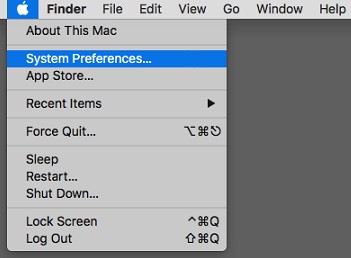
- On the desktop menu bar, click the Apple icon and then select System Preferences.
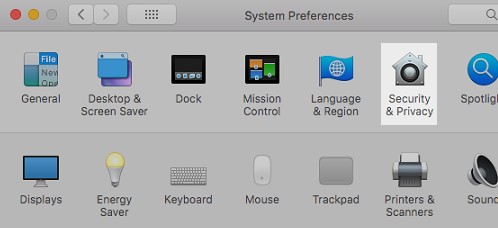
- In the System Preferences menu, double-click Security & Privacy.
- On the Privacy tab, select Full Disk Access.
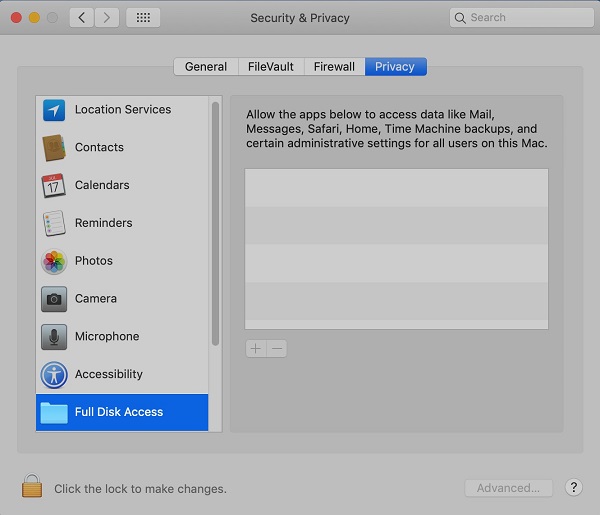
- If needed, click the padlock icon and provide credentials for a local administrator account (not an Apple ID) to allow changes.

- Click the + button to the right of the highlighted Full Disk Access.

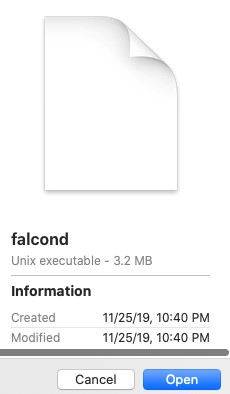
- Press CMD + SHIFT + G, type
/Library/CS/falcond, and then click Go. - Select
falcondand then click Open.
- Exit the Security & Privacy preferences.
To contact support, reference Dell Data Security International Support Phone Numbers.
Go to TechDirect to generate a technical support request online.
For additional insights and resources, join the Dell Security Community Forum.
Dotknuté produkty
CrowdStrikeVlastnosti článku
Číslo článku: 000125501
Typ článku: How To
Dátum poslednej úpravy: 19 apr 2026
Verzia: 12
Nájdite odpovede na svoje otázky od ostatných používateľov spoločnosti Dell
Služby podpory
Skontrolujte, či sa na vaše zariadenie vzťahujú služby podpory.