How to Identify the CrowdStrike Falcon Sensor Version
Zhrnutie: Learn to identify the CrowdStrike Falcon Sensor version for issues, process changes, or system requirements. Follow the steps for Windows, Mac, or Linux.
Tento článok sa vzťahuje na
Tento článok sa nevzťahuje na
Tento článok nie je viazaný na žiadny konkrétny produkt.
V tomto článku nie sú uvedené všetky verzie produktov.
Pokyny
Knowing the CrowdStrike Falcon Sensor version allows you to:
- Identify known issues
- Understand process changes
- Understand system requirements
Affected Products:
- CrowdStrike Falcon Sensor
Affected Operating Systems:
- Windows
- Mac
- Linux
For instructions about how to identify the CrowdStrike Falcon Sensor version, click on Windows, Mac, or Linux.
Note:
- The CrowdStrike Falcon Sensor must be installed before identifying the version. For information about the installation process, reference How to Install CrowdStrike Falcon Sensor.
- For more information about checking the CrowdStrike Falcon Sensor, reference https://supportportal.crowdstrike.com/s/article/Checking-Falcon-Sensor-Version-Locally
.
Windows
- Right-click the Windows start menu, and then click Run.

- In the Run UI, type the following command and then press OK.
cmd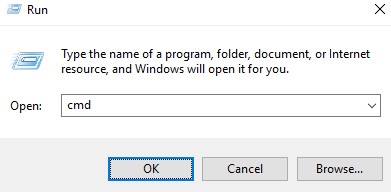
- In Command Prompt, type the following command and then press Enter.
"C:\Program Files\CrowdStrike\CSSensorSettings.exe" –version
- Record the version. In the example, 7.04.17605.0 is the version.
 Note: The version of your sensor may differ from the above screenshot.
Mac
- Locate and then double-click Terminal.

- In Terminal, type the following command and then press Enter.
sysctl cs.version
- Record the version. In the example, the version is 4.18.8013.0.
 Note: The version of your sensor may differ from the above screenshot.
Linux
- On the targeted endpoint, open Terminal.

- In Terminal, type the following command and then press Enter.
sudo /opt/CrowdStrike/falconctl -g --version
- Populate the sudo account password and then press Enter.
- Record the version. In the example, 4.20.6602.0 is the version.
 Note: The version of your sensor may differ from the above screenshot.
Dotknuté produkty
CrowdStrikeVlastnosti článku
Číslo článku: 000126120
Typ článku: How To
Dátum poslednej úpravy: 27 júl 2026
Verzia: 23
Nájdite odpovede na svoje otázky od ostatných používateľov spoločnosti Dell
Služby podpory
Skontrolujte, či sa na vaše zariadenie vzťahujú služby podpory.