How to Obtain the MSI Installer Package for Dell Command Update
Zhrnutie: Learn more about retrieving the MSI installer package from the Dell Command | Update (DCU) executable.
Tento článok sa vzťahuje na
Tento článok sa nevzťahuje na
Tento článok nie je viazaný na žiadny konkrétny produkt.
V tomto článku nie sú uvedené všetky verzie produktov.
Pokyny
MSI Installer Package
The following steps can be used to get the MSI installer package:
-
Go to Dell Command | Update product page.
-
Download the latest version available.
Note: The links in this table automatically identify the computer. If this is not the preferred choice, go to the installation section to install the preferred choice.DCU 5.7 for Computers with Intel or AMD Processors (Released April 2026) DCU 5.6 for Computers with ARM Processors (Released November 2025) -
Right-click the Windows start menu icon and select Run.
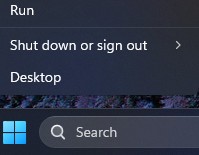
-
In the Run Box, type
CMDand press Ctrl + Shift + Enter keys simultaneously to run an elevated command prompt.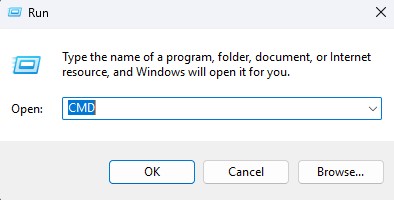
-
If prompted for the User Account Control (UAC), click Yes to proceed.
-
Browse to the folder location of the downloaded executable.
-
Type the following command, then press the Enter key:
Note: Switches are case-sensitive.Dell-Command-Update-Application_[VERSION].exe /passthrough /X /B”[EXTRACTION PATH]” Example: C:\Dell>Dell-Command-Update-Application_5CR1Y_WIN64_5.6.0_A00.exe /passthrough /X /B”C:\Dell\DCU_Extracted”
-
Click No if prompted to uninstall.
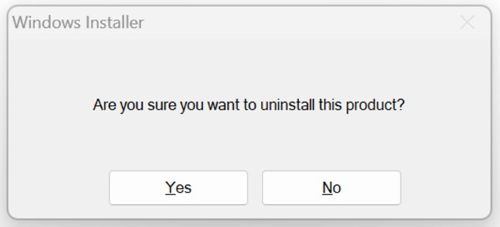
-
In Windows Explorer, go to the
[EXTRACTION PATH], and locate the MSI Installer Package.
Dotknuté produkty
Dell Command | UpdateVlastnosti článku
Číslo článku: 000177292
Typ článku: How To
Dátum poslednej úpravy: 08 máj 2026
Verzia: 17
Nájdite odpovede na svoje otázky od ostatných používateľov spoločnosti Dell
Služby podpory
Skontrolujte, či sa na vaše zariadenie vzťahujú služby podpory.