Computers Playing HDCP Movies Display Cyberlink PowerDVD Error Code 0012 or 0103
Zhrnutie: The following article supplies information about Cyberlink PowerDVD errors when playing HDCP movies on an external monitor through DisplayPort on a Dell docking station.
Symptómy
CyberLink PowerDVD displays 0012 and 0103 errors when playing HDCP movies
If your laptop is using an AMD graphics driver, then playing High-Bandwidth Digital Content Protection (HDCP) movies may generate an error such as 0012 (See Figure.1) or 0103. (See Figure.2) These can be seen when you are watching the movie on an external monitor, through a docking station using DisplayPort (DP).
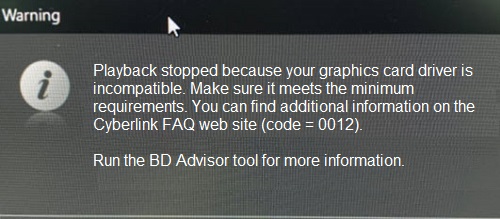
(Figure.1 CyberLink PowerDVD Warning Error 0012)
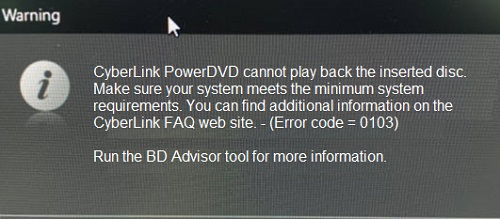
(Figure.2 CyberLink PowerDVD Warning Error 0103)
Príčina
HDCP is a form of digital copy protection. The purpose of HDCP is to protect digitally copyrighted content as it travels from a device to your screen.
This is the expected behavior. AMD graphics drivers do NOT support HDCP output by DP. As a result, the computer follows the Microsoft Output Protection Manager architecture.
Riešenie
You should use a different video output on your Dell docking station to avoid this. You can use either the High-Definition Multimedia Interface (HDMI) port or the Universal Serial Bus (USB) Type-C port depending on what is on the back of your dock. (See Figure.3)
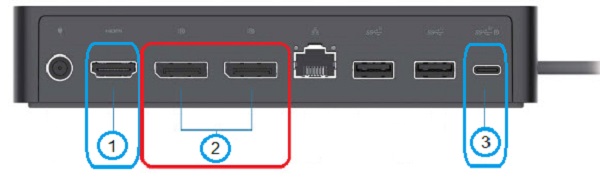
(Figure.3 For Example, The rear ports of the Dell universal dock UD22)
| 1 |  |
HDMI | 2 |  |
DisplayPort x 2 |
| 3 |  |
USB Type-C |