Data Domain: Alert: ENVIRONMENT-00029: TPM I/O Module Has Failed
Zhrnutie: How to diagnose a failed or absent Trust Platform Module (TPM) on a Data Domain system.
Tento článok sa vzťahuje na
Tento článok sa nevzťahuje na
Tento článok nie je viazaný na žiadny konkrétny produkt.
V tomto článku nie sú uvedené všetky verzie produktov.
Pokyny
Background:
- The TPM is a single removable 'Chip' in a dedicated slot on the Motherboard of a Data Domain System.
- The TPM has a range of functions around supporting secure boot, security, and encryption.
- The TPM Chip is logically BOUND to ONE motherboard, for example it cannot be reused on another system.
- The TPM can be replaced if it is found to be defective.
- If a motherboard is faulty and must be replaced, a new TPM is required to bind to the new motherboard.
Location of the TPM:
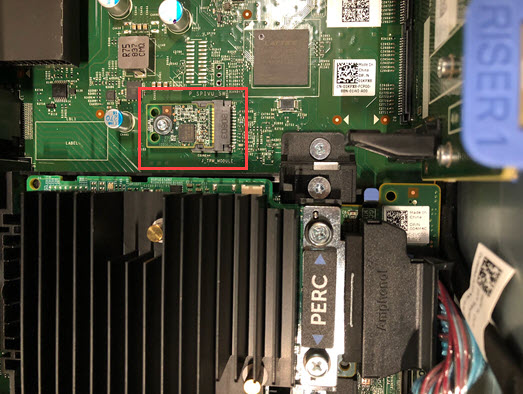
Figure 1: Screenshot of TPM location
Applies to:
- All Data Domain systems based on the PowerEdge platforms such as DD6900, DD9400, DD9900, and newer models
Symptoms:
- The Data Domain system reports an Alert with Event ID: EVT-ENVIRONMENT-00029
- The 'Object' identified is 'Enclosure=1:Slot=TPM'
Description: DD Alert DDhostname.companyx.com: CRITICAL: IOModuleFault: HardwareFailure

Event Id: EVT-ENVIRONMENT-00029
Event Message: I/O module has failed
Object: Enclosure=1:Slot=TPM
Additional Information: Cause=AbsentTPMonNonEDPSystem

Event Description:
A fault has been detected with an I/O module and it will not function correctly.

Recommended Action:
The I/O module must be replaced.
Troubleshooting:
-
Confirm the failure by checking active alerts on the Data Domain (using CLI or UI):
alerts show current
- Sometimes the alert is transient and is automatically cleared
- If the alert is cleared automatically, complete step 2 and if OK, then no further action is required.
-
Check the 'GENERAL INFO' section of a fresh show current Auto-Support | OR | DD-CLI:
system show all
- If there is an entry
TPM_DEVICE= Nuvoton chip for Rest of World, the TPM is GOOD - If the entry
TPM_DEVICE=is blank or missing, then the TPM is faulty or missing
- If there is an entry
-
Restore communication to the TPM by performing a 'BMC Reset' (aka: Flea Drain)
- Power-down the Data Domain unit gracefully. From the CLI, issue command:
system poweroff
- Remove AC power cables.
- Press and hold the Power Button for 10 seconds.
- Wait five minutes; if possible, take this opportunity to reseat the TPM by following steps available in the relevant 'Field Replacement Unit and Customer Replacement Unit Guide'
- Add AC power back to the unit and power on the unit.
- Once booted, check if the alert has cleared.
- If the TPM issues persist, then it must be replaced.
- A new TPM must be bound to the existing motherboard.
- The new TPM must be 'ENABLED' in the BIOS.
- Follow the TPM Replacement steps in the relevant 'PowerProtect and Data Domain Hardware Documentation Guide'
- Select affected Data Domain Model > Maintenance > Field Replacement Unit and Customer Replacement Unit Guide > Replace the Trusted Platform Module (TPM)
- A new TPM must be bound to the existing motherboard.
- Power-down the Data Domain unit gracefully. From the CLI, issue command:
Ďalšie informácie
DD6400, DD6900, DD9400, DD9900:
- TPM Replacement Part #: FMYG3
DD9910, DD9410:
- TPM Replacement Part #: T2FR2
Dotknuté produkty
Data DomainProdukty
Data Domain, DD6400 Appliance, DD6900 Appliance, DD9400 Appliance, DD9410 Appliance, DD9900 Appliance, DD9910 ApplianceVlastnosti článku
Číslo článku: 000217635
Typ článku: How To
Dátum poslednej úpravy: 19 máj 2026
Verzia: 7
Nájdite odpovede na svoje otázky od ostatných používateľov spoločnosti Dell
Služby podpory
Skontrolujte, či sa na vaše zariadenie vzťahujú služby podpory.