PowerProtect: SQL TLR Mount fail with Saveset is not GLR Capable
Zhrnutie: PPDM SQL :MS SQL TLR ( Table level Restore ) Fails to mount the database backup with Saveset is not GLR Capable This happens when backups are configured to run using T-SQL Script .
Tento článok sa vzťahuje na
Tento článok sa nevzťahuje na
Tento článok nie je viazaný na žiadny konkrétny produkt.
V tomto článku nie sú uvedené všetky verzie produktov.
Symptómy
Starting Table Level Restore will first mount the database backup form the Data Domain then launch Itempoint
Mounting the files fail with error :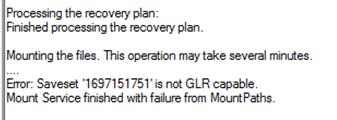
Mounting the files fail with error :
Error: Saveset '1697484639' is not GLR capable.
Mount Service finished with failure from MountPaths.
Príčina
During backup the GLR offset was not set on the saveset because access denied to the MSAPPAGENT folder for the user running the T-SQL Script.
Reviewing backup logs to verify if GLR offset was set during backup , you will see the following entries in backup logs
Reviewing backup logs to verify if GLR offset was set during backup , you will see the following entries in backup logs
 ddbmsqlsv PowerProtect Data Manager notice Failed to create GLR offset map file C:\Program Files\DPSAPPS\MSAPPAGENT\tmp\1697123111_97f6f441_om.bin.
ddbmsqlsv PowerProtect Data Manager severe Failed to create offset map file C:\Program Files\DPSAPPS\MSAPPAGENT\tmp\1697123111_97f6f441_om.bin.
Despite backup completed successfully , but the user was unable to access the directory to create the offset map file .
Riešenie
Resolution:
The user running backup using T-SQL Scripts must have read/write access permissions to the MSAPPAGENT folder
This is Also documented in the Guide starting 19.13 release
The user running backup using T-SQL Scripts must have read/write access permissions to the MSAPPAGENT folder
This is Also documented in the Guide starting 19.13 release
Required privileges for T-SQL backups
To enable the Application Direct backups using Transact-SQL (T-SQL) scripts with the Microsoft application agent, specific access permissions are required.
The SQL Agent Service login user must have read and write access permissions in the Microsoft application agent installation directory, which is C:\Program Files\DPSAPPS\MSAPPAGENT by default.
Dotknuté produkty
PowerProtect App DirectVlastnosti článku
Číslo článku: 000219290
Typ článku: Solution
Dátum poslednej úpravy: 22 jan 2026
Verzia: 3
Nájdite odpovede na svoje otázky od ostatných používateľov spoločnosti Dell
Služby podpory
Skontrolujte, či sa na vaše zariadenie vzťahujú služby podpory.