Data Protection Advisor (DPA): Error message ‘Error 401: Unauthorized Action’ appears in Gui
Summary: Error message ‘Error 401: Unauthorized Action’ appears in Gui
Bu makale şunlar için geçerlidir:
Bu makale şunlar için geçerli değildir:
Bu makale, belirli bir ürüne bağlı değildir.
Bu makalede tüm ürün sürümleri tanımlanmamıştır.
Symptoms
User sees an error message on the DPA GUI and has to log back in again:
Error 401: Unauthorized Action
Cause
This error happens when a user is logged into the DPA GUI for hours at a time and the open session is being closed due to inactivity or some other environment factor closes the session.
Resolution
The error can be ignored as it has no impact on DPA functionality.
User can log in to DPA again and continue as normal.
The following setting can be configured on the GUI to force a clean logoff after a specific period:
Administration > User & Security > Security Settings.
The Session Expiration parameter can be set to example for 6 hours (default is off):
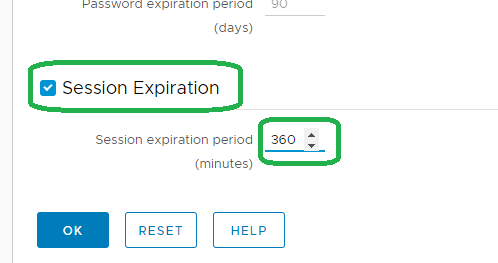
Note: The above feature was introduced on 18.2.
Please contact DELL Technical Support for further information.
User can log in to DPA again and continue as normal.
The following setting can be configured on the GUI to force a clean logoff after a specific period:
Administration > User & Security > Security Settings.
The Session Expiration parameter can be set to example for 6 hours (default is off):
Note: The above feature was introduced on 18.2.
Please contact DELL Technical Support for further information.
Etkilenen Ürünler
Data Protection AdvisorÜrünler
Data Protection AdvisorMakale Özellikleri
Article Number: 000173588
Article Type: Solution
Son Değiştirme: 05 May 2026
Version: 4
Sorularınıza diğer Dell kullanıcılarından yanıtlar bulun
Destek Hizmetleri
Aygıtınızın Destek Hizmetleri kapsamında olup olmadığını kontrol edin.