Isilon:使用 Powershell 與平台 API - 基礎知識
Summary: 本文說明如何使用Powershell和PAPI(平臺 API) 連線至叢集。
Bu makale şunlar için geçerlidir:
Bu makale şunlar için geçerli değildir:
Bu makale, belirli bir ürüne bağlı değildir.
Bu makalede tüm ürün sürümleri tanımlanmamıştır.
Symptoms
N/A
Cause
N/A
Resolution
注意:本主題為Isilon SDK - Isilon 資訊中心中的一部分。
介紹
隨著全新 RESTful 平臺應用程式發展介面 (PAPI) 的推出,現在使用 Powershell 來自動化和管理 Isilon 叢集的方式更加簡單且優雅。本文將說明如何使用 Powershell 和 PAPI 連線至叢集的基本知識。
強烈建議您 在此下載並閱讀 OneFS 版本的 PAPI 參考指南。
由於PAPI可透過 REST 存取叢集,因此您可以使用 HTTP 方法 (例如 GET、POST、PUT 和 DELETE) 來控制資源。物件和收藏的表示會以 JSON 格式的文件交換。若要使用PAPI,您必須透過登入WebUI並導覽至下列方式,在叢集上啟用 HTTP:協定>HTTP 設定>啟用 HTTP。
如果您沒有 Powershell v3 下載並安裝此處找到的 .NET Framework 版本 4。
然後在此下載並安裝適當的 v3 管理架構。
# 接受輸入參數
參數參數 ([String]$isilonip、[String]$username、[String]$password)
若要存取叢集上的資源,我們將使用具有適當參數的「Invoke-RestMethod」。此方法會採取多種參數,例如 URI 字串、本體 (用於 POST)、標頭等。下列代碼會建立我們需要的標頭資訊和存取的基本 URL:
# 編碼基本授權標頭並建立 baseurl
$EncodedAuthorization = [System.Text.Encoding]::UTF8。GetBytes ($username + ':'+ $password)
$EncodedPassword = [System.Convert]::ToBase64String($EncodedAuthorization)
$headers = @{“Authorization”=“Basic $($EncodedPassword)」
$baseurl = 'https://'+ $isilonip +“:8080”
在此範例中,我們將存取配額。將其新增至基本 URL,以建立最後 URI,我們將傳遞為「Invoke-RestMethod」。如果您查看 PAPI 說明檔,您會看到資源集合會以下列格式存取「/platform/1/namespace>/<<collection-name>」。舉例來說,如果想要收集代表叢集上定義之所有配額的對象,我們需要取得「/platform/1/quota/quotas」。
$resourceurl = 「/platform/1/quota/quotas」
,$uri = $baseurl + $resourceurl
現在,我們致電 Call-RestMethod,然後存取已傳回的物件,其中包含配額收集:
以下是腳本輸出的範例:


以下列出叢集上定義的所有配額及其屬性。使用此方法,PSv3 會自動將 JSON 輸出轉換為物件。
文稿檔正文:
介紹
隨著全新 RESTful 平臺應用程式發展介面 (PAPI) 的推出,現在使用 Powershell 來自動化和管理 Isilon 叢集的方式更加簡單且優雅。本文將說明如何使用 Powershell 和 PAPI 連線至叢集的基本知識。
強烈建議您 在此下載並閱讀 OneFS 版本的 PAPI 參考指南。
由於PAPI可透過 REST 存取叢集,因此您可以使用 HTTP 方法 (例如 GET、POST、PUT 和 DELETE) 來控制資源。物件和收藏的表示會以 JSON 格式的文件交換。若要使用PAPI,您必須透過登入WebUI並導覽至下列方式,在叢集上啟用 HTTP:協定>HTTP 設定>啟用 HTTP。
Powershell v3
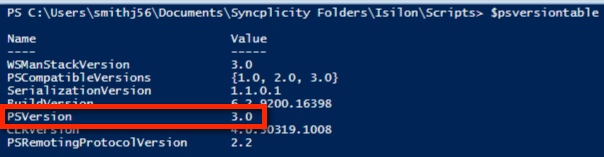
Powershell v3 內建方法可簡化 RESTful 存取。您可以查看$PSVersionTable值來檢查目前的 Powershell 版本:
如果您沒有 Powershell v3 下載並安裝此處找到的 .NET Framework 版本 4。
然後在此下載並安裝適當的 v3 管理架構。
線上至叢集
以下文稿接受 Isilon IP 位址或主機名稱、使用者名稱和密碼的參數:# 接受輸入參數
參數參數 ([String]$isilonip、[String]$username、[String]$password)
若要存取叢集上的資源,我們將使用具有適當參數的「Invoke-RestMethod」。此方法會採取多種參數,例如 URI 字串、本體 (用於 POST)、標頭等。下列代碼會建立我們需要的標頭資訊和存取的基本 URL:
# 編碼基本授權標頭並建立 baseurl
$EncodedAuthorization = [System.Text.Encoding]::UTF8。GetBytes ($username + ':'+ $password)
$EncodedPassword = [System.Convert]::ToBase64String($EncodedAuthorization)
$headers = @{“Authorization”=“Basic $($EncodedPassword)」
$baseurl = 'https://'+ $isilonip +“:8080”
在此範例中,我們將存取配額。將其新增至基本 URL,以建立最後 URI,我們將傳遞為「Invoke-RestMethod」。如果您查看 PAPI 說明檔,您會看到資源集合會以下列格式存取「/platform/1/namespace>/<<collection-name>」。舉例來說,如果想要收集代表叢集上定義之所有配額的對象,我們需要取得「/platform/1/quota/quotas」。
$resourceurl = 「/platform/1/quota/quotas」
,$uri = $baseurl + $resourceurl
現在,我們致電 Call-RestMethod,然後存取已傳回的物件,其中包含配額收集:
$ISIObject = Invoke-RestMethod -Uri $url -Headers $headers -Method Get
$ISIObject.quotas
$ISIObject.quotas
以下是腳本輸出的範例:
以下列出叢集上定義的所有配額及其屬性。使用此方法,PSv3 會自動將 JSON 輸出轉換為物件。
文稿檔正文:
##########
2013年9月18日,EMC NAS 專員中心部門
# 經修改:
#
#
# ps_isilon_get_quotas_via_papi.ps1 - 取得 Isilon 叢集
的所有配額# 注意:您必須在 OneFS 7.0.2 或更高版本使用 PAPI,且叢集上必須啟用 HTTP 存取。
#
#PARAMETERS## -isilonip = 節點 IP
# -username
# -password
# -path = /ifs directory path 包含需要配額
的目錄# -quoatasize = 配額位元組大小 (例如「500000“)
#
#
# EXAMPLE
# .\ps_isilon_get_quotas_via_papi.ps1 -isilonip 10.10.10.1 -user root -password P@ssword1
#
########### Accept input parameters
Param([String]$isilonip,[String]$username,[String]$password)
# 使用預設憑證,您通常會看到憑證錯誤 (來自 blogs.msdn.com)
add-type@“
,使用 System.Net;
使用 System.Security.Cryptography.X509Certates;
公家級 TrustAll: ICertatePolicy {
public TrustAll() {}
public bool CheckValidationResult (
ServicePoint sPoint、X509Certate cert、
WebRequest req、int problem) {
傳回 true;
}
}
“@
[System.Net.ServicePointManager]::CertificatePolicy = new-object TrustAll
#if 如果
(!$isilonip -and $username -and $password)) {
寫入「failed to specify parameters」;
寫入「範例:.\ps_isilon_get_quotas_via_papi.ps1 -isilonip 192.168.1.2 -username root -password p@ssw0rd1”
exit
}
# Encode basic authorization header and create baseurl
$EncodedAuthorization = [System.Text.Encoding]::UTF8。GetBytes ($username + ':' + $password)
$EncodedPassword = [System.Convert]::ToBase64String($EncodedAuthorization)
$headers = @{“Authorization”=“Basic $($EncodedPassword)”}
$baseurl = 'https://'+ $isilonip +“:8080”
# get all defined quotas
$resourceurl = “/platform/1/quota/quotas”
$uri = $baseurl + $resourceurl
$ISIObject = Invoke-RestMethod -Uri $uri -Headers $headers -Method Get
$ISIObject.quotas
2013年9月18日,EMC NAS 專員中心部門
# 經修改:
#
#
# ps_isilon_get_quotas_via_papi.ps1 - 取得 Isilon 叢集
的所有配額# 注意:您必須在 OneFS 7.0.2 或更高版本使用 PAPI,且叢集上必須啟用 HTTP 存取。
#
#PARAMETERS## -isilonip = 節點 IP
# -username
# -password
# -path = /ifs directory path 包含需要配額
的目錄# -quoatasize = 配額位元組大小 (例如「500000“)
#
#
# EXAMPLE
# .\ps_isilon_get_quotas_via_papi.ps1 -isilonip 10.10.10.1 -user root -password P@ssword1
#
########### Accept input parameters
Param([String]$isilonip,[String]$username,[String]$password)
# 使用預設憑證,您通常會看到憑證錯誤 (來自 blogs.msdn.com)
add-type@“
,使用 System.Net;
使用 System.Security.Cryptography.X509Certates;
公家級 TrustAll: ICertatePolicy {
public TrustAll() {}
public bool CheckValidationResult (
ServicePoint sPoint、X509Certate cert、
WebRequest req、int problem) {
傳回 true;
}
}
“@
[System.Net.ServicePointManager]::CertificatePolicy = new-object TrustAll
#if 如果
(!$isilonip -and $username -and $password)) {
寫入「failed to specify parameters」;
寫入「範例:.\ps_isilon_get_quotas_via_papi.ps1 -isilonip 192.168.1.2 -username root -password p@ssw0rd1”
exit
}
# Encode basic authorization header and create baseurl
$EncodedAuthorization = [System.Text.Encoding]::UTF8。GetBytes ($username + ':' + $password)
$EncodedPassword = [System.Convert]::ToBase64String($EncodedAuthorization)
$headers = @{“Authorization”=“Basic $($EncodedPassword)”}
$baseurl = 'https://'+ $isilonip +“:8080”
# get all defined quotas
$resourceurl = “/platform/1/quota/quotas”
$uri = $baseurl + $resourceurl
$ISIObject = Invoke-RestMethod -Uri $uri -Headers $headers -Method Get
$ISIObject.quotas
Etkilenen Ürünler
Isilon, PowerScale OneFS, Isilon Platform APIMakale Özellikleri
Article Number: 000177716
Article Type: Solution
Son Değiştirme: 11 Ara 2023
Version: 6
Sorularınıza diğer Dell kullanıcılarından yanıtlar bulun
Destek Hizmetleri
Aygıtınızın Destek Hizmetleri kapsamında olup olmadığını kontrol edin.