Data Protection Advisor: Saving a new SharePoint configuration causes Error 0 - Unknown error occurred
Summary: Saving a new SharePoint configuration causes Error 0 - Unknown error occurred
Bu makale şunlar için geçerlidir:
Bu makale şunlar için geçerli değildir:
Bu makale, belirli bir ürüne bağlı değildir.
Bu makalede tüm ürün sürümleri tanımlanmamıştır.
Symptoms
When saving a new SharePoint configuration in DPA UI, an error occurs:
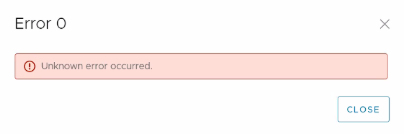
In the server.log on the DPA application server, the following error appears:
2022-07-04 05:23:37,558 ERROR [com.emc.dpa.command.serversettings.SharePointSettingsCommandsBean] (Thread-278) Failed to connect to https://mysites.sharepoint.com/sites/DPA_Reports : Connect to login.microsoftonline.com:443 failed: connect timed out
In the server.log on the DPA application server, the following error appears:
2022-07-04 05:23:37,558 ERROR [com.emc.dpa.command.serversettings.SharePointSettingsCommandsBean] (Thread-278) Failed to connect to https://mysites.sharepoint.com/sites/DPA_Reports : Connect to login.microsoftonline.com:443 failed: connect timed out
Cause
The DPA application server does not have access to the Internet.
Confirm by using a browser on the server to access the website https://login.microsoftonline.com.
Or
Use a command like "curl -I https://login.microsoftonline.com".
The first like returned should be HTTP/1.1 200 OK.
In this case, the command returned "curl: (7) Failed to connect to https://login.microsoftonline.com port 443: Connection timed out"
Confirm by using a browser on the server to access the website https://login.microsoftonline.com.
Or
Use a command like "curl -I https://login.microsoftonline.com".
The first like returned should be HTTP/1.1 200 OK.
In this case, the command returned "curl: (7) Failed to connect to https://login.microsoftonline.com port 443: Connection timed out"
Resolution
Configure the DPA application server with Internet access.
Etkilenen Ürünler
Data Protection AdvisorMakale Özellikleri
Article Number: 000201203
Article Type: Solution
Son Değiştirme: 26 May 2026
Version: 5
Sorularınıza diğer Dell kullanıcılarından yanıtlar bulun
Destek Hizmetleri
Aygıtınızın Destek Hizmetleri kapsamında olup olmadığını kontrol edin.