AppSync: In AppSync UI customer was unable to set the logging mode to debug as Apply button stayed disabled when debug option was selected.
Summary: In AppSync UI customer was unable to set the logging level to debug as Apply button stayed disabled when debug option was selected.
Bu makale şunlar için geçerlidir:
Bu makale şunlar için geçerli değildir:
Bu makale, belirli bir ürüne bağlı değildir.
Bu makalede tüm ürün sürümleri tanımlanmamıştır.
Symptoms
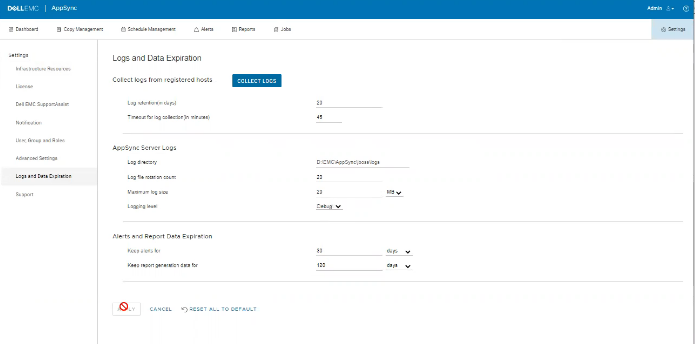
No errors in the logs but the issue can be observed on the UI as shown in the below.
Cause
The Issue is because customer on the same screen, had set "Timeout for log collection(in minutes)" option value to 45 which is invalid.
Resolution
Set The value for "Timeout for log collection(in minutes)" option to a valid value of 90 and 120.
Additional Information
AppSync 4.5 will not allow an invalid value for "Timeout for log collection(in minutes)."
Valid values can be from 90 to 120.
Valid values can be from 90 to 120.
Etkilenen Ürünler
AppSync, AppSyncMakale Özellikleri
Article Number: 000203604
Article Type: Solution
Son Değiştirme: 09 Eyl 2025
Version: 8
Sorularınıza diğer Dell kullanıcılarından yanıtlar bulun
Destek Hizmetleri
Aygıtınızın Destek Hizmetleri kapsamında olup olmadığını kontrol edin.