NetWorker: Client can override settings that does not apply to schedule if the level is set to skip at action level
Summary: The action property "Client Can Override" has been set but does not apply if the action schedule is set to skip.
Ця стаття стосується
Ця стаття не стосується
Ця стаття не стосується якогось конкретного продукту.
У цій статті зазначено не всі версії продукту.
Symptoms
The Policy->Workflow->Action contains a client override option. Client override is enabled, showing "Client Can Override."

When Client Can Override is enabled, the Client resource values for Schedule, Pool, Retention policy, and Storage Node attributes override the equivalent Action resource attributes.
Cause
NetWorker is working by design. If the NetWorker policy action schedule is set to Skip backup level, the Client can Override option is not honored.
Resolution
For NetWorker to consider the Client Can Override option, change the action schedule to a different level.
If the client should be skipped, define the skip level schedule at client properties.
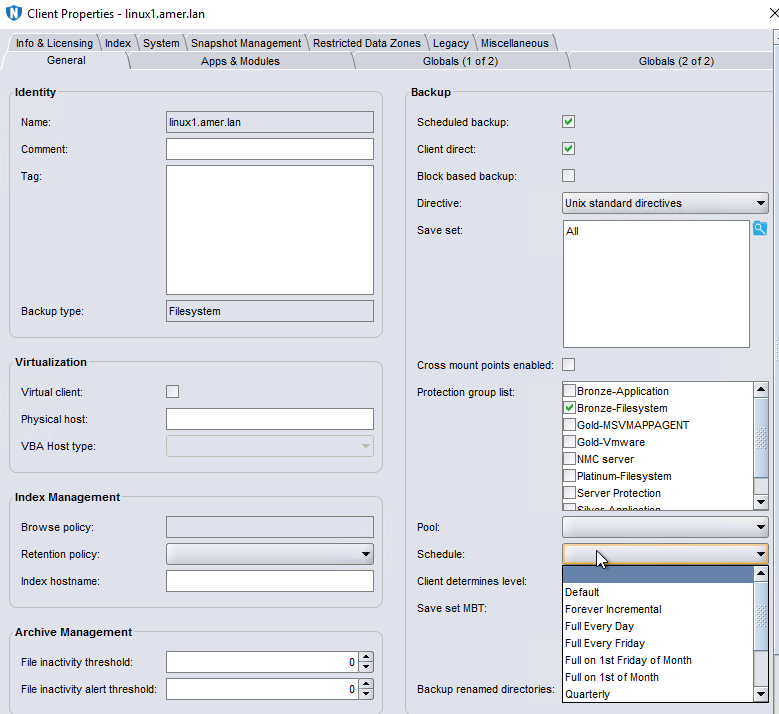
There are some default schedules defined. Custom schedules can be created under Protection->Schedules. Once created the scheduled is listed as an option in the Schedule drop-down in the client properties.
Additional Information
Client Overrides and scheduling is detailed further in the NetWorker Administration Guide, available through: https://www.dell.com/support/home/product-support/product/networker/docs
Продукти, яких це стосується
NetWorkerПродукти
NetWorker Family, NetWorker SeriesВластивості статті
Article Number: 000032150
Article Type: Solution
Востаннє змінено: 14 бер. 2025
Version: 4
Отримайте відповіді на свої запитання від інших користувачів Dell
Служба підтримки
Перевірте, чи послуги служби підтримки поширюються на ваш пристрій.