Dell Unity: Die Wiederaufnahme der Replikation zeigt eine vollständige Synchronisierung nach einem Failover mit Synchronisation an
Summary: In Dell Unity OE 5.0.x gibt die Bestätigungsmeldung zum Fortsetzen, die nach einem Failover mit Synchronisationsvorgang angezeigt wird, fälschlicherweise an, dass eine vollständige Synchronisation für alle ausgewählten Replikationssitzungen initiiert wird. Dies ist nur ein Meldungsproblem der Benutzeroberfläche und wirkt sich nicht auf das tatsächliche Replikationsverhalten aus. Dell Unity Development hat das Problem identifiziert und eine Korrektur ist für Dell Unity OE 5.1 geplant, wobei die Meldung "Zusammenfassung fortsetzen" den durchgeführten Replikationsvorgang korrekt wiedergibt. ...
Symptoms
In Dell Unity OE 5.0.x zeigt die Option Fortsetzen für eine Replikationssitzung nach der Durchführung eines Failovers mit Synchronisation eine Bestätigungsmeldung an, die besagt, dass eine vollständige Synchronisation für alle betroffenen Replikationssitzungen initiiert wird.
Diese Meldung wurde als neue Funktion in Unity OE 5.0.x eingeführt, um Nutzer über das erwartete Synchronisationsverhalten zu informieren. Obwohl die Meldung darauf hinweist, dass eine vollständige Synchronisierung durchgeführt wird, hat Dell Unity Development dieses Verhalten erkannt und korrigiert es in einer zukünftigen Version.
Diese Meldung wird möglicherweise auf jedem Dell Unity-Array angezeigt, auf dem Unity OE 5.0.x ausgeführt wird, wenn die Replikation nach einem Failover mit Synchronisationsvorgang fortgesetzt wird.
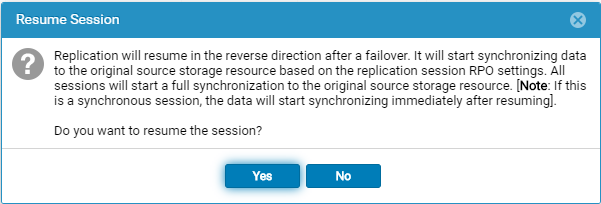
Die folgende Meldung wird angezeigt, wenn die Option Fortsetzen nach einem Failover mit Synchronisationsvorgang ausgewählt wird:
Replication will resume in the reverse direction after a failover. It will start synchronizing data to the original source storage resource based on the replication session RPO settings. All sessions will start a full synchronization to the original source storage resource. [Note: If this is a synchronous session, the data will start synchronizing immediately after resuming].

Do you want to resume the session?
Cause
Die Zusammenfassungsmeldung "Fortsetzen " ist falsch. Nach der Durchführung eines Failover mit Synchronisation weist die Bestätigungsmeldung, die bei Auswahl von Resume angezeigt wird, darauf hin, dass eine vollständige Synchronisation für alle Replikationssitzungen initiiert wird. Diese Meldung spiegelt jedoch nicht das tatsächliche Replikationsverhalten wider.
Das Problem ist auf die Meldung in der Benutzeroberfläche beschränkt und zeigt nicht an, dass eine vollständige Synchronisation durchgeführt wird. Dell Unity Development hat dies als Problem in Unity OE 5.0.x identifiziert und arbeitet an einer Korrektur.
Resolution
Die Meldung "Zusammenfassung fortsetzen " ist falsch und wird in einer zukünftigen Unity OE-Version korrigiert.
Die Meldung weist aktuell darauf hin, dass eine vollständige Synchronisation für alle Replikationssitzungen initiiert wird. Dies ist nur ein Anzeigeproblem und spiegelt nicht den tatsächlichen Replikationsvorgang wider, der durchgeführt wird.
Die richtigen Meldungen sollten lauten:
Failback-Bestätigungsmeldung
Failback will perform a synchronization from the destination storage resource to the source storage resource, block access to the destination storage resource to allow it to be used for replication, and change the source storage resource access to read/write mode. Replication will then resume. The synchronization could be either delta or full synchronization depending on the replicated snapshots. This operation will be lengthy if a full synchronization is needed during failback.
When the failback operation is complete, you can then connect your hosts to the source storage resource.
Note: Before you begin, you should block writes to the destination storage resource because it will be placed in read-only mode.
Bestätigung für Fortsetzen bei Failover
Replication will resume in the reverse direction after a failover. It will start synchronizing data to the original source storage resource based on the replication session RPO settings.
All sessions will start a synchronization to the original source storage resource. The synchronization could be either delta or full synchronization depending on the replicated snapshots.
Note: If this is a synchronous session, the data will start synchronizing immediately after resuming. Do you want to resume the session?