Dell Optimizer Audio Panel Option Missing and Audio Jack Detection Issue after Windows 10 Installation
Summary: This article discusses the audio panel option missing and audio jack detection issue in Dell Optimizer on Latitude 5320 and 5520 after Windows 10 installation with BIOS 1.17.2 to 1.19.1. ...
Ця стаття стосується
Ця стаття не стосується
Ця стаття не стосується якогось конкретного продукту.
У цій статті зазначено не всі версії продукту.
Symptoms
Affected Products:
- Dell Optimizer
Affected Platforms:
- Latitude 5320
- Latitude 5520
Affected Operating Systems:
- Windows 10 21H2
Affected Versions:
- BIOS v1.17.2 to 1.19.1
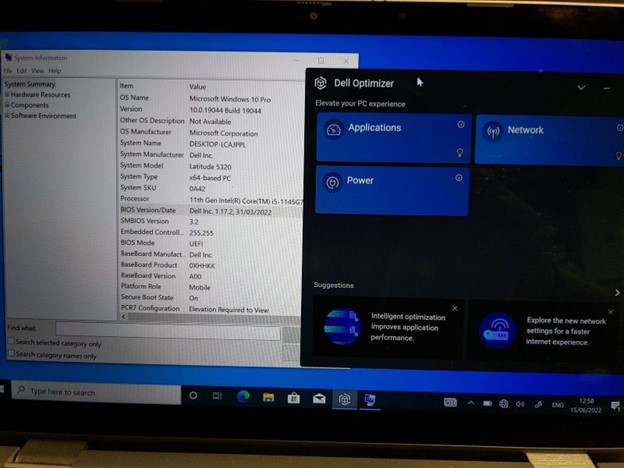
- When BIOS versions 1.17.2 to 1.19.1 are installed there appears to be an issue with detection of connected audio jack devices (headsets, headphones, speakers so on), which do not get detected at all, unless the audio device is connected on boot up (and then only until they are removed, not after replugging).
- When Dell Optimizer is installed, the Audio Panel and Option pane is missing,
- No Dell Optimizer audio settings and adjustments are available, severely limiting the functionality of the Latitude 5320.
- Dell Optimizer is required for full audio functionality, including microphone input using the audio jack.
Cause
Interplay of BIOS, Audio driver, and Windows installation is the cause of the issue.
Resolution
The engineering department is provided on a fix to be released in BIOS version 1.20.0 and later. The updated BIOS is posted to the computer's support page.
Продукти, яких це стосується
Dell Optimizer, Latitude 5320, Latitude 5520Властивості статті
Article Number: 000200858
Article Type: Solution
Востаннє змінено: 06 лип. 2026
Version: 17
Отримайте відповіді на свої запитання від інших користувачів Dell
Служба підтримки
Перевірте, чи послуги служби підтримки поширюються на ваш пристрій.